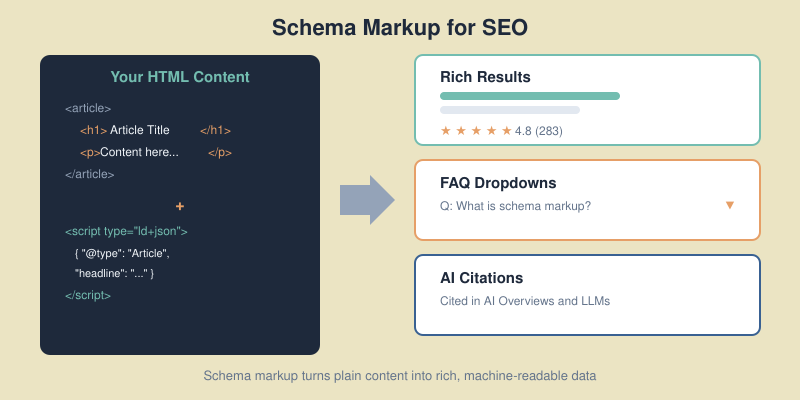
Schema Markup for SEO: How to Implement Structured Data That Earns Rich Results
When I first started adding schema markup to client websites back in 2018, most marketers dismissed it as “developer stuff.”...
When I first started adding schema markup to client websites back in 2018, most marketers dismissed it as “developer stuff.”...
When I first started adding schema markup to client websites back in 2018, most marketers dismissed it as “developer stuff.” Fast forward to 2026, and structured data has become one of the most powerful — yet still underused — SEO tools available. Only 31.3% of websites implement any schema markup at all, which means there’s a massive competitive advantage waiting for those who do it right.
In this guide, I’ll walk you through everything you need to know about schema markup — from the basics of how it works to advanced strategies for earning rich results and getting cited by AI search engines. No theoretical fluff, just practical implementation you can apply today.
Schema markup is a standardized vocabulary of tags (developed by Schema.org) that you add to your HTML to help search engines understand the context and meaning of your content. Think of it as a translation layer between your website and machines.
Without schema, Google sees your page as text. With schema, it understands that “Markus Schneider” is a Person, “Bootstrap8” is an Organization, and your blog post is an Article published on a specific date with a specific author.
This understanding directly translates into two measurable outcomes:
The data backs this up: pages with rich results achieve 82% higher click-through rates compared to standard listings, a lift you can verify through website traffic analysis. For FAQ schema specifically, CTR improvements can reach 87%.

Schema markup comes in three formats: JSON-LD, Microdata, and RDFa. Use JSON-LD. Google explicitly recommends it, and it’s by far the easiest to implement and maintain.
JSON-LD sits in a <script> tag in your page’s <head> section — completely separate from your visible HTML. This means you can add, edit, or remove schema without touching your page content.
Here’s what a basic Article schema looks like:
<script type="application/ld+json">
{
  "@context": "https://schema.org",
  "@type": "Article",
  "headline": "Your Article Title Here",
  "author": {
    "@type": "Person",
    "name": "Markus Schneider"
  },
  "publisher": {
    "@type": "Organization",
    "name": "Bootstrap8"
  },
  "datePublished": "2026-02-06",
  "dateModified": "2026-02-06",
  "description": "A concise description of this article."
}
</script>
The @context tells machines you’re using Schema.org vocabulary. The @type declares what kind of thing you’re describing. Everything else provides the properties that search engines and AI systems use to understand and display your content.
There are over 797 schema types on Schema.org, but for blogs and content websites, you only need to focus on a handful. I’ve ranked these by impact — start at the top and work down.

This is your foundation. Every blog post should have Article or BlogPosting schema. The difference is simple: BlogPosting is a more specific subtype of Article. Both work for rich results, but BlogPosting signals to search engines that your content is part of a blog — which can influence how it appears in Google Discover and News.
Key properties to always include:
headline — your article title (under 110 characters)author — a Person type with name and ideally a URL to an author pagedatePublished and dateModified — ISO 8601 formatimage — URL to the article’s featured imagepublisher — your Organization with logodescription — a concise summaryFAQ schema is arguably the highest-ROI structured data you can add. When it triggers, your search listing expands with clickable question-and-answer dropdowns — pushing competitors further down the page.
More importantly for 2026: FAQ schema is the easiest path to AI search visibility. The question-answer format mirrors exactly how LLMs process and cite information. Content with proper FAQ schema has a 2.5x higher chance of appearing in AI-generated answers.
I add 3-5 FAQ questions to every article I publish on Bootstrap8. The key is using questions people actually search for — check “People Also Ask” in Google and forums like Reddit for real queries.
With Google’s E-E-A-T guidelines, author identity matters more than ever. Person schema connects your content to a real human author with credentials, making your expertise machine-readable.
Include these properties for maximum impact:
name — full author namejobTitle — your professional titleurl — link to your author/about pagesameAs — array of social profile URLs (LinkedIn, Twitter)knowsAbout — topics you’re expert inThis builds what Google calls “entity recognition” — connecting your name across the web as a recognized authority on specific topics.
Your site’s identity. Organization schema tells search engines who publishes the content, which feeds into trust signals. At minimum, include your name, URL, logo, and social profiles.
Breadcrumbs help search engines understand your site structure and display navigation paths directly in search results. Instead of showing just a URL like bootstrap8.com/schema-markup-seo/, Google displays: Bootstrap8 > SEO > Schema Markup for SEO — which gives users context before they click.
An emerging type worth watching. Speakable schema identifies sections of your content best suited for audio playback by voice assistants. With 35% of searches now happening via voice, this is becoming increasingly relevant. Currently limited to news publishers in the US and still in beta, but implementing it now puts you ahead of the curve.
In January 2026, Google deprecated several structured data types. If you’ve been using any of these, they’ll no longer trigger rich results:
The good news: none of these affect typical blog or content sites. The core schema types — Article, FAQ, Breadcrumb, Organization, Person, HowTo, and Product — remain fully supported.
As Google’s John Mueller clarified: “Schema is here to stay, but specific markup types come and go.” No penalties for having deprecated schema on your site — it simply stops generating rich results.
My advice: remove deprecated schema to keep your markup clean, but don’t panic. Focus your energy on the schema types that still drive results.

Here’s what makes schema markup genuinely exciting right now: it’s no longer just about Google rich results. AI search engines — ChatGPT, Perplexity, Google AI Overviews — all rely on structured data to extract, verify, and cite information.
When I implemented comprehensive schema across a client’s content site last year, we saw a measurable increase in AI Overview appearances within 8 weeks. The data from multiple studies confirms this isn’t anecdotal:
dateModified signals freshness — a key factor in AI citationDifferent AI systems use schema differently. Google AI Overviews pull heavily from FAQ and HowTo schema for direct answers. ChatGPT and Perplexity weigh the combination of schema + content quality + source authority. But across all platforms, having structured data is better than not having it.

If you’re on WordPress (which powers 43% of the web), you have two options: plugins or manual implementation. Here’s my honest assessment of both.
Yoast SEO automatically generates Article, Organization, Person, and Breadcrumb schema for every page. It’s reliable and requires zero configuration for basic schema. The downside: FAQ and HowTo schema require using specific Gutenberg blocks — you can’t add them to existing content without reformatting.
Rank Math offers more granular control. You can add FAQ, HowTo, and custom schema types directly from the post editor sidebar. It also validates schema in real-time and alerts you to errors. I generally recommend Rank Math for sites that want to go beyond basic schema without writing code.
One critical warning: never run both plugins simultaneously. This creates duplicate schema markup that confuses search engines and can prevent rich results entirely. Pick one and stick with it.
For maximum control, add JSON-LD directly to your theme’s header.php or via a custom must-use plugin. This is what I do for Bootstrap8 — our FAQ schema is managed through a lightweight mu-plugin that reads post meta and outputs JSON-LD in the <head>.
The advantage of manual implementation: no plugin bloat, no conflicts, and complete control over exactly what schema appears on each page type. The trade-off is that you need to maintain it yourself.

Implementing schema is only half the job. You need to verify it actually works — and keep it working.
Go to search.google.com/test/rich-results and paste your page URL. This tool shows you exactly which rich results your page is eligible for and flags any errors or warnings.
Use validator.schema.org for a deeper technical check. This catches structural issues that the Rich Results Test might miss — like incorrect nesting, missing required properties, or invalid data types.
After publishing, monitor the “Enhancements” section in Google Search Console. This shows real-world data: how many pages have valid schema, which errors Google detected during crawling, and whether your schema actually triggered rich results.
Common errors I see regularly:
image in Article schema or acceptedAnswer in FAQ schema2026-02-06), not “February 6, 2026”
Schema markup is powerful, but it’s not risk-free. Google does penalize sites for misleading or spammy structured data. Here are the mistakes I see most often:
Your schema must describe content that’s actually visible on the page. Adding FAQ schema for questions that aren’t displayed to users violates Google’s guidelines and can trigger a manual action.
Adding Review or AggregateRating schema to pages that don’t contain genuine reviews is the fastest way to get a structured data penalty. I’ve seen sites lose all rich results across their entire domain because of this.
Running Yoast plus a separate schema plugin plus manually coded JSON-LD creates three layers of conflicting markup. Search engines don’t know which to trust and often ignore all of them. Audit your site for duplicate schema before adding anything new.
If your schema includes a dateModified that’s current but the actual content hasn’t been updated, Google considers this misleading. Always update both the content and the schema date together.
You need to track whether your schema investment actually pays off. Here’s the framework I use:
1. Baseline your current CTR. In Google Search Console, note the average CTR for pages you’re adding schema to. Filter by page, record impressions and clicks for the 30 days before implementation.
2. Wait 4-6 weeks. Google needs time to re-crawl your pages, process the schema, and start showing rich results. Don’t check daily — it takes patience.
3. Compare CTR after implementation. Same pages, same timeframe. A 20-40% CTR improvement is typical for pages that earn rich results. One content site I worked with jumped from 3.2% to 5.8% average CTR after implementing FAQ schema across 50 articles.
4. Monitor rich result coverage. In Search Console’s Enhancements section, track how many pages have valid rich results versus errors. Your goal is 100% valid across all pages with schema.
The real numbers from industry case studies confirm the ROI: sites with comprehensive schema markup see an average 15-30% increase in organic traffic within 3-6 months, with Rotten Tomatoes reporting a 25% higher CTR and e-commerce sites seeing up to 4.2x higher visibility in Google Shopping.
No, schema markup is not a direct ranking factor. It doesn’t boost your position in search results. However, it earns rich results that significantly increase click-through rates — which indirectly improves your SEO performance through higher engagement signals.
Yes. Misleading schema — such as fake reviews, ratings for unreviewed content, or markup describing invisible content — can trigger a Google manual action. This can remove all rich results from your site. Always ensure your schema accurately reflects visible page content.
FAQ schema delivers the highest ROI for most blogs. It expands your search listing with clickable Q&A dropdowns, can increase CTR by up to 87%, and aligns perfectly with how AI search engines extract and cite information.
Typically 2-6 weeks. Google needs to re-crawl your pages and process the structured data before rich results appear. Monitor the Enhancements section in Google Search Console to track when your schema becomes active.
Not necessarily. WordPress plugins like Rank Math and Yoast SEO handle basic schema automatically. For custom schema types like FAQ or advanced Article markup, you’ll need to either use plugin features or add JSON-LD code manually — which requires basic HTML knowledge but not programming expertise.

Honest reviews of analytics tools, SEO tactics that actually work, and growth strategies for bootstrapped SaaS — no fluff, no affiliate bias.