UTM Parameters: How to Track Every Campaign Like a Pro
You’re running campaigns across email, social media, paid ads, and partner sites. Traffic is coming in. But when you open...
You’re running campaigns across email, social media, paid ads, and partner sites. Traffic is coming in. But when you open...
You’re running campaigns across email, social media, paid ads, and partner sites. Traffic is coming in. But when you open Google Analytics, everything’s lumped under “direct” or “referral” — and you have no idea which campaign actually drove those conversions.
This is the reality for marketers who skip UTM parameters. And it’s completely avoidable.
I’ve been setting up tracking systems for marketing teams since 2016, and UTM parameters remain one of the most powerful yet underutilized tools in the analytics stack. When implemented correctly, they give you crystal-clear attribution data. When done poorly — or not at all — you’re making decisions based on incomplete information.
In this guide, I’ll show you exactly how to use UTM parameters to track every campaign with precision, avoid common mistakes that corrupt your data, and build a system that scales with your marketing efforts.
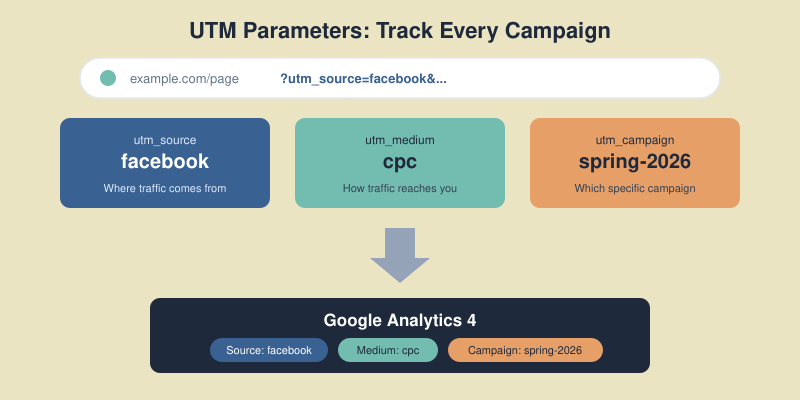
UTM parameters (Urchin Tracking Module) are tags you add to URLs that tell analytics tools where traffic came from. When someone clicks a link with UTM parameters, that information gets passed to Google Analytics, allowing you to see exactly which campaigns, channels, and content drove the visit.
A URL with UTM parameters looks like this:
https://example.com/landing-page?utm_source=facebook&utm_medium=paid&utm_campaign=spring-sale-2026
Without these tags, GA4 often misclassifies traffic — email campaigns show up as “direct,” social posts get lumped into “referral,” and you lose visibility into what’s actually working.
UTM parameters solve three critical problems:
In my experience, teams that implement proper UTM tracking typically discover that 20-30% of their website traffic was being misattributed. That’s a significant blind spot when making budget decisions.
There are five standard UTM parameters. Three are essential, two are optional but useful for specific use cases.

utm_source — Where the traffic comes from
This identifies the platform, website, or vendor sending traffic. Be specific but consistent.
google, facebook, newsletter, linkedin, partner-siteutm_medium — How the traffic reaches you
This describes the marketing channel or mechanism. Use standardized values that match GA4’s default channel groupings when possible.
cpc, email, social, affiliate, display, organicutm_campaign — Which specific campaign
This identifies the specific promotion, product launch, or marketing initiative.
spring-sale-2026, product-launch-q1, webinar-seo-basicsutm_term — Keyword targeting (mainly for paid search)
Originally designed for paid search keywords. Use it to track which terms triggered the ad click.
running+shoes, project+management+softwareutm_content — Content differentiation
Use this to distinguish between different links pointing to the same URL — like A/B testing ad creatives or tracking multiple links in the same email.
hero-button, sidebar-link, blue-cta, version-aThe most common UTM mistake isn’t forgetting to use them — it’s using them inconsistently. “Facebook,” “facebook,” “fb,” and “FB” all create separate line items in GA4, fragmenting your data and making analysis nearly impossible.

Always use lowercase — UTM parameters are case-sensitive. Email and email create separate entries. Pick lowercase and stick with it.
Use hyphens instead of spaces — Spaces get encoded as %20 in URLs, making them ugly and harder to read in reports. Use hyphens: spring-sale not spring%20sale.
Avoid special characters — Stick to letters, numbers, and hyphens. Special characters can break tracking or cause encoding issues.
Be descriptive but concise — email is better than e, but monthly-newsletter-subscriber-list-segment-a is overkill. Find the balance.
Standardize values across teams — Create a documented list of approved values. If your paid team uses cpc and your social team uses paid-social, your reports become fragmented.
| Parameter | Recommended Values |
|---|---|
| utm_medium | cpc, email, social, affiliate, display, referral, organic, video |
| utm_source | google, facebook, instagram, linkedin, twitter, newsletter, partner-name |
These align with GA4’s default channel groupings, making your reports cleaner and more actionable.
The utm_campaign parameter is where most teams struggle. It’s a free-form field, which means it’s easy to create chaos. Here’s how to structure it properly.
A good campaign name answers: What is this? When did it run? What’s it promoting?
I recommend this structure:
[type]-[name]-[date/identifier]
Examples:
promo-spring-sale-2026q1launch-new-feature-jan2026webinar-seo-fundamentals-20260115newsletter-weekly-w03You’ll run similar campaigns multiple times — monthly newsletters, seasonal sales, weekly promotions. Including dates lets you compare performance over time.
Without dates, your January newsletter data mixes with December’s, making trend analysis impossible.
Campaign names should be understandable at a glance. When you’re reviewing reports months later, promo-blackfriday-2026 tells you exactly what you’re looking at. bf26promo1 requires mental translation.
You can build UTM URLs manually, but I don’t recommend it for teams. Manual creation leads to typos and inconsistency.
Google offers a free Campaign URL Builder that generates properly formatted URLs. It’s simple but doesn’t enforce naming conventions.
For teams, I prefer spreadsheet-based UTM builders. They offer:
Create a Google Sheet with columns for each parameter, use data validation for standardized dropdowns, and add a formula column that concatenates everything into the final URL.
For larger teams, tools like UTM.io, Terminus, or Bitly offer advanced features: team governance, link shortening, and integration with marketing platforms.
Different channels have different tracking needs. Here’s how to approach each.

Email is frequently misattributed as “direct” traffic. Always tag email links.
| Parameter | Value |
|---|---|
| utm_source | newsletter (or specific list name) |
| utm_medium | |
| utm_campaign | campaign-name-date |
| utm_content | header-link, cta-button, footer-link |
Use utm_content to track which links in the email get clicked most. This data helps optimize email layout.
Organic social posts need UTMs — otherwise they often show as referral traffic without campaign context.
| Parameter | Value |
|---|---|
| utm_source | facebook, linkedin, twitter, instagram |
| utm_medium | social |
| utm_campaign | specific campaign or content-type |
Most ad platforms (Google Ads, Meta Ads) have auto-tagging features. Use those when available — they provide more detailed data than manual UTMs.
For platforms without auto-tagging, or when you need custom tracking:
| Parameter | Value |
|---|---|
| utm_source | platform name |
| utm_medium | cpc, display, video (match the ad type) |
| utm_campaign | campaign name from ad platform |
| utm_term | targeted keywords |
| utm_content | ad creative identifier |
Track traffic from partners to understand which relationships drive value.
| Parameter | Value |
|---|---|
| utm_source | partner-name |
| utm_medium | affiliate or referral |
| utm_campaign | partnership type or promo |
I’ve audited dozens of UTM implementations. These mistakes appear repeatedly.

This is the most damaging mistake. Adding UTM parameters to links within your own website overwrites the original traffic source, creates false sessions, and corrupts your attribution data.
If someone arrives from a Facebook ad, then clicks an internal link with UTMs, GA4 now thinks they came from wherever that internal UTM pointed. You’ve lost the true source.
Rule: UTMs are for external links pointing TO your site, never for links WITHIN your site. Use GA4 events or custom dimensions for internal tracking.
As mentioned earlier: Facebook, facebook, and FACEBOOK are three different sources in GA4. Pick one format (lowercase) and enforce it.
Email and organic social are the most commonly untagged channels. Without UTMs, email often appears as direct traffic, and social posts show as generic referrals. Always tag these channels.
I’ve seen campaign names like 2026_q1_email_newsletter_segment-a_version-2_test-subject-line-b. This creates analysis paralysis. Keep names informative but manageable.
Without documentation, teams drift into inconsistency. Create a UTM governance document that specifies:
Once your UTMs are in place, here’s how to analyze the data in GA4.

Navigate to: Reports → Acquisition → Traffic acquisition
This shows session-level data. Key dimensions to use:
Navigate to: Reports → Acquisition → User acquisition
This shows how users first discovered your site — useful for understanding which channels bring in new audiences.
For deeper analysis, use GA4’s Explore feature to build custom reports combining UTM dimensions with your conversion metrics. This lets you answer questions like:
Once you’ve mastered the basics, these advanced techniques add more value.
Ad platforms support dynamic parameters that auto-populate based on the ad. For example, in Google Ads:
utm_campaign={campaignid}&utm_content={creative}
This automatically inserts the campaign ID and creative ID, ensuring accuracy without manual entry.
Use UTMs on QR codes for print materials, event signage, and physical promotions. Create unique campaign names for each placement to track which offline touchpoints drive traffic.
Long UTM URLs look suspicious and can deter clicks. Use link shorteners like Bitly, Rebrandly, or your own branded short domain. The UTM data still gets captured — the shortened link just redirects to the full URL.
Review your UTM data monthly. Look for:
Clean data requires ongoing maintenance.
No, UTM parameters don’t affect SEO rankings. Google ignores UTM parameters when evaluating page content. However, don’t use UTMs on internal links — that causes analytics issues, not SEO issues.
Google Ads auto-tagging (GCLID) provides more detailed data than manual UTMs. Use auto-tagging for Google Ads. Manual UTMs are better for platforms without auto-tagging or when you need custom campaign tracking.
There’s no strict limit, but keep URLs under 2,000 characters total for maximum compatibility. More importantly, keep parameter values concise and readable — they should be understandable in reports.
No, once a link is shared, changing it requires sharing a new link. This is why planning and consistency upfront matters. Document your UTM strategy before launching campaigns.
Source identifies WHERE traffic comes from (facebook, google, newsletter). Medium identifies HOW it reaches you (cpc, email, social). Think of source as the specific platform and medium as the channel type.
Proper UTM parameters transform your marketing analytics from guesswork into precision. You’ll know exactly which campaigns drive traffic, which channels deliver ROI, and where to focus your budget.
The implementation isn’t complicated: establish naming conventions, document approved values, use a URL builder, and never tag internal links. The discipline of consistent UTM usage pays dividends every time you make a marketing decision.
Start simple. Tag your email campaigns and social posts first — these are the most commonly misattributed channels. Build your UTM spreadsheet, train your team on the conventions, and review your data monthly.
Your next step: Create a UTM naming convention document for your team. Define your approved values for source, medium, and campaign naming structure. Then tag your next campaign properly and watch the clean data flow into GA4.

Honest reviews of analytics tools, SEO tactics that actually work, and growth strategies for bootstrapped SaaS — no fluff, no affiliate bias.