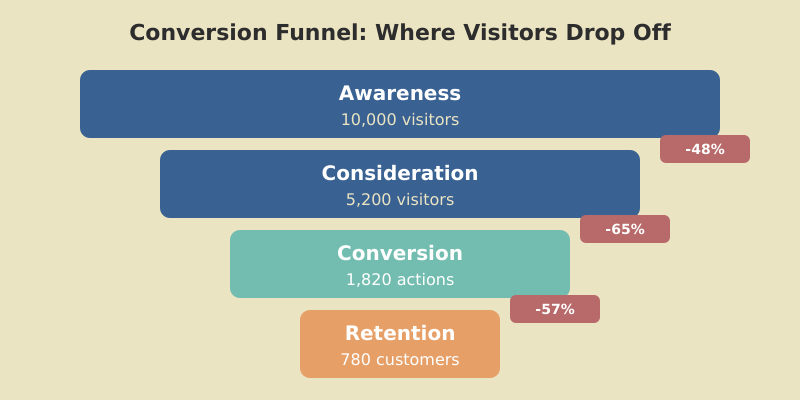
Conversion Funnel Optimization — The Analytics-First Guide for 2026
What Funnel Optimization Actually Means (And What Most Guides Miss) So what is conversion funnel optimization? In simple terms, it’s...
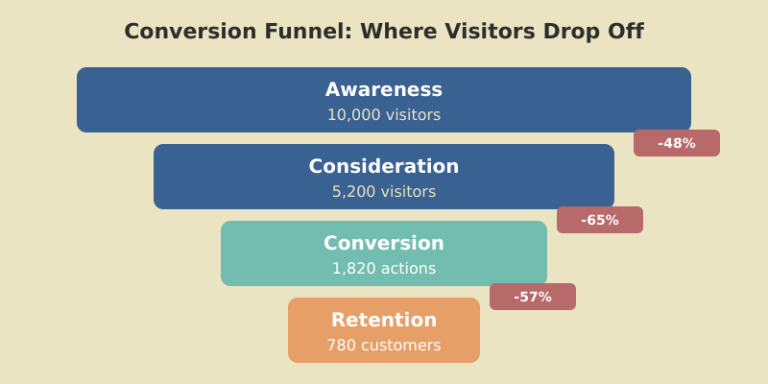
What Funnel Optimization Actually Means (And What Most Guides Miss) So what is conversion funnel optimization? In simple terms, it’s...
So what is conversion funnel optimization? In simple terms, it’s the process of improving each stage of your buyer’s journey to increase the percentage of visitors who complete a desired action — whether that’s signing up for a trial, purchasing a product, or subscribing to a newsletter.
But here’s what most guides get wrong: they treat funnel optimization as a list of generic tactics. “Improve your CTAs.” “Add social proof.” “A/B test your headlines.” That advice isn’t wrong — it’s just useless without knowing where your funnel actually breaks.
When I started working on funnels for a B2B SaaS product in 2019, I spent three weeks rewriting landing page copy. Conversion rate didn’t move. The real problem? 68% of visitors who clicked “Start Free Trial” abandoned the signup form on step 2 of 4. The landing page was fine. The form was the bottleneck. I would have found that in 20 minutes if I’d looked at the funnel data first.
What is funnel optimization at its core? It’s diagnosis before treatment. You measure, identify where people drop off, understand why, fix that specific point, and measure again. Everything else is guessing.
The classic TOFU/MOFU/BOFU model (top, middle, bottom of funnel) is a useful mental model. But when you sit down to actually build funnel reports in your analytics tool, you need concrete stages — not abstract categories.
Here’s the framework I use for different business types:
For SaaS products:
For content sites:
For ecommerce:
The key difference from generic TOFU/MOFU/BOFU: each stage is a measurable event you can track in GA4 or any analytics tool. If you can’t measure it, it doesn’t belong in your funnel. Once you map your stages, track conversion rates between each pair. That’s where the real insights live — not in the overall conversion rate, but in the stage-to-stage drop-offs.

GA4’s Funnel Exploration is one of the most powerful — and most underused — features in the platform. Here’s how to set one up from scratch.
Step 1: Open Explore. In GA4, go to Explore tab and click “Funnel exploration.” You’ll see a blank canvas with a steps panel on the left.
Step 2: Define your steps. Click “Steps” and add each funnel stage as a step. For each step, choose the event or page that represents it. For example: Step 1 = page_view where page_path contains “/pricing”, Step 2 = event “begin_signup”, Step 3 = event “signup_complete”.
Step 3: Choose open or closed funnel. A closed funnel requires visitors to complete steps in order — they must hit Step 1 before Step 2 counts. An open funnel allows users to enter at any step. For conversion optimisation, use closed funnels — they show the actual sequential path and where people bail.
Step 4: Add breakdowns. This is where it gets powerful. Add a breakdown by device category, traffic source, or country. Suddenly you’re not looking at one funnel — you’re comparing mobile vs desktop funnels, organic vs paid funnels. I’ve seen cases where the overall funnel looks healthy but the mobile funnel has a 90% drop-off at checkout.
Step 5: Set your date range and segment. Compare this month to last month. Apply segments for new vs returning users. Export the data to a spreadsheet if you need to track trends over time, or connect it to your marketing dashboard for ongoing monitoring.
Pro tip: save your funnel exploration as a template. You’ll run this analysis monthly, and rebuilding it each time wastes 15 minutes you’ll never get back.
Your funnel reports are only as good as the events feeding them. If you’re missing events, you’re missing funnel steps — and drawing wrong conclusions. Google Tag Manager (GTM) is the simplest way to instrument funnel events without touching your site’s codebase.
Here’s the minimum setup for a SaaS trial funnel:
Event 1: Pricing page view. Create a GA4 Event tag in GTM. Trigger: Page View where Page Path contains “/pricing”. Event name: “view_pricing”. No custom parameters needed.
Event 2: Trial signup start. Trigger: Click on the “Start Free Trial” button. Use GTM’s click trigger with a CSS selector matching your CTA button. Event name: “begin_trial”.
Event 3: Trial signup complete. Trigger: Page View on your thank-you or onboarding page. Event name: “trial_complete”. Add a parameter for the signup method (Google SSO, email, etc.) if you want to compare conversion paths later.
Event 4: Activation. This depends on your product. It might be “created first project,” “invited a team member,” or “completed onboarding.” Fire this event when the user completes the action that correlates with retention. Event name: “activation”.
Test every event in GTM’s Preview mode before publishing. Open your site, walk through the funnel, and verify each event fires in the Tag Assistant. Then publish and wait 24 hours before building your funnel report — GA4 needs time to process new events.
For campaign-level granularity, combine GTM events with UTM parameter tracking so you can see which campaigns drive users deepest into the funnel.

Sales funnel optimization in SaaS is a different game than ecommerce. You’re not optimizing for a single purchase moment — you’re optimizing for a sequence of value-realization steps that happen over days or weeks.
Here are the benchmarks I use, based on working with 15+ SaaS products over the past 6 years:
To how to optimize sales funnel at each stage, focus on removing friction, not adding persuasion. At the signup stage, reduce form fields — every additional field drops conversion by 5-10%. At activation, build guided onboarding that gets users to their “aha moment” within the first session. At conversion, use well-timed upgrade prompts when users hit feature limits, not arbitrary calendar reminders.
One SaaS client I worked with had a 14-day free trial with a 12% trial-to-paid rate. We analyzed the activation data and found that users who completed two specific actions in the first 3 days converted at 47%. Users who didn’t complete them by day 7 almost never converted. We rebuilt the onboarding to push those two actions front and center. Trial-to-paid jumped to 23% in 60 days. The funnel data told us exactly where to focus — we didn’t guess.
Track these SaaS metrics alongside your funnel to connect conversion rates to revenue impact.
Content sites have funnels too — they’re just less obvious. Most content marketers think their funnel is “write good content → people buy.” The reality is more nuanced, and optimizing it requires tracking the intermediate steps.
The content-site funnel typically looks like this:
Stage 1: First visit (organic or referral). The reader lands on an article. Your job here is to deliver on the search intent so they stay. Engagement rate above 50% means you’re doing this well. Below 40%, your headline or intro is misaligned with the content.
Stage 2: Second page view. This is the most underrated metric for content sites. A reader who clicks to a second article is 5-8x more likely to subscribe than a single-page visitor. Good internal linking makes this happen. Build it into every article — link to related content naturally, not as an afterthought.
Stage 3: Email subscription. This is your content funnel’s conversion point. Every reader who gives you their email address has moved from “anonymous visitor” to “known lead.” Track newsletter signup rates by landing page to find which content converts best.
Stage 4: Email engagement. Not all subscribers are equal. Track open rates and click rates for your first 3-5 emails. Subscribers who engage early are your most valuable segment — they’re warm leads for whatever you sell.
Stage 5: Monetization. Whether it’s a product, service, course, or sponsorship clicks, this is where content converts to revenue. The path from subscribed reader to paying customer might take weeks or months. Track it with cohort analysis and be patient.
Build a content calendar around your funnel. Top-of-funnel articles should target high-volume keywords and need a solid content distribution strategy to reach the right audience. Mid-funnel content should solve specific problems that demonstrate your expertise. Bottom-funnel content should directly address purchasing decisions.
Every funnel leaks. The question isn’t whether you’re losing people — it’s where and why.
Start with the data. Open your GA4 funnel exploration and look at the completion rate between each step. Focus on the step with the largest absolute drop-off — that’s where you’ll get the most impact from optimization.
Common drop-off patterns and what they mean:
High drop-off between landing page and next step. The page isn’t communicating value quickly enough. Check: Is the CTA visible above the fold? Does the headline match what brought the visitor here? If it’s paid traffic, does the landing page match the ad copy?
High drop-off at form or signup. Friction. Too many fields, confusing layout, no social login option, or asking for information the user isn’t ready to share (credit card for a free trial is the classic killer). Reducing a 7-field form to 3 fields typically improves completion rates by 25-40%.
High drop-off after signup but before activation. Onboarding failure. The user signed up but couldn’t figure out what to do next. This is a product/UX problem, not a marketing problem — but marketing should flag it because it kills your funnel metrics.
High drop-off at payment. Price objection, trust issues, or checkout UX problems. Add trust signals (security badges, money-back guarantee). Test pricing tiers. Check if the checkout process works on mobile — 50%+ of users will attempt it on their phone.
After identifying the biggest leak, use Microsoft Clarity or Hotjar session recordings to watch real users struggle. Quantitative data tells you where they drop off. Qualitative data (session recordings, heatmaps) tells you why.

Here are seven conversion optimisation strategies I’ve tested across real projects. Each one includes the context and results — because a tactic without numbers is just an opinion.
1. Reduce form fields. A SaaS signup form went from 6 fields to 3 (email, password, company name). Signup completion rate: 34% → 52%. The fields we removed (phone number, team size, role) were collected during onboarding instead.
2. Add progress indicators. A multi-step checkout added a “Step 2 of 3” bar. Cart completion: 28% → 36%. People abandon less when they know how close they are to finishing.
3. Match landing page to ad copy. A paid campaign drove traffic to a generic homepage. We built a dedicated landing page that mirrored the ad’s headline and offer. Conversion rate: 1.2% → 4.8%. Message match is one of the highest-ROI optimizations you can make.
4. Social proof placement. Moved customer logos and a testimonial from the bottom of the pricing page to directly above the CTA button. Demo requests: +22%. Social proof works best when it appears at the moment of decision, not buried below the fold.
5. Exit-intent offers. Added an exit-intent popup offering a free resource (PDF guide) in exchange for email on blog posts. Captured 3.2% of abandoning visitors as email subscribers. These later converted to paid at 2.1% over 90 days. Sales funnel optimisation isn’t just about the immediate sale — it’s about capturing leads who aren’t ready yet.
6. Mobile-specific checkout. An ecommerce site redesigned its mobile checkout with larger buttons, auto-fill, and Apple Pay. Mobile conversion: 1.1% → 2.9%. Desktop was already at 3.4% — the mobile gap was pure lost revenue.
7. Urgency without manipulation. Added real inventory counts (“Only 3 left at this price”) instead of fake countdown timers. Conversion rate: +18%. Honest urgency works. Fake scarcity erodes trust and increases refund rates.

I’ve made all of these mistakes. Some of them more than once.
Mistake 1: Optimizing the wrong stage. If your landing page converts at 8% but your checkout converts at 15%, don’t spend months A/B testing headlines. Fix the checkout first — that’s where the volume is. Always start with the stage that has the highest absolute drop-off, not the lowest percentage.
Mistake 2: Testing too many things at once. If you change the headline, CTA color, form layout, and pricing simultaneously, you won’t know what worked. Test one variable at a time. It’s slower but produces reliable insights.
Mistake 3: Ignoring micro-conversions. A visitor who downloads your whitepaper, watches your demo video, or visits your pricing page 3 times hasn’t “converted” — but they’re showing strong intent. Track these micro-conversions and build nurture sequences around them.
Mistake 4: Not segmenting funnel data. Your overall funnel conversion rate is an average of very different user journeys. Organic visitors from comparison keywords might convert at 6%, while social media visitors convert at 0.8%. Blending them hides the real story — proper customer segmentation reveals it. Use your traffic analysis to understand which sources feed your funnel best.
Mistake 5: Giving up too early on A/B tests. Statistical significance matters. Running a test for 3 days on 200 visitors tells you nothing. Most tests need 1,000-2,000 conversions per variant to reach significance. Use a sample size calculator before starting any test.
Mistake 6: Treating the funnel as linear. Real buyer journeys aren’t straight lines. A visitor might read your blog, leave, see a retargeting ad, come back via Google, check your pricing, leave again, and finally convert from an email. Attribution across these touchpoints matters — single-touch models (first-click or last-click) will mislead you about which channels drive conversions.
It depends on the funnel type. Ecommerce purchase funnels average 2-4% end-to-end. SaaS free-trial-to-paid funnels range from 15-25%. Landing page to lead-capture funnels typically convert at 5-15%. Focus less on industry averages and more on improving your own rates month over month — a 20% improvement on your baseline matters more than matching a benchmark.
Build a funnel exploration in GA4 with each stage as a step. Look at the completion rate between each pair of steps. The step with the largest absolute drop in users is your biggest leak. Then use session recordings (Microsoft Clarity or Hotjar) to watch real users at that step and understand why they leave.
Use a closed funnel for conversion analysis — it requires users to complete steps in order, showing the actual sequential path. Use an open funnel when you want to see how many users reach each stage regardless of order, which helps with general engagement analysis. For optimization, closed funnels give more actionable data.
Until you reach statistical significance — typically 1,000 to 2,000 conversions per variant, depending on the expected effect size. For most sites, this means 2-4 weeks minimum. Never make decisions based on a few days of data. Use a sample size calculator before starting and commit to running the test until it reaches the required sample.
Macro conversions are your primary business goals: purchases, trial signups, demo requests. Micro conversions are smaller engagement signals that indicate intent: pricing page visits, video watches, PDF downloads, email signups. Tracking micro conversions helps you optimize the upper funnel and build audiences for retargeting — even when visitors aren’t ready to buy yet.

Honest reviews of analytics tools, SEO tactics that actually work, and growth strategies for bootstrapped SaaS — no fluff, no affiliate bias.