Marketing Attribution Models — The Honest Guide (No Vendor Spin)
Every marketing team I’ve worked with has the same problem: they’re making budget decisions based on attribution data that’s lying...
Web analytics, tracking, and data measurement
Every marketing team I’ve worked with has the same problem: they’re making budget decisions based on attribution data that’s lying...
Most customer segmentation guides give you a list of 20+ examples with a one-sentence description each. Neat for skimming, useless...
Most marketing teams say they segment their audience. In practice, they split an email list by job title, call it...
What Funnel Optimization Actually Means (And What Most Guides Miss) So what is conversion funnel optimization? In simple terms, it’s...
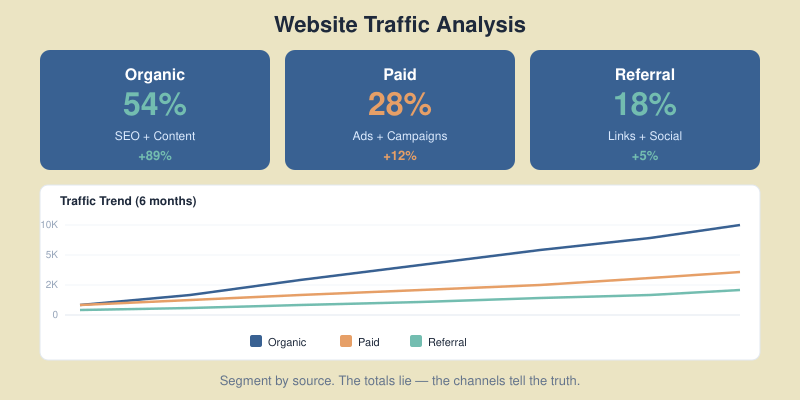
What Web Traffic Analysis Actually Tells You (Beyond Pageviews) Most marketers open their analytics dashboard, glance at pageviews, and move...
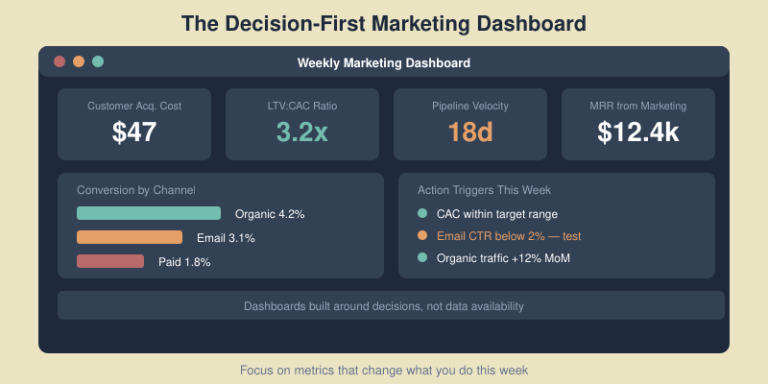
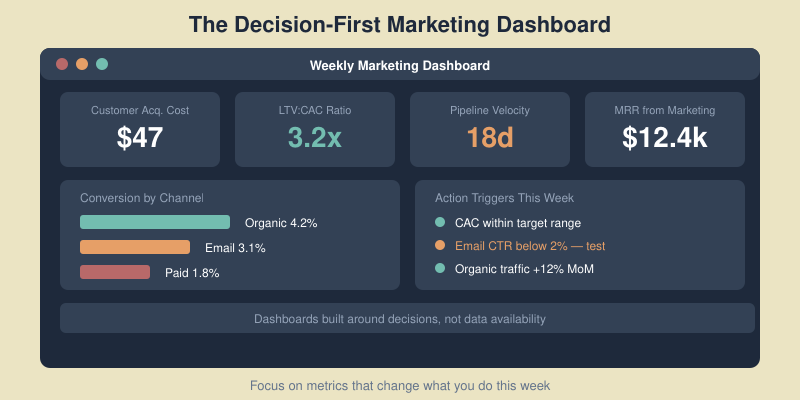
I have built, inherited, and — more often than I care to admit — quietly abandoned more marketing dashboards than...
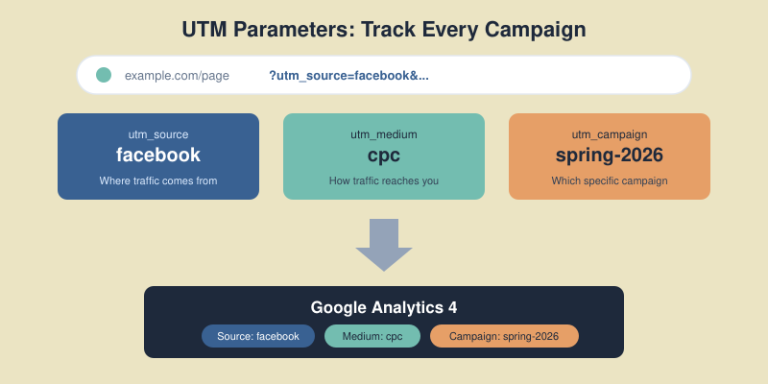
You’re running campaigns across email, social media, paid ads, and partner sites. Traffic is coming in. But when you open...
Every marketing team I’ve worked with has the same problem: they’re making budget decisions based on attribution data that’s lying to them. Not because the tools are broken — but because marketing attribution models are, by design, simplifications of messy reality.
Last-click attribution tells your CEO that branded search “drives” 60% of revenue. First-touch says it’s all about blog posts. Linear attribution spreads credit so evenly it’s meaningless. And the vendor selling you their “AI-powered” model? They have their own incentives.
This guide is different. I won’t rank models from worst to best — because that framing is wrong. Instead, I’ll show you what each model reveals, what it hides, and how to triangulate toward the truth using a combination of attribution, incrementality testing, and marketing mix modeling. After a decade of building traffic analysis and measurement systems for SaaS and content businesses, this is the framework I keep coming back to.

An attribution model is a set of rules for assigning credit to marketing touchpoints that preceded a conversion. That’s it. It’s not a truth machine — it’s a credit assignment system.
Think of it like splitting a restaurant bill. Did the appetizer contribute to the meal experience? Yes. Did dessert? Yes. But how much credit does each dish deserve for the overall satisfaction? There’s no objectively correct answer — only different frameworks for dividing the check.
The critical distinction most guides miss: attribution measures correlation, not causation. When your last-click report says Google Ads drove $50,000 in revenue, it means $50,000 in conversions happened after someone clicked a Google ad. It does NOT mean that $50,000 disappears if you turn off Google Ads. Some of those buyers would have found you anyway.
This gap between “gets credit” and “actually caused” is where millions of marketing dollars get wasted every year.
Before we get into why models fail, let’s make sure we speak the same language. Here are the six attribution models you’ll encounter in GA4, ad platforms, and third-party tools:
First-Touch Attribution gives 100% credit to the first interaction. If a customer first discovers you through an organic blog post, then later clicks a retargeting ad, then searches your brand name and buys — the blog post gets all the credit. This model favors awareness channels and content marketing.
Last-Touch Attribution gives 100% credit to the final interaction before conversion. In the same journey, branded search gets all the credit. This model favors bottom-of-funnel channels and brand search. It’s the default in most platforms because it’s simple and flatters the platform showing you the report.
Linear Attribution splits credit equally across all touchpoints. Three touchpoints? Each gets 33.3%. This sounds fair but treats a random display impression the same as a high-intent product demo.
Time-Decay Attribution gives more credit to touchpoints closer to conversion. The logic: recent interactions are more influential. This works well for short sales cycles but undervalues the awareness channels that started the journey.
Position-Based (U-Shaped) Attribution gives 40% to first touch, 40% to last touch, and splits the remaining 20% among middle interactions. This is a popular compromise — it values both discovery and closing while acknowledging the middle.
Data-Driven (Algorithmic) Attribution uses machine learning to analyze your actual conversion paths and assign credit based on statistical patterns. Google’s data-driven attribution in GA4 does this automatically. It’s the most sophisticated option, but it’s a black box — you can’t see why it assigns credit the way it does, and it needs significant conversion volume (typically 300+ conversions per month) to work reliably.

This is the section most attribution guides skip entirely. Every model produces a distorted view of reality. Here’s how, with specific scenarios.
Scenario: You run a podcast ad campaign for three months. Listeners hear your brand name, Google it later, and buy. Last-click gives 100% credit to branded search. Your report says: “Branded Google Ads drove $200K this quarter.” You cut the podcast budget because it “doesn’t convert.” Next quarter, branded search revenue drops 40% because nobody is hearing about you anymore.
I’ve watched this exact pattern destroy a SaaS company’s growth. They cut all top-of-funnel spend because last-click said it wasn’t working. Twelve weeks later, their pipeline collapsed. The lesson: last-click measures the last step, not the reason someone took it.
Scenario: Someone reads your blog post, then receives 14 emails, attends a webinar, talks to sales twice, and finally buys. First-touch gives the blog post 100% credit. Your team concludes: “Content marketing is our best channel!” Meanwhile, the email nurture sequence and sales team — which actually closed the deal — get zero credit.
Scenario: A customer’s journey has 12 touchpoints, including 6 display ad impressions they probably never noticed. Linear attribution gives each touchpoint 8.3% credit, treating an invisible banner the same as a product demo that answered their buying questions. This inflates the value of high-volume, low-impact channels.
Algorithmic models are only as good as the data they train on. If your tracking misses offline touchpoints, underestimates word-of-mouth, or loses users across devices, the algorithm builds its model on an incomplete picture. Garbage in, sophisticated garbage out. And because it’s a black box, you can’t audit the assumptions.

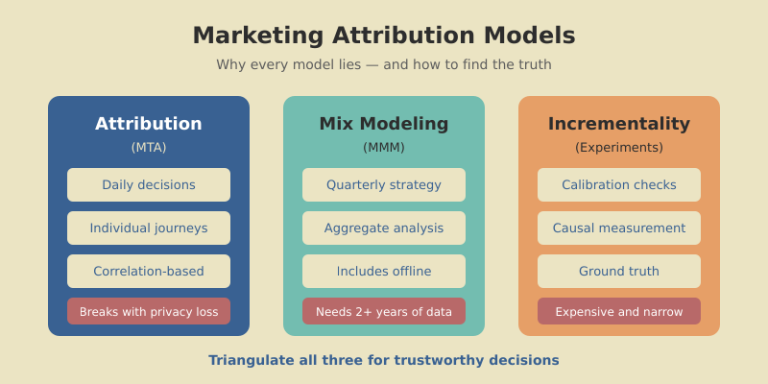
If every model lies, how do you find the truth? The answer isn’t a better model — it’s triangulation. Modern measurement uses three complementary methods, each covering the others’ blind spots.
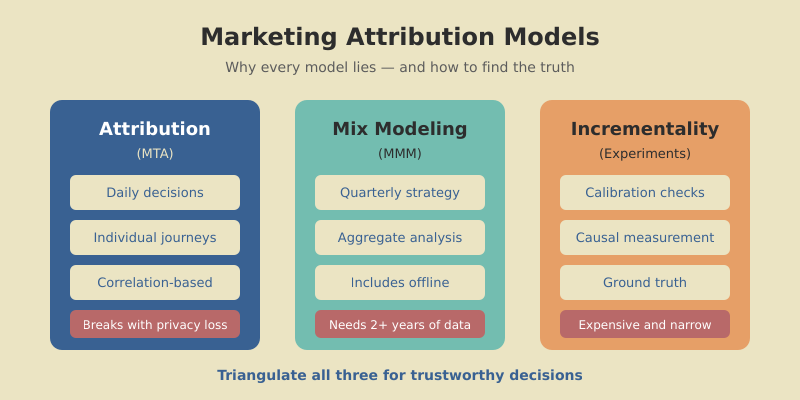
Multi-Touch Attribution (MTA) tracks individual user journeys and assigns credit to touchpoints. It’s granular and real-time, but it only sees digital interactions, breaks with cookie restrictions, and measures correlation.
Marketing Mix Modeling (MMM) uses aggregate statistical analysis (regression) to measure how spend across channels correlates with outcomes over time. It handles offline media and isn’t affected by cookie loss, but it requires 2+ years of data, updates quarterly at best, and can’t optimize individual campaigns.
Incrementality Testing measures causation directly. You run controlled experiments — showing ads to a test group and withholding them from a control group — then measure the difference. It’s the closest thing to ground truth, but it’s expensive, time-consuming, and only answers one question at a time.
Think of it this way: MTA is your daily dashboard (fast but noisy), MMM is your quarterly strategy review (slow but comprehensive), and incrementality is your spot-check calibration (precise but narrow). You need all three — or at minimum, two of the three — to make decisions you can trust. This same principle applies to conversion funnel optimization: no single metric tells the full story.

Incrementality sounds intimidating, but the basic version is straightforward. Here’s a framework I’ve used with teams that don’t have dedicated data scientists.
Step 1: Pick one channel and one question. Don’t try to test everything. Start with your biggest uncertainty. Example: “Does our Facebook retargeting actually drive incremental revenue, or are these people who would buy anyway?”
Step 2: Create a holdout group. Split your retargeting audience randomly: 85% see ads (test group), 15% don’t (control group). Most ad platforms support this natively — Facebook calls it “conversion lift,” Google calls it “brand lift studies.”
Step 3: Run for 2-4 weeks. You need enough time and conversions for statistical significance. A rule of thumb: at least 100 conversions in each group.
Step 4: Compare conversion rates. If the test group converts at 4.2% and the control group at 3.1%, your incremental lift is 1.1 percentage points. That means roughly 26% of your retargeting “conversions” are truly incremental — the rest would have happened without the ads.
Step 5: Recalibrate your attribution. If your attribution model says retargeting drove $100K this quarter, but incrementality shows only 26% is truly incremental, the real value is closer to $26K. That’s a massive difference for budget allocation.
One of the most eye-opening tests I ran was for a B2B SaaS client. Their attribution said branded search drove 55% of signups. We paused branded ads for two weeks in one geo. Organic clicks absorbed 89% of the lost paid traffic. The true incremental value of branded search ads was about 11% — not 55%. They reallocated $30K/month to top-of-funnel content that actually expanded the audience.

There’s no universally “best” model. The right choice depends on your business maturity, sales cycle, and what decisions you’re trying to make. Here’s a practical framework.
If you’re early-stage (under $1M ARR, small team): Use last-click for operational decisions (which campaigns to pause today) but supplement with first-touch reports monthly to understand what’s filling the top of the funnel. Don’t overcomplicate it — your biggest risk is not tracking at all, not using the wrong model.
If you’re growth-stage ($1M-$10M ARR): Move to position-based (U-shaped) attribution as your default view. It balances discovery and conversion credit. Start running quarterly incrementality tests on your top 2-3 channels. Build a simple marketing dashboard that shows both attributed revenue and incrementality-adjusted revenue side by side.
If you’re scaling ($10M+ ARR, multi-channel): Use data-driven attribution as your daily lens, commission an MMM study annually, and run incrementality tests monthly on your highest-spend channels. The triangulation approach pays for itself at this scale because misallocating even 10% of a multi-million dollar budget is hundreds of thousands wasted.
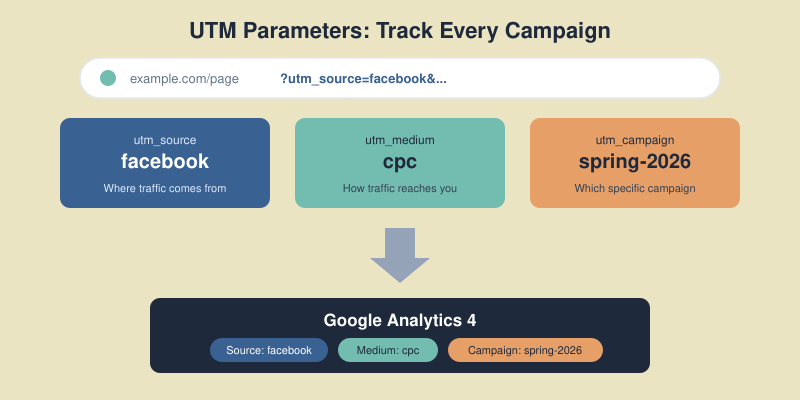
Regardless of stage, track your UTM parameters religiously. No attribution model can work if the underlying tracking data is broken.

The attribution landscape has fundamentally shifted. iOS App Tracking Transparency, GDPR enforcement, third-party cookie deprecation, and consent management have broken the tracking chain that multi-touch attribution depends on. Here’s what’s changed and how to adapt.
What’s broken: Cross-device tracking, third-party cookies, and view-through attribution are all unreliable now. If a customer browses on their phone, researches on their laptop, and buys on their work computer, MTA often sees three separate people. Studies estimate that current MTA tools miss 20-40% of touchpoints due to privacy restrictions.
What still works: First-party data (your own site, CRM, email) remains fully trackable. Server-side tracking recovers some lost signals. And methods that don’t rely on individual tracking — MMM and geo-based incrementality tests — are actually gaining accuracy because they never depended on cookies in the first place.
The practical shift: Privacy-first attribution means moving from “track every click” to “measure outcomes at the cohort level.” Instead of knowing that User #47382 saw three ads and bought, you measure: “We increased Facebook spend 20% in Region A but not Region B. Region A conversions grew 12% more. Facebook’s incremental impact is roughly 12%.” This is less granular but more honest — and it works regardless of cookie settings.
Before investing in new tools or models, audit what you have. This takes five minutes and reveals whether your current attribution data is trustworthy.
Check 1: Channel overlap. Look at assisted conversions in GA4 (Reports → Advertising → Attribution paths). If “Direct” appears in more than 40% of paths, your tracking has gaps — real direct traffic is rare, so “Direct” usually means “we don’t know where this came from.”
Check 2: Model divergence. In GA4, compare the same date range under different attribution models (last-click, first-click, data-driven). If a channel’s credit swings more than 50% between models, that channel is the one worth running an incrementality test on.
Check 3: Platform agreement. Compare what Google Ads claims it drove versus what GA4 attributes to Google Ads. If there’s more than a 30% gap, your conversion tracking or attribution window settings need attention.
Check 4: Time lag. Check your conversion paths for average time to conversion. If most conversions take 14+ days but your attribution window is 7 days, you’re systematically undercounting channels that start long journeys.
Check 5: The gut check. Show your attribution report to someone who doesn’t manage ads. If “brand search” or “direct” dominate and they say “that doesn’t sound right” — they’re probably correct. Human intuition about your business is a useful sanity check against model outputs.
There is no single best model. Position-based (U-shaped) is the most balanced starting point for most businesses because it credits both discovery and conversion touchpoints. However, the real answer is to use multiple models and compare them — the divergence between models is more informative than any single model’s output.
Attribution measures correlation — which touchpoints preceded a conversion. Incrementality measures causation — what happens when you turn a channel off. Attribution tells you who gets credit; incrementality tells you what actually works. Both are valuable, but incrementality is closer to ground truth.
Yes, but keep it simple. Start with last-click for daily optimization and first-touch for monthly pipeline analysis. Focus energy on clean tracking (proper UTM parameters, consistent naming conventions) rather than sophisticated models. Clean data in a simple model beats messy data in an advanced one.
Privacy changes have reduced the accuracy of individual-level tracking by an estimated 20-40%. The shift is toward aggregate measurement methods — marketing mix modeling and geo-based incrementality tests — that don’t rely on tracking individual users. First-party data from your own properties has become the most reliable tracking signal.
Review your attribution setup quarterly. Check for model divergence, platform discrepancies, and whether your chosen model still matches your channel mix. Run incrementality tests on your highest-spend channel at least twice a year to calibrate your attribution against real causal data.
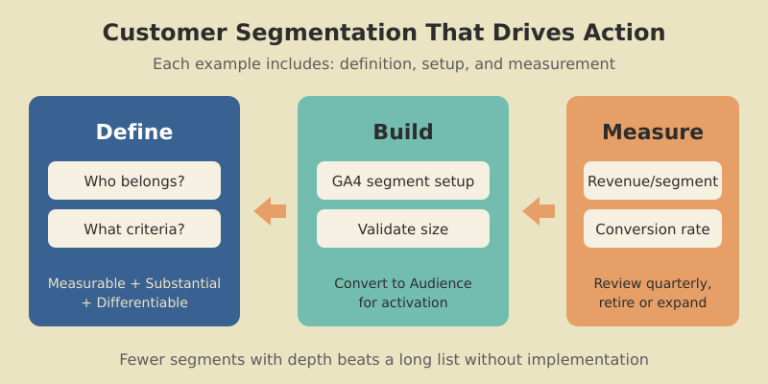
Most customer segmentation guides give you a list of 20+ examples with a one-sentence description each. Neat for skimming, useless for implementation. You finish reading and still have no idea how to actually build any of those segments.
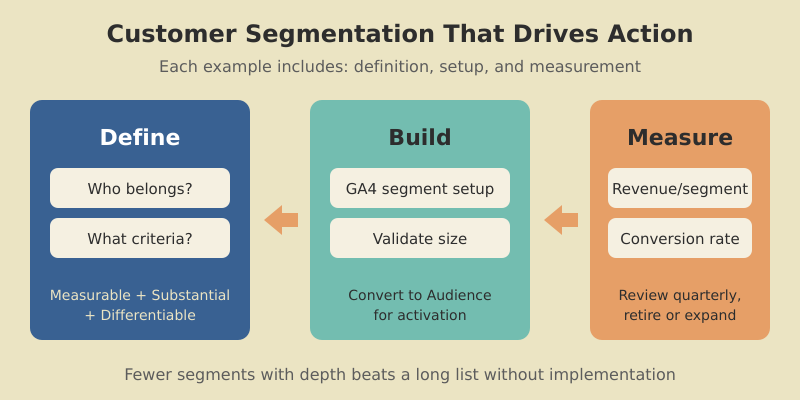
This guide takes the opposite approach. Fewer examples, more depth. Each one includes what the segment is, how to build it in your analytics tool, how to validate it is large enough to matter, and how to measure whether it is actually driving revenue. I have used every one of these segments with real clients — SaaS products, ecommerce stores, and content businesses.
If you have already read our guide on audience segmentation strategy, this is the practical companion piece. Less theory, more copy-and-implement examples.

Before jumping into examples, let us define the baseline. What are customer segments? They are groups of customers who share meaningful characteristics — behaviors, demographics, purchase patterns, or engagement levels — that justify treating them differently in your marketing, product, or support strategy.
The key word is “actionable.” A segment is only useful if it meets three criteria:
A segment like “users aged 25-34 in California” is measurable and might be substantial, but if they behave identically to users aged 35-44 in California, it is not differentiable — and therefore not actionable. Always validate that your segments actually behave differently before investing in segment-specific strategies.

There are many ways to slice your customer base, but most practical segmentation falls into five types of customer segments. Each type answers a different question about your customers.
Based on who your customers are: age, location, company size, industry, job role. Most accessible data but lowest predictive power on its own. Best used as a first filter combined with behavioral data.
Based on what customers do: features used, pages visited, purchase frequency, support interactions. This is the highest-signal type for most digital businesses. A user who logged in 15 times last month is fundamentally different from one who logged in once.
Based on how much customers are worth: revenue generated, lifetime value, plan tier, expansion potential. Essential for prioritizing where to allocate resources — your top 20% of customers likely generate 60-80% of revenue.
Based on where customers are in their journey: new, onboarding, activated, mature, at-risk, churned. Each stage requires different communication and different funnel optimization strategies.
Based on what customers are trying to accomplish: their goals, pain points, and use cases. Harder to identify but incredibly powerful for product development and messaging. Typically discovered through surveys, support analysis, and user interviews.
Knowing the types is one thing. Knowing the practical ways to segment customers is another. Here are three methods I use repeatedly.

Score every customer on three dimensions: Recency (when did they last engage?), Frequency (how often do they engage?), and Monetary value (how much have they spent?). Each dimension gets a score of 1-5. A customer scoring 5-5-5 is a “Champion.” A customer scoring 1-3-5 is a “Can’t Lose Them” — high-spending but disengaging.
RFM works exceptionally well for ecommerce and subscription businesses. I implemented it for a DTC brand, and it immediately revealed that 8% of customers generated 43% of revenue — and half of those high-value customers had not purchased in 60+ days. One targeted win-back campaign recovered $47K in the first month.
Group customers by the actions they take (or do not take) within specific timeframes. For SaaS: “completed onboarding within 3 days” vs. “took longer than 7 days.” For ecommerce: “purchased within first visit” vs. “needed 3+ sessions.” The behavior that happens early in the customer journey often predicts long-term value.
Segment by the problem customers are solving, not their demographics. A project management tool might have customers using it for client work, internal team coordination, and personal task management — three completely different jobs that require different onboarding, features, and messaging. Identify these through product usage patterns and customer interviews.
Here are customer segments examples I have built for SaaS products, with specific implementation details.

Definition: Signed up in the last 7 days, completed at least 2 of 5 onboarding steps, but have not hit the activation event (e.g., created their first project, sent their first campaign).
Why it works: These users showed intent but got stuck. A targeted nudge at this moment has the highest conversion impact. PocketSuite used a similar segment and reduced churn by 30%.
GA4 setup: Create a User segment where sign_up event occurred in the last 7 days AND onboarding_step count is between 2 and 4 AND activation_event count is 0.
Definition: Logged in 10+ times per month for the past 3 months, but login frequency dropped below 3 in the current month.
Why it works: These are your most engaged users showing disengagement signals. Losing a power user costs 5-10x more than losing a casual user because they are typically on higher plans and influence team adoption.
GA4 setup: Build a predictive audience using the “likely to churn in 7 days” model, filtered to users with historically high engagement scores.
Definition: Using 80%+ of their plan’s feature limits (seats, storage, API calls), logged in by multiple team members, and on a plan for 3+ months.
Why it works: These accounts are ready for an upgrade conversation. They have proven product value and are hitting natural usage ceilings. Baremetrics used value-based segmentation like this to grow MRR by 20%.
Action: Trigger an in-app message showing usage relative to limits, plus a one-click upgrade path.
The same principles apply outside SaaS. Here are user segmentation examples for ecommerce and content businesses.

Definition: Customers who made exactly one purchase vs. those with two or more purchases.
Why it works: The marketing strategy is completely different. First-time buyers need trust-building and a reason to return. Repeat buyers need loyalty rewards and cross-sell offers. Sur La Table segmented this way and saw a 6% lift in conversion rates and 12% more product page views.
GA4 setup: Create two audiences — one where purchase event count equals 1, another where it is greater than 1. Export both to Google Ads for differentiated remarketing.
Definition: Users who added items to cart but did not purchase, segmented into three tiers: under $50, $50-$200, and $200+.
Why it works: A $20 cart abandoner might respond to free shipping. A $200+ abandoner might need a phone call or live chat. Different recovery tactics for different value tiers dramatically improve recovery rates.
Action: Under $50 gets an automated email with a free shipping code. $50-$200 gets a 10% discount. $200+ gets a personal outreach from sales within 24 hours.
Definition: Blog readers who visit 3+ articles, then view a product or pricing page within 30 days.
Why it works: These are your content-qualified leads. They have self-educated through your content and are now evaluating your product. This segment converts at 3-5x the rate of direct traffic because they arrive with context and trust.
GA4 setup: Build a sequential segment: Step 1 is page_view where path contains “/blog/” (count ≥ 3), followed by Step 2 page_view where path contains “/pricing” or “/product”, within 30 days.
Knowing the examples is half the battle. Actually segmenting customer groups in your analytics tool is the other half. Here is the practical workflow I follow in GA4.
Start in Explore → New Exploration → Free-form. Click “+” next to Segments. For each of the examples above, you are creating either a User segment (tracks individuals across sessions) or a Session segment (tracks specific visits).
The key settings that most guides skip:
Once validated in Explorations, convert segments to Audiences for ongoing use. Audiences update in real-time and can be exported to Google Ads. I recommend building your traffic analysis foundation first — clean event tracking makes segmentation far more reliable.
Individual segments are useful. A complete customer segmentation strategy example shows how segments work together. Here are two complete models.

This model covers the full customer lifecycle:
Every customer falls into exactly one segment at any time. Track movement between segments weekly on your marketing dashboard — the flow between segments tells you more than any individual metric.
The critical metric is migration rate: what percentage of Browsers become First-Time Buyers? What percentage of First-Time Buyers make a second purchase? Industry benchmarks suggest 27% of first-time buyers return for a second purchase. If your rate is below 20%, focus all effort there — it is your biggest growth lever.

After building segmentation models for dozens of clients, I see the same mistakes repeatedly.
Too many segments, too soon. Starting with 12 segments when your team can only execute personalized campaigns for 3. Each segment needs distinct messaging, offers, and measurement. Start with 3-5 and expand only when you are consistently activating every segment.
Segmenting on demographics alone. Company size and job title are easy to collect but poor predictors of behavior. A Series A startup CTO and a Fortune 500 CTO have vastly different needs. Layer behavioral data on top of demographics — what they do matters more than who they are.
Never retiring segments. Customer behavior changes. A segment that performed well last year might be irrelevant now. Review quarterly: merge segments that have converged, split segments that have become too broad, and retire segments smaller than 100 members.
Ignoring negative segments. Knowing who NOT to target is as valuable as knowing who to target. Build an “unqualified” segment — users who match your ICP on paper but never convert. Exclude them from paid campaigns. I have seen this single change reduce ad spend waste by 15-25%.
Start with 3-5 segments. Each segment requires its own messaging, campaigns, and measurement — more segments means more execution overhead. Scale to 6-8 only when your team consistently delivers differentiated experiences for every existing segment. Most successful companies I work with operate with 5-7 active segments.
Market segmentation divides a total addressable market (including people who are not yet customers) into groups for targeting and positioning. Customer segmentation divides your existing customers into groups for retention, expansion, and experience optimization. Market segmentation helps you find customers. Customer segmentation helps you keep and grow them.
Compare conversion rates, revenue per user, and engagement metrics across segments. If segments show statistically different performance on these metrics, they are working. If two segments perform identically, merge them. Run A/B tests within segments to validate that segment-specific campaigns outperform generic ones. A 10-15% lift in conversion rate from segmented campaigns is a good benchmark.
Yes, even with a small customer base. Start with two segments: active customers and at-risk customers (no engagement in 30+ days). Send different messages to each group. This single split often produces measurable results. As your base grows, add segments based on purchase behavior or product usage. GA4 is free and handles segmentation for businesses of any size.
Review segment definitions and performance quarterly. Check segment sizes (are they growing or shrinking?), conversion rates (are they still differentiated?), and whether new behavioral patterns suggest segments you have not defined yet. Dynamic segments in GA4 update automatically, but the criteria behind them need human review to stay relevant.
Most marketing teams say they segment their audience. In practice, they split an email list by job title, call it a day, and wonder why open rates stay flat. Real segmentation is messier — and far more rewarding.
I spent three months rebuilding the segmentation model for a B2B SaaS client last year. We went from two segments (“free” and “paid”) to seven behavioral groups. Email revenue jumped 34% in the first quarter. Not because we wrote better copy, but because each group finally got a message that matched where they actually were in the buying journey.
This guide walks you through the entire process: defining segments, collecting the right data, building them in GA4, activating them across channels, and measuring what works. No fluff, no theory-only frameworks — just the steps that move numbers.

So what is audience segmentation, exactly? It is the process of dividing your total addressable audience into smaller groups based on shared characteristics — demographics, behaviors, preferences, or needs. Instead of treating everyone the same, you tailor messaging, offers, and timing to each group.
The concept is simple. The execution is where most teams stumble. A 2025 study found that segmented email campaigns generate 14% higher open rates and 100% more clicks than non-segmented sends. Yet only 20% of companies use real-time, AI-powered segmentation. The gap between knowing you should segment and doing it well is enormous.
Three forces make segmentation especially urgent right now. First, third-party cookies are effectively dead — Chrome’s consent prompt means most users opt out, just like Safari and Firefox users already do. Second, customer acquisition costs keep climbing, so wasting budget on the wrong audience is more expensive than ever. Third, privacy regulations (GDPR, state-level US laws) limit what data you can collect, making every first-party signal more valuable.
The companies winning in 2026 are not the ones with the most data. They are the ones who organize data into segments that drive specific actions.
Before building anything, you need a clear mental model. What are audience segments in practice? They fall into four core types, each useful for different decisions.

The classic starting point: age, gender, income, job title, company size, location. Demographic segments are easy to build because the data is straightforward to collect. They work well for broad targeting — a B2B SaaS tool might segment by company size (SMB vs. enterprise) because the buying process differs completely.
The limitation is precision. Two marketing directors at mid-size companies can have wildly different needs. Demographics tell you who someone is, not what they want.
This is where segmentation gets powerful. Behavioral segments group people by what they do: pages visited, features used, purchase frequency, email engagement, support tickets filed. A user who visits your pricing page three times in a week is in a fundamentally different mental state than someone who read one blog post.
Behavioral data comes from your own analytics — GA4 events, product usage logs, CRM activity. It is first-party, privacy-safe, and high-signal.
Psychographics capture values, interests, attitudes, and motivations. Are your buyers motivated by cost savings or by being first to adopt new technology? Do they care about sustainability or speed?
Psychographic data is harder to collect at scale. Zero-party data — surveys, preference centers, quiz responses — is the most reliable source. When you have it, psychographic segments often outperform demographic ones because they explain why people buy, not just who they are.
For B2B and SaaS, technographic data — what tools, platforms, and tech stack a prospect uses — can be a deal-breaker. If your product integrates with Salesforce, targeting companies that use Salesforce is an obvious high-intent segment. Tools like BuiltWith and SimilarTech provide this data at scale.
A solid audience segmentation strategy follows five steps. I have used this framework for SaaS products, content sites, and ecommerce — the specifics change, but the structure holds.
Segments exist to serve a goal. “Segment our audience” is not a goal. “Increase trial-to-paid conversion by 15% in Q2” is. Start with one or two measurable objectives, then ask: which audience groups are most relevant to each objective?
For the SaaS client I mentioned earlier, the goal was reducing churn. That meant we needed segments based on product engagement, not demographics. The objective dictated the segmentation model.
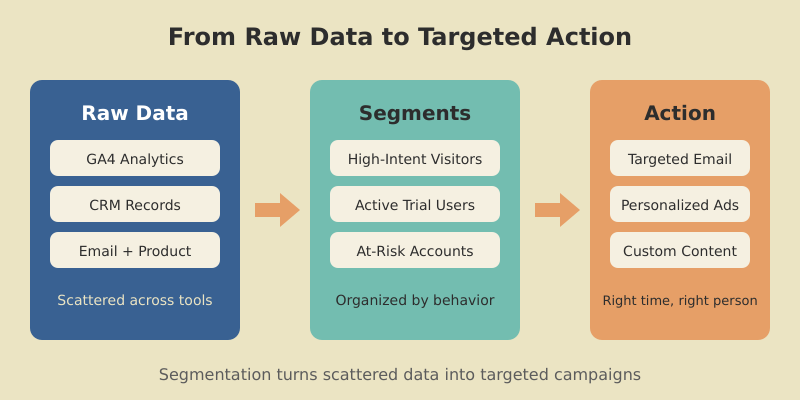
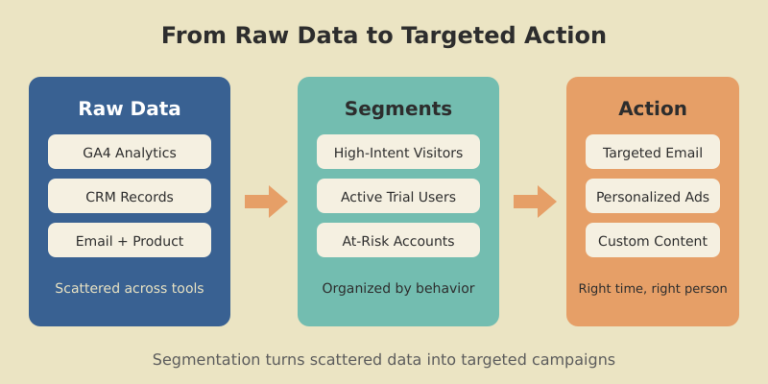
List every data source you have: GA4, CRM, email platform, product analytics, customer support, billing system. For each source, note what user attributes and behaviors you can extract. Most teams discover they already have more data than they use — it is just scattered across tools.
Pick the segmentation type (or combination) that aligns with your objective. For acquisition, demographic + behavioral works well. For retention, behavioral + psychographic is usually stronger. Do not try to use all four types at once — start with two.
Create your initial segments using the criteria from step 3. Then validate: is each segment large enough to matter? (A segment of 12 people is not actionable.) Are the segments distinct from each other? Does each segment suggest a different action you would take?
A good rule of thumb: if two segments would receive the same message, merge them.
Push segments to your marketing tools — email, ads, personalization engine — and run campaigns. Measure results per segment. Refine. This is not a one-time exercise. The best segmentation models evolve quarterly.

Target audience segmentation is about narrowing down from “everyone who visits our site” to “the specific groups most likely to become customers.” This is where data meets prioritization.
Here is a practical approach I use. Start with your existing customer base. Pull a list of your best customers — highest LTV, lowest churn, shortest sales cycle — and look for patterns. What do they have in common? Which pages did they visit before converting? How many touchpoints did they need?
In one project, we discovered that users who visited the integrations page within their first session converted at 3x the rate of those who did not. That single behavioral signal became our primary targeting criterion for ad campaigns. We built lookalike audiences around it, and cost per acquisition dropped 28%.
The RFM framework (Recency, Frequency, Monetary value) works well for ecommerce and subscription businesses. Score each customer on all three dimensions, then group them into segments: Champions (high across all three), At-Risk (were active, now quiet), New Customers (recent but low frequency). Each group gets a different retention or upsell strategy. For detailed customer segmentation examples using frameworks like RFM, see our dedicated guide.
Do not build more than five to seven segments initially. Each segment needs its own messaging, offers, and measurement. More than seven and your team will not be able to execute consistently.
Segments are only as good as the data behind them. Audience data segmentation starts with getting the right inputs organized in the right places.

This is data you collect directly through your own properties: website analytics, app usage, purchase history, email engagement, support interactions. GA4, your CRM, and your product database are the primary sources. First-party data is the most reliable and privacy-compliant foundation for segmentation.
Make sure your UTM parameters are consistent across all campaigns. Inconsistent tagging is the number one reason first-party data becomes unusable for segmentation — you end up with “google / cpc” in one campaign and “Google / CPC” in another, fragmenting your segments.
Zero-party data is what users voluntarily share: survey responses, preference selections, quiz answers, account profile fields. A 2025 study found 84% higher acceptance rates for zero-party data collection when users perceive a clear value exchange.
Practical examples: an onboarding flow that asks “What is your primary goal with our product?” (three options), a preference center in your email footer, or a quiz that recommends content based on answers. Each response becomes a segmentation attribute.
Second-party data comes from trusted partners who share their first-party data with you, typically through data clean rooms. This approach is growing — 66% of US data professionals have adopted data clean rooms as a response to privacy regulations. It is relevant mainly for larger organizations with co-marketing partnerships.
The challenge is not collecting data. It is connecting it. A customer who visits your site (GA4 data), opens your emails (email platform data), and uses your product (product analytics data) exists as three separate records until you unify them. A Customer Data Platform (CDP) like Segment or RudderStack solves this — but even a well-structured CRM with consistent user IDs gets you 80% of the way.
Let me walk you through exactly how to segment your audience using GA4. This is the most accessible starting point because GA4 is free and most marketing teams already have it installed.
GA4 uses two related but different concepts. Segments exist only inside Exploration reports — they let you analyze a subset of your data. Audiences are persistent groups that you can use in standard reports and export to Google Ads for remarketing. You can create a segment first, then convert it to an audience.
Open GA4 and navigate to Explore → create a new Exploration. In the left panel, click the “+” next to Segments. You will see three types: User segment, Session segment, and Event segment.
For a “high-intent visitors” segment, choose User segment and set these conditions:
page_view where page_location contains “/pricing” — at least 1 timesession_start — at least 2 times in the last 30 daysThis gives you users who viewed your pricing page and returned to the site at least twice. That is a high-intent group worth targeting with specific messaging.
Sequential segments track users who complete actions in a specific order. For example: visited a blog post, then viewed the pricing page, then started a free trial — all within 7 days. This sequence maps to a content-driven conversion path and tells you which blog content actually drives pipeline.
In the segment builder, add a sequence condition. Set Step 1 as page_view where page path contains “/blog/”, Step 2 as page_view where page path contains “/pricing”, Step 3 as your trial signup event. Apply a “within 7 days” time constraint.
Once you have built a segment that shows interesting patterns, check the “Build an audience” checkbox when creating it. GA4 will create a persistent audience that updates automatically as new users meet the criteria. You can then use this audience for Google Ads remarketing or as a filter in standard reports.
I recommend building three to five core audiences that align with your traffic analysis framework: new visitors, engaged visitors, high-intent visitors, trial users, and paying customers. These five groups cover the full funnel and give you clear performance benchmarks.

A segment sitting in an analytics dashboard does nothing. Marketing audience segmentation only becomes valuable when it changes what you send, to whom, and when.

Email is the highest-leverage channel for segmentation because you control the audience completely. Start with lifecycle stages: onboarding sequences for new signups, feature education for trial users, upgrade nudges for engaged free users, expansion offers for paying customers.
Layer behavioral triggers on top: “User completed Setup Wizard → send Advanced Features email in 3 days.” “User has not logged in for 14 days → send Re-engagement email.” These behavior-triggered sends consistently outperform batch newsletters — I have seen 2-3x higher click-through rates across multiple clients.
Export your GA4 audiences to Google Ads for remarketing. Create separate ad groups for each segment with tailored messaging. High-intent visitors who viewed pricing get a direct trial CTA. Blog readers get a content-upgrade or newsletter offer.
The key insight: exclude your existing customers from acquisition campaigns. It sounds obvious, but I regularly audit accounts where 15-20% of ad spend goes to people who already pay. Build a “current customers” audience in GA4 and add it as an exclusion to every acquisition campaign.
Match your content calendar to your segment priorities. If your highest-value segment cares about enterprise security, create content for them — case studies, compliance guides, security whitepapers. Then distribute that content through the channels where that segment is most active.
On-site personalization takes this further. Show different CTAs, hero banners, or recommended content based on which audience a visitor belongs to. Tools like Optimizely and Mutiny make this possible without heavy engineering. Even simple changes — showing “Start Your Enterprise Trial” instead of “Start Free Trial” when a visitor from a Fortune 500 company lands on your site — can lift conversion rates meaningfully.
You have built segments and activated them. Now you need to know if they are working. Audience segmentation analysis is an ongoing practice, not a one-time report.
Track these metrics for every active segment, ideally in a centralized marketing dashboard:
Build a comparison view in GA4 Explorations. Create a Free-form exploration, add your audiences as a segment comparison, and set conversion rate as your primary metric. This instantly shows which segments convert best and worst.
Segments are not permanent. Customer behavior changes, markets shift, and your product evolves. Review your segmentation model quarterly. Look for segments that have become too small to be actionable, segments where conversion rates have converged (meaning the distinction no longer matters), and new behavioral patterns that suggest a segment you have not defined yet.
I typically retire or merge one to two segments per quarter and test one new segment. This keeps the model fresh without creating segment sprawl that overwhelms your marketing team.
The most valuable segmentation analysis compares campaign performance across segments. Run the same A/B test — say, a new email subject line — but analyze results per segment rather than in aggregate. You will often find that Variant A wins for one segment and Variant B wins for another. Aggregate results hide these differences and lead to one-size-fits-all decisions.

The old model of segmentation relied heavily on third-party data: tracking pixels, cross-site cookies, purchased data lists. That model is gone. Chrome’s consent prompt, Safari’s ITP, Firefox’s ETP, and global privacy laws have made third-party cookies unreliable for segmentation.
But this is actually good news for marketers who build on first-party foundations. Here is how to approach privacy-first segmentation.
Client-side analytics miss 15-30% of visitors due to ad blockers and browser restrictions. Server-side tracking captures events on your server before sending them to analytics platforms, bypassing most client-side limitations. Google Tag Manager’s server-side container is the most accessible option. It takes a few hours to set up and immediately improves data completeness.
Instead of tracking users without their knowledge, offer a clear value exchange. “Tell us your role and goals, and we will personalize your experience” converts at surprisingly high rates when the benefit is tangible. Preference centers, progressive profiling (asking one question per visit rather than a long form), and gated tools (calculators, assessments) all generate rich segmentation data with explicit consent.
When you cannot identify a visitor, contextual targeting uses the content they are viewing — not their identity — to serve relevant messages. A visitor reading your article about SaaS metrics is likely interested in analytics tools, regardless of whether you have a cookie on them. AI-powered contextual tools analyze page content, sentiment, and structure to match ads and CTAs to reader intent.
Maximize the signals from your owned properties. Every form submission, every product interaction, every support conversation generates data. Connect these signals through a unified user ID across your analytics, CRM, and email platform. A strong distribution strategy brings visitors back to your owned properties where you can collect first-party data, rather than relying on rented audiences on social platforms.
Start with three to five segments. Each segment needs its own messaging strategy, so more segments means more execution work. Scale up to seven or eight once your team can consistently personalize content and campaigns for each group. Beyond eight, most marketing teams struggle to maintain meaningful differentiation between segments.
At minimum, you need an analytics platform (GA4 is free), an email marketing tool with segmentation features (Mailchimp, ActiveCampaign, or similar), and a CRM. For advanced segmentation, consider a Customer Data Platform (CDP) like Segment or RudderStack to unify data from multiple sources. You do not need expensive tools to start — GA4 audiences and a well-structured email platform cover most use cases.
Buyer personas are fictional composites — “Marketing Mary, 35, VP at a mid-size company.” Segments are data-defined groups based on actual behavior and attributes. Personas are useful for content planning and creative direction. Segments are what you use for targeting and measurement. The best approach uses personas to guide your messaging and segments to determine who sees that messaging.
Review segment definitions quarterly. Check whether segments are still the right size (large enough to be actionable, not so large they are meaningless), whether conversion rates have shifted, and whether new behavioral patterns have emerged. Dynamic segments in GA4 update automatically as users meet the criteria, so the maintenance is mainly about refining the criteria, not manually moving users.
Yes. GA4 audiences, your email platform’s built-in segmentation, and a well-organized CRM cover 80% of segmentation needs. A CDP becomes valuable when you have more than five data sources and need real-time cross-channel identity resolution. For most small-to-mid-size businesses, manual connections between GA4, your email tool, and your CRM (possibly using Zapier or native integrations) work well enough to start seeing results from segmentation.
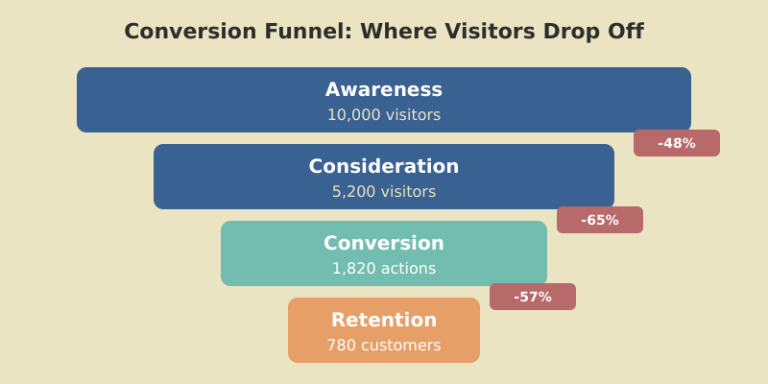
So what is conversion funnel optimization? In simple terms, it’s the process of improving each stage of your buyer’s journey to increase the percentage of visitors who complete a desired action — whether that’s signing up for a trial, purchasing a product, or subscribing to a newsletter.
But here’s what most guides get wrong: they treat funnel optimization as a list of generic tactics. “Improve your CTAs.” “Add social proof.” “A/B test your headlines.” That advice isn’t wrong — it’s just useless without knowing where your funnel actually breaks.
When I started working on funnels for a B2B SaaS product in 2019, I spent three weeks rewriting landing page copy. Conversion rate didn’t move. The real problem? 68% of visitors who clicked “Start Free Trial” abandoned the signup form on step 2 of 4. The landing page was fine. The form was the bottleneck. I would have found that in 20 minutes if I’d looked at the funnel data first.
What is funnel optimization at its core? It’s diagnosis before treatment. You measure, identify where people drop off, understand why, fix that specific point, and measure again. Everything else is guessing.
The classic TOFU/MOFU/BOFU model (top, middle, bottom of funnel) is a useful mental model. But when you sit down to actually build funnel reports in your analytics tool, you need concrete stages — not abstract categories.
Here’s the framework I use for different business types:
For SaaS products:
For content sites:
For ecommerce:
The key difference from generic TOFU/MOFU/BOFU: each stage is a measurable event you can track in GA4 or any analytics tool. If you can’t measure it, it doesn’t belong in your funnel. Once you map your stages, track conversion rates between each pair. That’s where the real insights live — not in the overall conversion rate, but in the stage-to-stage drop-offs.

GA4’s Funnel Exploration is one of the most powerful — and most underused — features in the platform. Here’s how to set one up from scratch.
Step 1: Open Explore. In GA4, go to Explore tab and click “Funnel exploration.” You’ll see a blank canvas with a steps panel on the left.
Step 2: Define your steps. Click “Steps” and add each funnel stage as a step. For each step, choose the event or page that represents it. For example: Step 1 = page_view where page_path contains “/pricing”, Step 2 = event “begin_signup”, Step 3 = event “signup_complete”.
Step 3: Choose open or closed funnel. A closed funnel requires visitors to complete steps in order — they must hit Step 1 before Step 2 counts. An open funnel allows users to enter at any step. For conversion optimisation, use closed funnels — they show the actual sequential path and where people bail.
Step 4: Add breakdowns. This is where it gets powerful. Add a breakdown by device category, traffic source, or country. Suddenly you’re not looking at one funnel — you’re comparing mobile vs desktop funnels, organic vs paid funnels. I’ve seen cases where the overall funnel looks healthy but the mobile funnel has a 90% drop-off at checkout.
Step 5: Set your date range and segment. Compare this month to last month. Apply segments for new vs returning users. Export the data to a spreadsheet if you need to track trends over time, or connect it to your marketing dashboard for ongoing monitoring.
Pro tip: save your funnel exploration as a template. You’ll run this analysis monthly, and rebuilding it each time wastes 15 minutes you’ll never get back.
Your funnel reports are only as good as the events feeding them. If you’re missing events, you’re missing funnel steps — and drawing wrong conclusions. Google Tag Manager (GTM) is the simplest way to instrument funnel events without touching your site’s codebase.
Here’s the minimum setup for a SaaS trial funnel:
Event 1: Pricing page view. Create a GA4 Event tag in GTM. Trigger: Page View where Page Path contains “/pricing”. Event name: “view_pricing”. No custom parameters needed.
Event 2: Trial signup start. Trigger: Click on the “Start Free Trial” button. Use GTM’s click trigger with a CSS selector matching your CTA button. Event name: “begin_trial”.
Event 3: Trial signup complete. Trigger: Page View on your thank-you or onboarding page. Event name: “trial_complete”. Add a parameter for the signup method (Google SSO, email, etc.) if you want to compare conversion paths later.
Event 4: Activation. This depends on your product. It might be “created first project,” “invited a team member,” or “completed onboarding.” Fire this event when the user completes the action that correlates with retention. Event name: “activation”.
Test every event in GTM’s Preview mode before publishing. Open your site, walk through the funnel, and verify each event fires in the Tag Assistant. Then publish and wait 24 hours before building your funnel report — GA4 needs time to process new events.
For campaign-level granularity, combine GTM events with UTM parameter tracking so you can see which campaigns drive users deepest into the funnel.

Sales funnel optimization in SaaS is a different game than ecommerce. You’re not optimizing for a single purchase moment — you’re optimizing for a sequence of value-realization steps that happen over days or weeks.
Here are the benchmarks I use, based on working with 15+ SaaS products over the past 6 years:
To how to optimize sales funnel at each stage, focus on removing friction, not adding persuasion. At the signup stage, reduce form fields — every additional field drops conversion by 5-10%. At activation, build guided onboarding that gets users to their “aha moment” within the first session. At conversion, use well-timed upgrade prompts when users hit feature limits, not arbitrary calendar reminders.
One SaaS client I worked with had a 14-day free trial with a 12% trial-to-paid rate. We analyzed the activation data and found that users who completed two specific actions in the first 3 days converted at 47%. Users who didn’t complete them by day 7 almost never converted. We rebuilt the onboarding to push those two actions front and center. Trial-to-paid jumped to 23% in 60 days. The funnel data told us exactly where to focus — we didn’t guess.
Track these SaaS metrics alongside your funnel to connect conversion rates to revenue impact.
Content sites have funnels too — they’re just less obvious. Most content marketers think their funnel is “write good content → people buy.” The reality is more nuanced, and optimizing it requires tracking the intermediate steps.
The content-site funnel typically looks like this:
Stage 1: First visit (organic or referral). The reader lands on an article. Your job here is to deliver on the search intent so they stay. Engagement rate above 50% means you’re doing this well. Below 40%, your headline or intro is misaligned with the content.
Stage 2: Second page view. This is the most underrated metric for content sites. A reader who clicks to a second article is 5-8x more likely to subscribe than a single-page visitor. Good internal linking makes this happen. Build it into every article — link to related content naturally, not as an afterthought.
Stage 3: Email subscription. This is your content funnel’s conversion point. Every reader who gives you their email address has moved from “anonymous visitor” to “known lead.” Track newsletter signup rates by landing page to find which content converts best.
Stage 4: Email engagement. Not all subscribers are equal. Track open rates and click rates for your first 3-5 emails. Subscribers who engage early are your most valuable segment — they’re warm leads for whatever you sell.
Stage 5: Monetization. Whether it’s a product, service, course, or sponsorship clicks, this is where content converts to revenue. The path from subscribed reader to paying customer might take weeks or months. Track it with cohort analysis and be patient.
Build a content calendar around your funnel. Top-of-funnel articles should target high-volume keywords and need a solid content distribution strategy to reach the right audience. Mid-funnel content should solve specific problems that demonstrate your expertise. Bottom-funnel content should directly address purchasing decisions.
Every funnel leaks. The question isn’t whether you’re losing people — it’s where and why.
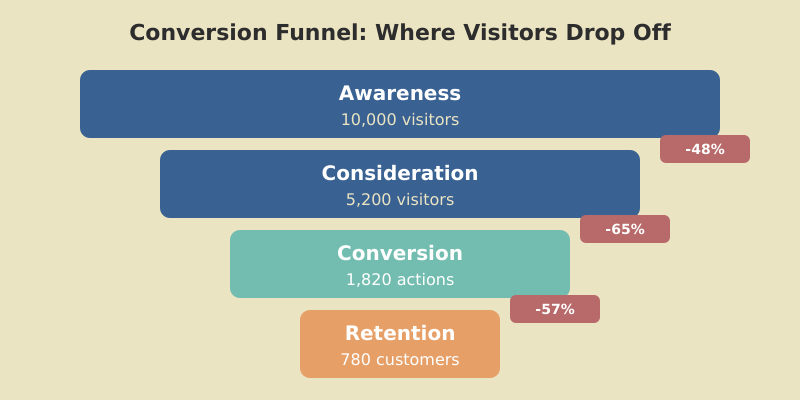
Start with the data. Open your GA4 funnel exploration and look at the completion rate between each step. Focus on the step with the largest absolute drop-off — that’s where you’ll get the most impact from optimization.
Common drop-off patterns and what they mean:
High drop-off between landing page and next step. The page isn’t communicating value quickly enough. Check: Is the CTA visible above the fold? Does the headline match what brought the visitor here? If it’s paid traffic, does the landing page match the ad copy?
High drop-off at form or signup. Friction. Too many fields, confusing layout, no social login option, or asking for information the user isn’t ready to share (credit card for a free trial is the classic killer). Reducing a 7-field form to 3 fields typically improves completion rates by 25-40%.
High drop-off after signup but before activation. Onboarding failure. The user signed up but couldn’t figure out what to do next. This is a product/UX problem, not a marketing problem — but marketing should flag it because it kills your funnel metrics.
High drop-off at payment. Price objection, trust issues, or checkout UX problems. Add trust signals (security badges, money-back guarantee). Test pricing tiers. Check if the checkout process works on mobile — 50%+ of users will attempt it on their phone.
After identifying the biggest leak, use Microsoft Clarity or Hotjar session recordings to watch real users struggle. Quantitative data tells you where they drop off. Qualitative data (session recordings, heatmaps) tells you why.

Here are seven conversion optimisation strategies I’ve tested across real projects. Each one includes the context and results — because a tactic without numbers is just an opinion.
1. Reduce form fields. A SaaS signup form went from 6 fields to 3 (email, password, company name). Signup completion rate: 34% → 52%. The fields we removed (phone number, team size, role) were collected during onboarding instead.
2. Add progress indicators. A multi-step checkout added a “Step 2 of 3” bar. Cart completion: 28% → 36%. People abandon less when they know how close they are to finishing.
3. Match landing page to ad copy. A paid campaign drove traffic to a generic homepage. We built a dedicated landing page that mirrored the ad’s headline and offer. Conversion rate: 1.2% → 4.8%. Message match is one of the highest-ROI optimizations you can make.
4. Social proof placement. Moved customer logos and a testimonial from the bottom of the pricing page to directly above the CTA button. Demo requests: +22%. Social proof works best when it appears at the moment of decision, not buried below the fold.
5. Exit-intent offers. Added an exit-intent popup offering a free resource (PDF guide) in exchange for email on blog posts. Captured 3.2% of abandoning visitors as email subscribers. These later converted to paid at 2.1% over 90 days. Sales funnel optimisation isn’t just about the immediate sale — it’s about capturing leads who aren’t ready yet.
6. Mobile-specific checkout. An ecommerce site redesigned its mobile checkout with larger buttons, auto-fill, and Apple Pay. Mobile conversion: 1.1% → 2.9%. Desktop was already at 3.4% — the mobile gap was pure lost revenue.
7. Urgency without manipulation. Added real inventory counts (“Only 3 left at this price”) instead of fake countdown timers. Conversion rate: +18%. Honest urgency works. Fake scarcity erodes trust and increases refund rates.

I’ve made all of these mistakes. Some of them more than once.
Mistake 1: Optimizing the wrong stage. If your landing page converts at 8% but your checkout converts at 15%, don’t spend months A/B testing headlines. Fix the checkout first — that’s where the volume is. Always start with the stage that has the highest absolute drop-off, not the lowest percentage.
Mistake 2: Testing too many things at once. If you change the headline, CTA color, form layout, and pricing simultaneously, you won’t know what worked. Test one variable at a time. It’s slower but produces reliable insights.
Mistake 3: Ignoring micro-conversions. A visitor who downloads your whitepaper, watches your demo video, or visits your pricing page 3 times hasn’t “converted” — but they’re showing strong intent. Track these micro-conversions and build nurture sequences around them.
Mistake 4: Not segmenting funnel data. Your overall funnel conversion rate is an average of very different user journeys. Organic visitors from comparison keywords might convert at 6%, while social media visitors convert at 0.8%. Blending them hides the real story — proper customer segmentation reveals it. Use your traffic analysis to understand which sources feed your funnel best.
Mistake 5: Giving up too early on A/B tests. Statistical significance matters. Running a test for 3 days on 200 visitors tells you nothing. Most tests need 1,000-2,000 conversions per variant to reach significance. Use a sample size calculator before starting any test.
Mistake 6: Treating the funnel as linear. Real buyer journeys aren’t straight lines. A visitor might read your blog, leave, see a retargeting ad, come back via Google, check your pricing, leave again, and finally convert from an email. Attribution across these touchpoints matters — single-touch models (first-click or last-click) will mislead you about which channels drive conversions.
It depends on the funnel type. Ecommerce purchase funnels average 2-4% end-to-end. SaaS free-trial-to-paid funnels range from 15-25%. Landing page to lead-capture funnels typically convert at 5-15%. Focus less on industry averages and more on improving your own rates month over month — a 20% improvement on your baseline matters more than matching a benchmark.
Build a funnel exploration in GA4 with each stage as a step. Look at the completion rate between each pair of steps. The step with the largest absolute drop in users is your biggest leak. Then use session recordings (Microsoft Clarity or Hotjar) to watch real users at that step and understand why they leave.
Use a closed funnel for conversion analysis — it requires users to complete steps in order, showing the actual sequential path. Use an open funnel when you want to see how many users reach each stage regardless of order, which helps with general engagement analysis. For optimization, closed funnels give more actionable data.
Until you reach statistical significance — typically 1,000 to 2,000 conversions per variant, depending on the expected effect size. For most sites, this means 2-4 weeks minimum. Never make decisions based on a few days of data. Use a sample size calculator before starting and commit to running the test until it reaches the required sample.
Macro conversions are your primary business goals: purchases, trial signups, demo requests. Micro conversions are smaller engagement signals that indicate intent: pricing page visits, video watches, PDF downloads, email signups. Tracking micro conversions helps you optimize the upper funnel and build audiences for retargeting — even when visitors aren’t ready to buy yet.
Most marketers open their analytics dashboard, glance at pageviews, and move on. That’s like checking the odometer on your car without ever looking at the fuel gauge, engine temperature, or speed. You know something happened, but you have no idea what it means.
Web traffic analysis is the practice of collecting, measuring, and interpreting visitor data to make better marketing and product decisions. It answers three questions that actually matter: where are visitors coming from, what are they doing on your site, and why are they leaving without converting?
When I started analyzing traffic for my first SaaS client in 2017, I made the classic mistake — I obsessed over total sessions. The number went up every month, but revenue stayed flat. The problem was obvious once I dug deeper: 60% of the traffic came from irrelevant keywords, and the visitors who actually mattered were bouncing from the pricing page. The raw numbers told a success story. The segmented data told the truth.
The difference between reporting traffic and analyzing it is interpretation. Reporting says “we had 50,000 sessions.” Analysis says “organic sessions from bottom-funnel keywords grew 23%, but our paid traffic has a 78% bounce rate on mobile — we’re wasting budget on a broken landing page.”

Not all metrics deserve your attention. After working with dozens of sites across SaaS, content, and ecommerce, I’ve narrowed it down to seven metrics that consistently lead to action — not just observation.
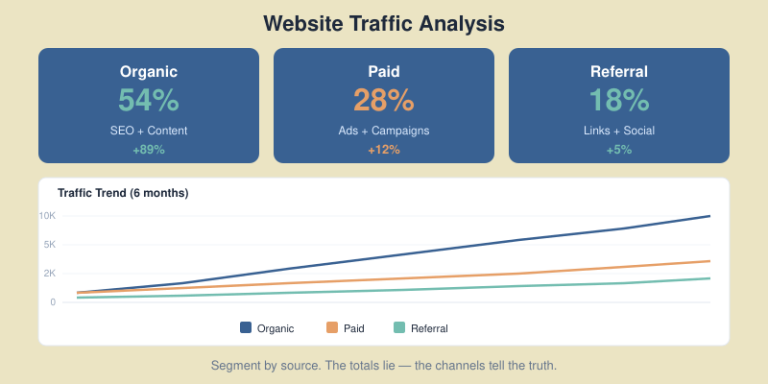
1. Sessions by source/medium. This is your traffic mix. It tells you where growth is coming from and where you’re vulnerable. If 70% of traffic is organic, one algorithm update could cut your pipeline in half. A healthy mix balances organic, direct, referral, and paid channels.
2. Engagement rate. GA4 replaced bounce rate with engagement rate — the percentage of sessions that lasted longer than 10 seconds, had a conversion event, or viewed 2+ pages. This is a far better signal of content quality than the old bounce rate.
3. Conversion rate by source. Not all traffic converts equally. Organic visitors from long-tail keywords often convert at 3-5x the rate of social media traffic. Track this by source to allocate budget where it actually drives revenue.
4. Pages per session. For content sites, this reveals whether your internal linking works. For SaaS, it shows if visitors explore your product pages or leave after the blog post. Anything above 2.0 is a solid baseline.
5. Average session duration. Context matters here. A 45-second session on a pricing page might be perfectly fine — the visitor found the answer. A 45-second session on a 2,000-word guide means they didn’t read it. Always pair duration with page type.
6. New vs returning visitors. A content site should aim for 25-35% returning visitors. Lower means your content isn’t sticky. Higher might mean you’re not attracting new audiences. For SaaS, returning visitors to your product pages are strong buying signals.
7. Exit pages. Forget the homepage — look at which pages people leave from most. If your pricing page has the highest exit rate, that’s where friction lives. If it’s your signup confirmation page, that’s expected. Context separates useful data from noise.

Knowing which metrics matter is half the battle. Here’s the exact workflow I use when I sit down to analyze a site’s traffic — whether it’s for a client audit or my own projects.
Step 1: Start with the big picture (7-day and 30-day trends). Open GA4 and compare the last 30 days to the previous 30. Look for anomalies — traffic spikes, sudden drops, or shifts in source mix. Don’t explain anything yet, just observe.
Step 2: Break down by source/medium. In GA4’s Traffic Acquisition report, sort by sessions. Identify your top 5 sources and check if each one is growing, flat, or declining. Pay special attention to organic — if it dropped, check Google Search Console for indexing issues or ranking changes.
Step 3: Check engagement by landing page. Go to Pages and Screens, sort by sessions, and add engagement rate as a column. Your top 10 landing pages should all have engagement rates above 50%. Anything below 40% is a red flag — the page isn’t delivering what the visitor expected.
Step 4: Follow the money. If you have conversions set up, filter by conversion events. Which sources drive the most conversions? Which landing pages? This is where you stop looking at traffic as a vanity metric and start seeing it as a revenue driver. For campaign-level tracking, proper UTM parameters make this analysis possible.
Step 5: Identify drop-off points. Use GA4’s funnel exploration to map the path from landing page to conversion. Where do visitors leave? A high drop-off between product page and pricing page suggests a value communication problem. Between pricing and signup? Price objection or trust issue.
Step 6: Segment and compare. Never analyze all traffic as one blob. Segment by device (mobile vs desktop often tells wildly different stories), by geography, or by new vs returning users. I once found that a client’s mobile conversion rate was 0.3% versus 4.1% on desktop — the mobile checkout was broken, and nobody had noticed because the overall rate looked “fine.”
Step 7: Document and act. Write down three findings and three actions. Not ten. Not twenty. Three findings, three actions. Track them in your marketing dashboard and revisit next week.

You don’t need expensive website traffic analysis tools to get actionable insights. You need the right combination for your stage and budget. Here are three stacks I’ve used and recommend — from bootstrapped to well-funded.
This covers 80% of what most sites need. Google Analytics 4 handles traffic and behavior data. Google Search Console covers organic search performance — impressions, clicks, average position. Looker Studio connects both into a single dashboard. And Microsoft Clarity adds heatmaps and session recordings for free, with no traffic limits.
The tradeoff: GA4 has a steep learning curve, data sampling kicks in on large sites, and Google owns your data. But for most sites under 500K monthly sessions, this stack works.
Replace or supplement GA4 with a privacy-first platform like Plausible (€9/month) or Fathom (€14/month). These are lightweight, GDPR-compliant by default, and don’t require cookie consent banners — which means you capture 100% of visits instead of only the visitors who click “Accept.” Add Matomo if you need full event tracking and funnel analysis without sending data to third parties.
For competitive intelligence, SimilarWeb‘s free tier gives rough traffic estimates for competitors. Not accurate enough for decisions, but useful for directional benchmarking.
At this level, add dedicated traffic tools for specific jobs. Semrush or Ahrefs for organic traffic analysis and keyword tracking. Hotjar or FullStory for behavioral analytics. Mixpanel or Amplitude for product analytics in SaaS. And a data warehouse (BigQuery) if you need to blend traffic data with revenue data from your CRM.
My honest take: most sites stay at the Growth Stack far longer than they think they need to. Don’t over-tool. Start simple, add when you hit a specific question your current stack can’t answer.
SEO traffic analysis deserves its own section because organic is usually the highest-converting, lowest-cost channel — and the hardest to read correctly.
Start in Google Search Console, not GA4. GSC shows you what happened in Google’s search results before the click: impressions, click-through rate, and average position. GA4 only sees what happens after the click. You need both perspectives.
Here’s what I check weekly:
One pattern I see constantly: sites with strong technical SEO foundations — proper XML sitemaps, clean site architecture, structured data markup — recover faster from algorithm updates. Technical SEO isn’t glamorous, but it’s insurance.
For deeper organic analysis, connect GSC to Looker Studio and build a report that shows organic landing pages alongside their conversion rates from GA4. This tells you which keywords actually drive business, not just traffic.
For your own site, the data lives in your analytics platform. But what if you need to find website traffic data for competitors, potential partners, or market sizing?
Let me be honest about accuracy first. Third-party traffic estimation tools are directionally useful but never precise. In my testing, SimilarWeb’s estimates were within 20-30% of actual traffic for sites above 100K monthly visits — and wildly off for smaller sites. Ahrefs and Semrush are more reliable for organic traffic estimates because they model from keyword ranking data, but they still miss branded search and long-tail variations.
Here’s how I approach competitive traffic research:
For organic traffic estimates: Use Ahrefs’ “Site Explorer” or Semrush’s “Domain Overview.” Look at organic traffic trends over 12+ months, not snapshots. A competitor growing 15% month-over-month in organic traffic is investing heavily in content — pay attention.
For total traffic estimates: SimilarWeb gives the broadest picture — organic, paid, social, referral, and direct. The free version shows top-level numbers. Cross-reference with Ahrefs’ organic estimate to sanity-check.
For content gap analysis: Ahrefs’ “Content Gap” tool shows keywords your competitors rank for that you don’t. This is where traffic analysis turns into strategy — you’re identifying exactly where the opportunity sits.
For market sizing: Combine SimilarWeb data for 5-10 competitors in your niche. Sum their estimated traffic, and you have a rough addressable audience size. Not precise, but good enough for planning your content distribution strategy.

Theory is useful. Practice is better. Here’s a condensed version of a site traffic analytics audit I ran for a B2B SaaS client last quarter — anonymized, but the numbers are real.
The situation: 45,000 monthly sessions, primarily organic (62%). The marketing team was celebrating growth. Revenue from inbound leads was flat for 6 months.
Finding 1: Wrong traffic, right volume. Their top 10 organic landing pages drove 70% of traffic but only 12% of demo requests. The high-traffic pages ranked for informational keywords (“what is X”) while their product-comparison pages — which converted at 8.2% — sat on page 2 of Google.
Finding 2: Mobile was a dead zone. Mobile traffic was 38% of total sessions but accounted for just 4% of conversions. The demo request form required 11 fields and didn’t auto-fill on mobile browsers. Desktop conversion rate: 3.8%. Mobile: 0.4%.
Finding 3: Paid traffic was leaking. Their Google Ads drove 5,200 sessions per month to two landing pages. One converted at 6.1%. The other at 0.9%. Same budget split. Simply reallocating budget to the winning page was the fastest revenue win.
The actions: (1) Rewrote and expanded the product-comparison pages with fresh data and FAQ schema markup to target featured snippets. (2) Reduced the mobile form to 4 fields. (3) Shifted 80% of ad budget to the high-converting landing page. Results after 90 days: demo requests up 41%, cost per lead down 34%.
The point isn’t to share my results — it’s to show that the audit workflow matters more than the tools. GA4, Search Console, and a spreadsheet were all we used.
The analytics landscape has shifted fundamentally. Safari and Firefox block third-party cookies by default. Google Chrome is pushing the Privacy Sandbox. The EU’s ePrivacy regulations keep tightening. If you still rely entirely on cookie-based analytics, you’re probably missing 20-40% of your actual traffic.
Here’s the practical reality in 2026:
Cookie consent affects data completeness. On European sites using GA4 with a consent banner, typically only 55-75% of visitors accept cookies. That means your traffic numbers in GA4 are systematically undercounted. Privacy-first tools like Plausible and Fathom don’t use cookies at all, so they capture every visit — no consent banner needed.
Server-side tracking is becoming the default. Instead of loading a JavaScript tag in the browser (which ad blockers can block), server-side tracking sends data from your server directly to the analytics platform. It’s more reliable, more private, and harder to block. Google Tag Manager supports server-side containers, and Matomo can self-host entirely.
First-party data is king. The shift away from third-party cookies makes your own first-party data more valuable than ever. Email subscribers, logged-in users, CRM data — these are your most reliable data sources. Build your analytics around first-party relationships, not borrowed audiences.
My recommendation for 2026: run GA4 for depth and a cookieless tool (Plausible or Fathom) for accuracy. Compare the numbers monthly. The delta between them is your “consent gap” — and it’s growing every year.
Even experienced marketers fall into these traps. I’ve made every one of them at some point.
Mistake 1: Not filtering internal traffic. If your team visits the site 200 times a day during development or content review, that’s noise in your data. Set up IP filters in GA4 or use the internal traffic identification feature. It takes 2 minutes and saves months of dirty data.
Mistake 2: Ignoring referral spam. Check your referral sources monthly. If you see domains you don’t recognize driving hundreds of sessions with 100% bounce rates, that’s referral spam. Exclude them via GA4 filters.
Mistake 3: Measuring the wrong conversions. A “conversion” in GA4 is whatever you define it as. If your only conversion event is “purchase” but you’re a content site, you’ll think nothing converts. Define micro-conversions: email signups, scroll depth thresholds, content downloads, key SaaS events like trial starts.
Mistake 4: Comparing incomparable time periods. Don’t compare December traffic to January traffic and conclude “traffic dropped.” Seasonality is real. Always compare year-over-year, or at minimum, control for seasonal patterns.
Mistake 5: Chasing vanity metrics. Total pageviews, total sessions, social media followers — these feel good but rarely correlate with revenue. Focus on metrics tied to business outcomes: conversion rate by source, revenue per session, cost per acquisition.
Google Analytics 4 combined with Google Search Console covers most needs. GA4 tracks on-site behavior and conversions, while Search Console shows organic search performance. Add Microsoft Clarity for free heatmaps and session recordings. This stack costs nothing and handles sites up to 500K monthly sessions without data sampling issues.
Check high-level trends weekly — a 10-minute review of source mix, top pages, and conversion rates catches problems early. Do a deep analysis monthly, comparing 30-day periods and investigating anomalies. Run a full audit quarterly, reviewing segments, attribution, and content performance against business goals.
Tools like SimilarWeb, Semrush, and Ahrefs provide directional estimates, not exact numbers. For sites above 100K monthly visits, SimilarWeb is typically within 20-30% of actual traffic. For smaller sites, the margin of error increases significantly. Use them for competitive benchmarking and trend spotting, never for precise planning.
The average engagement rate across industries is 55-65%. Content sites typically see 45-55% (many visitors read one article and leave). SaaS product pages should aim for 65-75%. Ecommerce sites average 55-65%. Anything consistently below 40% on a key landing page signals a mismatch between visitor expectations and page content.
Ideally, both. GA4 offers unmatched depth — funnel analysis, audiences, predictive metrics, and free BigQuery export. Privacy-first tools like Plausible or Fathom capture visitors who decline cookies (typically 25-45% of European audiences), giving you more accurate total counts. Running both gives you depth from GA4 and completeness from the cookieless tool.
I have built, inherited, and — more often than I care to admit — quietly abandoned more marketing dashboards than I can count. After ten-plus years in digital marketing, I can tell you the dirty secret of our industry: most dashboards are decoration. They look impressive in stakeholder meetings, they photograph well for LinkedIn posts, and they do almost nothing to help you make better decisions.
The data backs this up. Research consistently shows that roughly 40% of dashboards are rated 3 out of 5 or lower by their own users. Even more telling, 72% of marketers admit they regularly export dashboard data to Excel just to get the answers they actually need. Think about that for a moment. Nearly three-quarters of us build dashboards and then immediately work around them.
The root problem is not the tools. Looker Studio is powerful. Tableau is gorgeous. Power BI is deeply integrated. The problem is that we build dashboards around data availability rather than decisions. We connect every API we can find, drag every metric onto the canvas, and call it a day. The result is a wall of numbers that impresses nobody and informs even fewer.
This guide is different. I am going to walk you through a framework I have refined across SaaS companies, e-commerce brands, and lean growth teams — one that starts with the decisions you need to make and works backward to the data. It builds on the same principles covered in my website traffic analysis playbook, but extends them into a full dashboard system. If you are a SaaS founder trying to understand where your pipeline actually comes from, a lean marketing team of two or three people who cannot afford to waste hours in spreadsheets, or a growth marketer who needs to prove ROI to a skeptical CFO, this article is for you.
By the end, you will have a repeatable system for building dashboards that people actually open, trust, and act on. No fluff. No “it depends.” Just the framework, the tools, and the step-by-step process.
Before we build anything, we need to understand why dashboards die. In my experience, nearly every failed dashboard falls into one of three archetypes. I call them the Vanity Dashboard, the Frankenstein Dashboard, and the Ghost Dashboard.
This is the dashboard built for show. It is packed with impressive-sounding metrics — total impressions, page views, social followers, email list size — that trend up and to the right but tell you absolutely nothing actionable. I once inherited a dashboard at a B2B SaaS company that proudly displayed “total website sessions: 1.2 million.” Sounds great until you realize the conversion rate was 0.3% and nobody could tell me which channels were actually producing pipeline. The Vanity Dashboard exists to make the marketing team look busy, not to make the company smarter.
This is what happens when every stakeholder gets a say. Sales wants lead source data. The CEO wants revenue attribution. The content team wants engagement metrics. Product wants feature adoption. You end up with a 47-widget monstrosity that takes 90 seconds to load, answers nobody’s specific question, and requires a PhD in data visualization to interpret. The Frankenstein Dashboard tries to be everything to everyone and ends up being useful to no one.
This is the most common failure mode, and the saddest. Someone builds a genuinely thoughtful dashboard, presents it in a team meeting, gets a round of applause — and then nobody ever opens it again. Within three months, the data connections break, the filters go stale, and it becomes a digital artifact. The Ghost Dashboard dies not because it was bad, but because it was not woven into any actual workflow.
The root cause behind all three failures is the same: these dashboards were built around data, not around a decision cadence. Nobody asked “what decisions do we make every week, and what data do we need to make them?” Instead, they asked “what data do we have, and how can we display it?”
That distinction is everything. And it is the foundation of what I call the Decision-First Dashboard framework.

Here is the single most important thing I will tell you in this entire article: do not open your dashboard tool until you have written down the decisions your dashboard needs to support. Grab a notebook, open a blank document, whatever. But do not touch Looker Studio, do not touch Tableau, do not connect a single data source until you complete these three steps.
Not the metrics you track. Not the reports you send. The actual decisions. For most marketing teams, these sound something like: “Should we increase or decrease spend on Google Ads this week?” or “Which content topic should we prioritize next?” or “Is our trial-to-paid conversion healthy enough, or do we need to intervene?” If you cannot articulate the decision, you do not need the metric.
This is where discipline matters. For each decision, identify the single primary metric that most directly informs it. Not three metrics. Not a composite score. One number. You can have supporting context, but there should be one metric that, if you could only see a single number, would let you make a reasonable call.
This is what separates a decision-first dashboard from a monitoring dashboard. For each metric, define the specific value or range that triggers a specific action. Not “we will keep an eye on it.” A concrete threshold and a concrete response.
Here is what this looks like in practice for a typical SaaS marketing team:
| Decision | Metric | Source | Threshold | Action |
|---|---|---|---|---|
| Scale or cut paid spend? | Blended CAC | CRM + Ad platforms | CAC > $180 for 2 consecutive weeks | Pause lowest-performing channel |
| Is content driving pipeline? | Content-attributed SQLs | CRM + GA4 | < 15 SQLs per month | Shift 20% of content effort to bottom-funnel |
| Is email nurture working? | Nurture-to-demo rate | Email platform + CRM | < 2.5% conversion | A/B test new nurture sequence |
| Where to allocate next sprint? | Pipeline velocity by channel | CRM | Channel velocity drops 20% MoM | Reallocate resources to top 2 channels |
| Is trial experience healthy? | Trial-to-paid conversion | Product analytics + CRM | < 12% conversion rate | Trigger onboarding optimization sprint |
Notice what is not in that table: impressions, page views, follower counts, open rates as primary metrics. Those may appear as supporting context somewhere on the dashboard, but they are not driving decisions. When you start with this table, your dashboard practically builds itself.

Once you have your decision table, you need to populate it with the right KPIs. This is where most marketers go wrong — they either pick vanity metrics that feel good or they try to track everything and end up with analysis paralysis. I use a simple filter I call the “So What?” test.
For every metric you consider adding to your dashboard, ask yourself: “If this number changed by 20% tomorrow, would I do something different?” If the answer is no, the metric does not belong on your primary dashboard. It might belong in a detailed report or an ad-hoc analysis, but it should not occupy prime real estate on the screen your team looks at every morning.
Page views? So what — unless you can tie them to pipeline. Email open rates? So what — unless a drop triggers a deliverability investigation. Twitter follower count? So what — period.
These are the metrics that pass the “So What?” test for nearly every SaaS company I have worked with:
These metrics are useful for diagnosing why a Tier 1 metric moved, but they should not drive decisions on their own:
My hard rule: no more than 7 to 10 metrics per dashboard. If you need more, you need a second dashboard for a different audience or decision cadence — not a bigger dashboard. Research from Gartner tells us that 87% of executives say data is their organization’s most underused asset. The solution is not more data. It is the right data, in the right context, connected to the right decisions.

Now we get tactical. You have your decision table, you have your KPIs, and you are ready to build. Here is the exact process I follow every time.
Before you pick a tool, inventory where your data actually lives. For most marketing teams, it comes down to four core systems:
Write down every source, the specific metrics you need from each, and whether an API connector exists. This step takes 30 minutes and saves you hours of frustration later.
I am not going to tell you there is one right answer here because it genuinely depends on your budget and technical comfort. Here is my honest breakdown:
For most readers of this blog, I recommend starting with Looker Studio and Sheets. You can always migrate later.
This is the step everyone underestimates. Raw data from different sources does not agree with itself. GA4 will report different conversion numbers than Google Ads, which will differ from your CRM. This is normal and expected — each platform uses different attribution models and tracking methods.
My approach: pick one system of record for each metric type. Use your CRM as the source of truth for pipeline and revenue. Use GA4 as the source of truth for website behavior. Use ad platforms as the source of truth for spend. Do not try to reconcile the differences in your dashboard — just be consistent and document your choices.
Also, invest 30 minutes in UTM hygiene. Standardize your UTM parameters across every channel. Use lowercase. Use consistent naming conventions like utm_source=google and utm_medium=cpc, not sometimes “Google” and sometimes “google-ads.” Broken UTMs are the number one reason attribution dashboards produce garbage data.
Borrow from journalism. The most critical information goes at the top left — that is where eyes land first. Structure your dashboard in three horizontal bands:
Resist the urge to fill every pixel. White space is a feature, not a bug. If your dashboard requires scrolling, it has too much on it.
Not every metric needs real-time data. Match the refresh rate to the decision cadence:
Over-refreshing creates noise and anxiety. Under-refreshing creates blind spots. Match the cadence to how frequently the related decision gets made.

This is the section that separates a genuinely useful dashboard from a pretty picture. I have reviewed hundreds of marketing dashboards over the years, and I can tell you that a dashboard without action thresholds is just a screen with numbers on it. It generates anxiety, not insight.
The Metrics-to-Action Map is a simple document — it can be a table in a Google Doc, a section in your team wiki, or even a note pinned to your dashboard itself — that explicitly connects every key metric to a specific response. Here is what mine looks like for a typical SaaS engagement:
| Metric | Condition | Action | Owner | Timeframe |
|---|---|---|---|---|
| Blended CAC | Exceeds $180 for 2+ consecutive weeks | Pause lowest-ROI channel; reallocate budget to top performer | Paid lead | Within 48 hours |
| LTV:CAC ratio | Drops below 3:1 | Conduct channel-level profitability audit; cut unprofitable segments | Marketing director | Within 1 week |
| Pipeline velocity | Slows by 20%+ month-over-month | Diagnose bottleneck stage; deploy targeted nurture or sales enablement | Growth lead | Within 1 week |
| Trial-to-paid rate | Falls below 12% | Launch onboarding experiment; review activation events with product | Product marketing | Within 2 weeks |
| Content-attributed SQLs | Below 15 per month for 2 months | Shift 30% of editorial calendar to bottom-funnel comparison & use-case content | Content lead | Next sprint |
| Email nurture conversion | Below 2.5% | A/B test subject lines and CTAs; review segmentation logic | Email specialist | Within 1 week |
The magic of this map is that it removes ambiguity. When CAC spikes, you do not schedule a meeting to discuss what to do. You already know what to do, who does it, and how fast. I have seen teams using this approach make decisions up to 5 times faster than teams staring at dashboards and debating interpretation.
Print this map. Tape it to the wall next to your monitor. Reference it in every weekly standup. Over time, your team will internalize the thresholds, and the dashboard becomes a genuine decision engine rather than a reporting obligation.
“The goal is not to have a dashboard. The goal is to have a system where data triggers action without requiring a meeting.”
If you only implement one thing from this entire article, make it this map. Everything else is optimization. This is the foundation.
We cannot talk about dashboards in 2026 without addressing the AI elephant in the room. The good news: AI is not going to replace your dashboard. The better news: it is going to make your dashboard dramatically more useful. I see three practical applications that are ready for production use today — not science fiction, not hype, actual things I am using with clients right now.
Instead of manually scanning your dashboard for problems, set up automated anomaly detection that flags when any metric moves more than 2 or more standard deviations from its rolling average. Most BI tools now support this natively. Power BI has built-in anomaly detection. Looker Studio can achieve this with calculated fields and conditional formatting. The result is that you stop scanning and start being notified — a subtle but enormous shift in how you interact with data.
This one has been a game-changer for me personally. Every Monday morning, an automated workflow exports the previous week’s dashboard data as a CSV, feeds it to an LLM (I use Claude or ChatGPT depending on the client), and generates a plain-English summary: “CAC rose 14% week-over-week, driven primarily by a 22% increase in LinkedIn Ads CPC. Pipeline velocity held steady. Trial-to-paid improved slightly to 13.1%, above threshold.” That summary goes into Slack. Executives love it. It takes the interpretation burden off the marketing team and ensures everyone reads the same narrative.
Feed 6 to 12 months of historical data into a forecasting model, and you can project where your KPIs are heading before they arrive. This is not crystal ball territory — it is basic time-series analysis that AI makes accessible without a data science degree. Tools like Narrative BI, the built-in AI features in Looker Studio and Power BI, and even ChatGPT’s Advanced Data Analysis can generate surprisingly accurate 30 to 60 day forecasts for metrics like MRR, lead volume, and CAC.
The adoption numbers are compelling. According to recent Forrester research, 74% of B2B marketing teams now use some form of AI-powered analytics, reporting an average 23% boost in team productivity and 19% improvement in marketing ROI. These are not marginal gains. If you are not experimenting with AI on top of your dashboard data, you are leaving real performance on the table.
My recommendation for getting started: do not buy a new tool. Take your existing dashboard data, export it as a CSV, and have a conversation with Claude or ChatGPT about what the data is telling you. You will be surprised at the insights a fresh set of (artificial) eyes can surface.

Here is a pattern I see in every company that takes dashboards seriously: they start with one great dashboard, and within 18 months they have 37 dashboards, half of which nobody remembers building and the other half of which show conflicting data. Dashboard sprawl is real, it is insidious, and it undermines the trust you worked so hard to build.
Every dashboard should follow a conscious lifecycle: Build, Adopt, Iterate, Sunset. Yes, sunset. Dashboards should die. If a dashboard has outlived its usefulness, retiring it is not failure — it is hygiene.
Here are my three signals that a dashboard needs to be retired:
I keep dashboard governance simple because complex governance gets ignored:
[Team] - [Decision Area] - [Cadence]. For example: Marketing - Paid Performance - Weekly or Growth - Pipeline Health - Monthly. This sounds bureaucratic, but it makes searching and auditing painless.My ideal dashboard architecture for a marketing team of 5 to 20 people is one executive overview dashboard plus three to four operational dashboards. The executive dashboard shows only Tier 1 KPIs with trend lines and thresholds. Each operational dashboard goes deep on one area: paid acquisition, content and SEO, email and lifecycle, or product-led growth. The executive dashboard links to the operational ones for drill-down. This gives leadership the altitude they need and gives practitioners the detail they need, without either group wading through the other’s view.
Let me be direct about what a well-built dashboard saves you, because I have measured it across multiple engagements.
Time saved: A decision-first dashboard with automated data connections eliminates the manual reporting grind. I have seen teams achieve an 80% reduction in time spent on reporting — going from 8 hours per week pulling and formatting data to under 2 hours reviewing and acting on it. For a team of three marketers billing at $75 per hour, that is over $18,000 per year in recovered productive time.
Faster decisions: When your dashboard is wired to a Metrics-to-Action Map, you stop scheduling meetings to discuss what the data means. You already know. The average decision timeline I have measured drops from 5 to 7 business days (the typical “let’s review this at next week’s meeting” cycle) to 1 to 2 business days.
Reduced ad waste: By surfacing CAC and channel-level performance in near real-time, teams catch underperforming campaigns days earlier. On a $20,000 per month ad budget, catching a broken campaign or audience fatigue even 3 days earlier can save $2,000 to $3,000 per month in wasted spend.
The free option pays for itself immediately. Even if you go with Google Looker Studio at $0 in software costs and invest 8 hours of setup time, you will recoup that investment in the first month through time savings alone. There is genuinely no excuse not to start.
But the biggest ROI is one that does not show up in a spreadsheet: alignment. When everyone on the team — marketing, sales, product, the CEO — looks at the same dashboard and shares the same definitions of success, you eliminate an enormous amount of organizational friction. No more “my numbers say something different” conversations. No more attribution debates. One source of truth, one shared understanding, one direction.

Google Looker Studio (formerly Data Studio) is the best free option for most marketing teams, and it is not even close. It connects natively to GA4, Google Ads, Google Sheets, and BigQuery, and there are free community connectors for platforms like Facebook Ads, HubSpot, and Mailchimp. Pair it with Google Sheets as an intermediary data layer — pulling data from your various platforms into Sheets via add-ons or simple Apps Script automations, then connecting Sheets to Looker Studio — and you have a surprisingly robust setup. I have built dashboards with this stack for companies doing $10 million or more in annual revenue. The main limitation is that it lacks advanced statistical features and can be slow with very large datasets, but for 90% of marketing teams, it is more than enough.
I recommend a hard maximum of 7 to 10 metrics per dashboard view. This is not an arbitrary number — it aligns with cognitive load research showing that humans can effectively process and compare roughly 7 pieces of information at once. Your primary dashboard should feature 3 to 5 Tier 1 KPIs that directly inform decisions, supported by 3 to 5 Tier 2 metrics that provide diagnostic context. If you find yourself needing more than 10 metrics, that is a signal that you are trying to serve multiple audiences or decision cadences with a single dashboard. Split it into an executive overview and one or more operational dashboards instead of cramming everything onto one screen.
Match the refresh cadence to the decision cadence, not to your anxiety level. For most marketing teams, a daily refresh of campaign-level metrics (spend, leads, conversion rates) and a weekly refresh of strategic KPIs (CAC, pipeline velocity, MRR attribution) works well. Real-time or hourly refreshes should be reserved for specific scenarios like monitoring a product launch, a flash sale, or heavy campaign spend days where you need budget pacing visibility. In practice, I find that most teams check their dashboard twice: once at the start of the day for a quick pulse, and once during a weekly team review for deeper analysis. Set your refresh cadence to support those two moments, and you will be well served.
Absolutely, and I would argue that you should. The most effective dashboards I have seen were built by the marketers who use them, not by analysts working from a requirements doc. Modern tools like Looker Studio, Databox, and HubSpot’s dashboard builder are designed for non-technical users. The Decision-First Framework I outlined above does not require any SQL, Python, or data engineering skills — it requires clarity about your decisions and the discipline to keep things simple. Where a data analyst becomes valuable is when you need to connect complex data sources, build custom attribution models, or do advanced statistical analysis. But for a standard marketing performance dashboard? You have everything you need. Start with Looker Studio and Google Sheets, follow the steps in this guide, and you will have a working dashboard in a single afternoon.
A dashboard is a living, continuously updated view of your current state — think of it as a car’s instrument panel. It answers “where are we right now?” and “do we need to act?” A report is a point-in-time analysis that answers “what happened, why, and what should we do next?” Reports are narrative. They include interpretation, context, and recommendations. Dashboards are visual. They surface patterns and anomalies at a glance. You need both, but they serve different purposes. A common mistake is trying to turn a dashboard into a report by adding too much text and explanation, or trying to turn a report into a dashboard by stripping out the analysis. Let your dashboard handle the monitoring and alerting. Let your reports (weekly, monthly, or quarterly) handle the storytelling and strategic recommendations. The best marketing teams use dashboards daily and reports weekly or monthly, with the dashboard data feeding directly into the report narrative.
You’re running campaigns across email, social media, paid ads, and partner sites. Traffic is coming in. But when you open Google Analytics, everything’s lumped under “direct” or “referral” — and you have no idea which campaign actually drove those conversions.
This is the reality for marketers who skip UTM parameters. And it’s completely avoidable.
I’ve been setting up tracking systems for marketing teams since 2016, and UTM parameters remain one of the most powerful yet underutilized tools in the analytics stack. When implemented correctly, they give you crystal-clear attribution data. When done poorly — or not at all — you’re making decisions based on incomplete information.
In this guide, I’ll show you exactly how to use UTM parameters to track every campaign with precision, avoid common mistakes that corrupt your data, and build a system that scales with your marketing efforts.
UTM parameters (Urchin Tracking Module) are tags you add to URLs that tell analytics tools where traffic came from. When someone clicks a link with UTM parameters, that information gets passed to Google Analytics, allowing you to see exactly which campaigns, channels, and content drove the visit.
A URL with UTM parameters looks like this:
https://example.com/landing-page?utm_source=facebook&utm_medium=paid&utm_campaign=spring-sale-2026
Without these tags, GA4 often misclassifies traffic — email campaigns show up as “direct,” social posts get lumped into “referral,” and you lose visibility into what’s actually working.
UTM parameters solve three critical problems:
In my experience, teams that implement proper UTM tracking typically discover that 20-30% of their website traffic was being misattributed. That’s a significant blind spot when making budget decisions.
There are five standard UTM parameters. Three are essential, two are optional but useful for specific use cases.

utm_source — Where the traffic comes from
This identifies the platform, website, or vendor sending traffic. Be specific but consistent.
google, facebook, newsletter, linkedin, partner-siteutm_medium — How the traffic reaches you
This describes the marketing channel or mechanism. Use standardized values that match GA4’s default channel groupings when possible.
cpc, email, social, affiliate, display, organicutm_campaign — Which specific campaign
This identifies the specific promotion, product launch, or marketing initiative.
spring-sale-2026, product-launch-q1, webinar-seo-basicsutm_term — Keyword targeting (mainly for paid search)
Originally designed for paid search keywords. Use it to track which terms triggered the ad click.
running+shoes, project+management+softwareutm_content — Content differentiation
Use this to distinguish between different links pointing to the same URL — like A/B testing ad creatives or tracking multiple links in the same email.
hero-button, sidebar-link, blue-cta, version-aThe most common UTM mistake isn’t forgetting to use them — it’s using them inconsistently. “Facebook,” “facebook,” “fb,” and “FB” all create separate line items in GA4, fragmenting your data and making analysis nearly impossible.

Always use lowercase — UTM parameters are case-sensitive. Email and email create separate entries. Pick lowercase and stick with it.
Use hyphens instead of spaces — Spaces get encoded as %20 in URLs, making them ugly and harder to read in reports. Use hyphens: spring-sale not spring%20sale.
Avoid special characters — Stick to letters, numbers, and hyphens. Special characters can break tracking or cause encoding issues.
Be descriptive but concise — email is better than e, but monthly-newsletter-subscriber-list-segment-a is overkill. Find the balance.
Standardize values across teams — Create a documented list of approved values. If your paid team uses cpc and your social team uses paid-social, your reports become fragmented.
| Parameter | Recommended Values |
|---|---|
| utm_medium | cpc, email, social, affiliate, display, referral, organic, video |
| utm_source | google, facebook, instagram, linkedin, twitter, newsletter, partner-name |
These align with GA4’s default channel groupings, making your reports cleaner and more actionable.
The utm_campaign parameter is where most teams struggle. It’s a free-form field, which means it’s easy to create chaos. Here’s how to structure it properly.
A good campaign name answers: What is this? When did it run? What’s it promoting?
I recommend this structure:
[type]-[name]-[date/identifier]
Examples:
promo-spring-sale-2026q1launch-new-feature-jan2026webinar-seo-fundamentals-20260115newsletter-weekly-w03You’ll run similar campaigns multiple times — monthly newsletters, seasonal sales, weekly promotions. Including dates lets you compare performance over time.
Without dates, your January newsletter data mixes with December’s, making trend analysis impossible.
Campaign names should be understandable at a glance. When you’re reviewing reports months later, promo-blackfriday-2026 tells you exactly what you’re looking at. bf26promo1 requires mental translation.
You can build UTM URLs manually, but I don’t recommend it for teams. Manual creation leads to typos and inconsistency.
Google offers a free Campaign URL Builder that generates properly formatted URLs. It’s simple but doesn’t enforce naming conventions.
For teams, I prefer spreadsheet-based UTM builders. They offer:
Create a Google Sheet with columns for each parameter, use data validation for standardized dropdowns, and add a formula column that concatenates everything into the final URL.
For larger teams, tools like UTM.io, Terminus, or Bitly offer advanced features: team governance, link shortening, and integration with marketing platforms.
Different channels have different tracking needs. Here’s how to approach each.

Email is frequently misattributed as “direct” traffic. Always tag email links.
| Parameter | Value |
|---|---|
| utm_source | newsletter (or specific list name) |
| utm_medium | |
| utm_campaign | campaign-name-date |
| utm_content | header-link, cta-button, footer-link |
Use utm_content to track which links in the email get clicked most. This data helps optimize email layout.
Organic social posts need UTMs — otherwise they often show as referral traffic without campaign context.
| Parameter | Value |
|---|---|
| utm_source | facebook, linkedin, twitter, instagram |
| utm_medium | social |
| utm_campaign | specific campaign or content-type |
Most ad platforms (Google Ads, Meta Ads) have auto-tagging features. Use those when available — they provide more detailed data than manual UTMs.
For platforms without auto-tagging, or when you need custom tracking:
| Parameter | Value |
|---|---|
| utm_source | platform name |
| utm_medium | cpc, display, video (match the ad type) |
| utm_campaign | campaign name from ad platform |
| utm_term | targeted keywords |
| utm_content | ad creative identifier |
Track traffic from partners to understand which relationships drive value.
| Parameter | Value |
|---|---|
| utm_source | partner-name |
| utm_medium | affiliate or referral |
| utm_campaign | partnership type or promo |
I’ve audited dozens of UTM implementations. These mistakes appear repeatedly.

This is the most damaging mistake. Adding UTM parameters to links within your own website overwrites the original traffic source, creates false sessions, and corrupts your attribution data.
If someone arrives from a Facebook ad, then clicks an internal link with UTMs, GA4 now thinks they came from wherever that internal UTM pointed. You’ve lost the true source.
Rule: UTMs are for external links pointing TO your site, never for links WITHIN your site. Use GA4 events or custom dimensions for internal tracking.
As mentioned earlier: Facebook, facebook, and FACEBOOK are three different sources in GA4. Pick one format (lowercase) and enforce it.
Email and organic social are the most commonly untagged channels. Without UTMs, email often appears as direct traffic, and social posts show as generic referrals. Always tag these channels.
I’ve seen campaign names like 2026_q1_email_newsletter_segment-a_version-2_test-subject-line-b. This creates analysis paralysis. Keep names informative but manageable.
Without documentation, teams drift into inconsistency. Create a UTM governance document that specifies:
Once your UTMs are in place, here’s how to analyze the data in GA4.

Navigate to: Reports → Acquisition → Traffic acquisition
This shows session-level data. Key dimensions to use:
Navigate to: Reports → Acquisition → User acquisition
This shows how users first discovered your site — useful for understanding which channels bring in new audiences.
For deeper analysis, use GA4’s Explore feature to build custom reports combining UTM dimensions with your conversion metrics. This lets you answer questions like:
Once you’ve mastered the basics, these advanced techniques add more value.
Ad platforms support dynamic parameters that auto-populate based on the ad. For example, in Google Ads:
utm_campaign={campaignid}&utm_content={creative}
This automatically inserts the campaign ID and creative ID, ensuring accuracy without manual entry.
Use UTMs on QR codes for print materials, event signage, and physical promotions. Create unique campaign names for each placement to track which offline touchpoints drive traffic.
Long UTM URLs look suspicious and can deter clicks. Use link shorteners like Bitly, Rebrandly, or your own branded short domain. The UTM data still gets captured — the shortened link just redirects to the full URL.
Review your UTM data monthly. Look for:
Clean data requires ongoing maintenance.
No, UTM parameters don’t affect SEO rankings. Google ignores UTM parameters when evaluating page content. However, don’t use UTMs on internal links — that causes analytics issues, not SEO issues.
Google Ads auto-tagging (GCLID) provides more detailed data than manual UTMs. Use auto-tagging for Google Ads. Manual UTMs are better for platforms without auto-tagging or when you need custom campaign tracking.
There’s no strict limit, but keep URLs under 2,000 characters total for maximum compatibility. More importantly, keep parameter values concise and readable — they should be understandable in reports.
No, once a link is shared, changing it requires sharing a new link. This is why planning and consistency upfront matters. Document your UTM strategy before launching campaigns.
Source identifies WHERE traffic comes from (facebook, google, newsletter). Medium identifies HOW it reaches you (cpc, email, social). Think of source as the specific platform and medium as the channel type.
Proper UTM parameters transform your marketing analytics from guesswork into precision. You’ll know exactly which campaigns drive traffic, which channels deliver ROI, and where to focus your budget.
The implementation isn’t complicated: establish naming conventions, document approved values, use a URL builder, and never tag internal links. The discipline of consistent UTM usage pays dividends every time you make a marketing decision.
Start simple. Tag your email campaigns and social posts first — these are the most commonly misattributed channels. Build your UTM spreadsheet, train your team on the conventions, and review your data monthly.
Your next step: Create a UTM naming convention document for your team. Define your approved values for source, medium, and campaign naming structure. Then tag your next campaign properly and watch the clean data flow into GA4.

Honest reviews of analytics tools, SEO tactics that actually work, and growth strategies for bootstrapped SaaS — no fluff, no affiliate bias.