How to Build a Content Calendar That Actually Gets Results
Most content calendars are just fancy to-do lists. They track what you’ll publish and when — but they don’t tell...
Most content calendars are just fancy to-do lists. They track what you’ll publish and when — but they don’t tell...
Every piece of content that ranks well in search starts with the same foundation: solid keyword research. Yet most marketers either skip this step entirely or do it so superficially that they end up creating content nobody searches for.
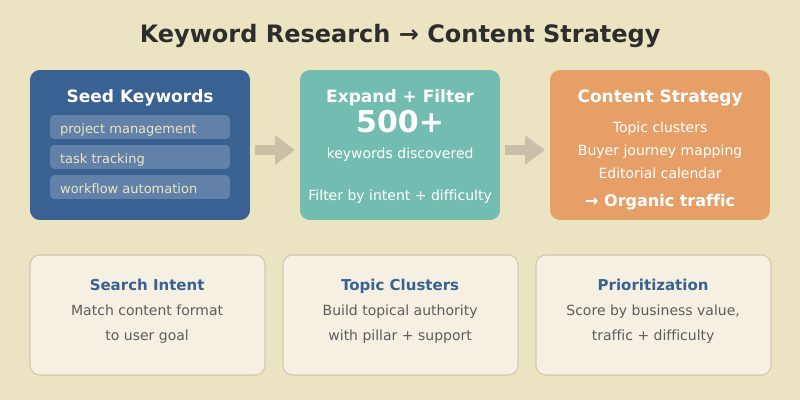
I’ve been doing keyword research professionally since 2015, and the process has evolved dramatically. Today, it’s not just about finding high-volume terms — it’s about understanding user intent, mapping content to the buyer journey, and building topical authority through strategic clustering.
In this guide, I’ll walk you through my complete keyword research process — from finding your first seed keywords to building a full content strategy that drives organic traffic and conversions.
Keyword research is the process of discovering the words and phrases people type into search engines when looking for information, products, or solutions. It’s the bridge between what your audience wants and the content you create.
Here’s why it’s non-negotiable for content success:
Without keyword research, you’re essentially guessing. And in my experience working with dozens of content teams, guessing leads to wasted resources and flat traffic charts. Combining keyword data with traffic analysis gives you the complete picture of what’s working and where to focus next.
Before diving into tools and tactics, you need to understand search intent — the reason behind a search query. Google’s algorithm has become remarkably good at determining intent, and content that mismatches intent simply won’t rank.
| Intent Type | User Goal | Example Queries | Content Format |
|---|---|---|---|
| Informational | Learn something | “what is keyword research” | Guides, tutorials, explainers |
| Navigational | Find specific site/page | “ahrefs login” | Homepage, login pages |
| Commercial | Research before buying | “best keyword research tools” | Comparisons, reviews, lists |
| Transactional | Complete an action | “ahrefs pricing” | Product pages, pricing pages |

When I evaluate a keyword, I always check the current search results first. If Google shows mostly product pages for a term, writing a blog post won’t work — the intent doesn’t match.
The fastest way: Google the keyword and analyze what ranks.
Match your content format to the dominant intent, or you’re fighting an uphill battle.
Every keyword research tool throws numbers at you. Here’s what actually matters:

The average monthly searches for a keyword. Higher isn’t always better — a 50-volume keyword with perfect intent often outperforms a 10,000-volume keyword with mismatched intent.
I typically look for:
An estimate of how hard it is to rank for a term, usually scored 0-100. This metric varies wildly between tools, so use it directionally rather than absolutely.
My general framework:
What advertisers pay for clicks on this keyword. High CPC signals commercial value — people are willing to pay for this traffic because it converts.
A keyword with $15 CPC and 200 monthly searches often beats a $0.50 CPC keyword with 5,000 searches in terms of business value.
Some keywords get lots of searches but few clicks — Google answers them directly in featured snippets or AI overviews. Check if the SERP has:
These features can steal clicks from organic results. Factor this into your prioritization.
You don’t need expensive tools to start, but paid tools save significant time at scale.
Google Search Console — Shows what keywords you already rank for. Essential for finding quick wins and content gaps.
Google Keyword Planner — Free with a Google Ads account. Volume ranges are broad, but useful for initial research.
Google Autocomplete & Related Searches — Type your seed keyword and see what Google suggests. These are real searches people make.
AnswerThePublic — Visualizes questions people ask around a topic. Great for finding informational content ideas.
Ahrefs — My primary tool. Best for keyword difficulty accuracy, content gap analysis, and competitive research. I’ve used it since 2018 and it’s worth every dollar.
SEMrush — Excellent for competitor keyword analysis and tracking. Shows exactly what keywords rivals rank for.
Moz — Good keyword suggestions and SERP analysis. More affordable entry point.
Ubersuggest — Budget-friendly option with decent data. Good for beginners.
For most content teams, one premium tool (Ahrefs or SEMrush) plus free tools covers everything you need.
Seed keywords are the broad topics your business relates to. They’re the starting point for expansion.
Ask yourself:
For a project management software company, seed keywords might be:
Start with 5-10 seed keywords. You’ll expand from there.
Now turn those seeds into hundreds of potential keywords.
Keyword tool suggestions: Enter seed keywords into Ahrefs or SEMrush and export all suggestions. A single seed can generate 1,000+ related terms.
Competitor analysis: Find what keywords competitors rank for that you don’t. In Ahrefs: Site Explorer → enter competitor → Organic Keywords → filter by position 1-20.
Question mining: Use “People Also Ask” boxes, Quora, Reddit, and industry forums to find questions your audience asks.
Modifier expansion: Add common modifiers to seed keywords:
After expansion, you should have 200-500+ keywords to work with.
Not all keywords deserve content. Filter ruthlessly.
For each keyword, assess:
| Factor | Question to Ask |
|---|---|
| Business relevance | Does this relate to what we sell/do? |
| Traffic potential | Is the volume worth the effort? |
| Ranking feasibility | Can we realistically compete? |
| Conversion potential | Will this traffic convert? |
| Content gap | Can we create something better than existing results? |
I score keywords on a simple 1-5 scale for each factor, then prioritize by total score.
Modern SEO rewards topical authority. Instead of isolated posts, organize keywords into clusters around pillar topics.
A topic cluster consists of:
Group your keywords by parent topic. For “keyword research,” clusters might include:
Pillar: Keyword Research (this article)
Each cluster page links back to the pillar. The pillar links out to all cluster pages. This structure signals expertise to Google.

Different keywords serve different stages of the customer journey. Map yours accordingly.

User knows they have a problem but not the solution.
User researches potential solutions.
User ready to choose/buy.
A balanced content strategy covers all stages. Too much awareness content without decision content means traffic that never converts.
You can’t publish everything at once. Prioritize strategically.
I use a simple scoring system:
| Factor | Weight | Scoring |
|---|---|---|
| Business value | 3x | 1-5 based on conversion potential |
| Traffic potential | 2x | 1-5 based on volume |
| Ranking difficulty | 2x | 5=easy, 1=hard (inverted) |
| Content gap | 1x | 1-5 based on opportunity |
Calculate: (Business × 3) + (Traffic × 2) + (Difficulty × 2) + (Gap × 1)
Highest scores = publish first.
Start with keywords where you can rank quickly:
Early wins build momentum and prove the process works.
Keywords alone aren’t a strategy. Here’s how to connect the dots.
Match keywords to optimal content formats:
| Keyword Pattern | Content Type |
|---|---|
| “How to…” | Step-by-step tutorial |
| “What is…” | Definitive guide / explainer |
| “Best…” | Listicle / roundup |
| “X vs Y” | Comparison post |
| “[Product] review” | In-depth review |
| “[Topic] template” | Template + explanation |
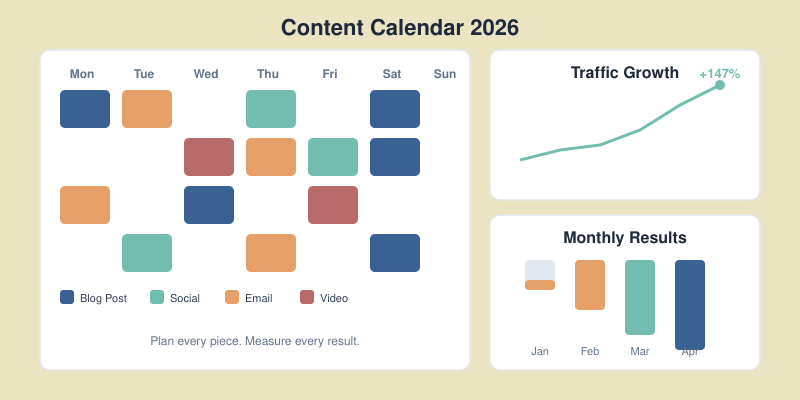
Translate prioritized keywords into a publishing schedule:
I recommend planning 1-3 months ahead, with flexibility to adjust based on performance data.
After reviewing hundreds of keyword strategies, these errors appear repeatedly:
Chasing volume over intent
A 10,000-volume keyword means nothing if the intent doesn’t match your content or business model.
Ignoring difficulty
New sites targeting KD 80+ keywords waste months creating content that won’t rank.
One keyword per page thinking
Modern content should target keyword clusters, not single terms. A good article naturally ranks for dozens of related keywords.
Skipping competitor analysis
If you don’t know what’s ranking, you don’t know what to beat. Always analyze the current SERP before writing.
Set and forget
Keywords trends shift. Review and update your keyword strategy quarterly.
Focus on one primary keyword and 2-5 secondary keywords per page. However, well-written content naturally ranks for dozens or hundreds of related terms. Don’t force keywords — write comprehensively about the topic and variations will rank naturally.
Conduct comprehensive keyword research quarterly, with lighter monthly reviews. Trends shift, new opportunities emerge, and competitors change tactics. Your keyword strategy should evolve with the market.
Sometimes yes. Keyword tools often underestimate volume for newer or niche terms. If a keyword has clear intent and business relevance, it may be worth targeting even with “zero” reported volume. Trust your industry knowledge alongside the data.
Neither in isolation. The best keywords balance achievable difficulty with meaningful volume and strong business relevance. A low-difficulty keyword with 100 monthly searches often delivers better ROI than a high-difficulty keyword with 10,000 searches you’ll never rank for.
Typically 3-6 months for new content to rank well. Lower-difficulty keywords may show results in weeks, while competitive terms can take a year or more. Consistent publishing and link building accelerate results.
Effective keyword research is the foundation of every successful content strategy. It transforms guesswork into data-driven decisions, ensuring every piece of content you create has real ranking potential and business value.
The process isn’t complicated: start with seed keywords, expand systematically, filter ruthlessly, organize into clusters, and prioritize by impact. Then execute consistently and measure results.
Whether you’re building a content program from scratch or optimizing an existing one, the principles remain the same. Understand what your audience searches for, create content that matches their intent, and build topical authority through strategic clustering.
Your next step: Open your keyword tool of choice (or start with Google Search Console if you don’t have one). Export your current rankings, identify gaps, and build your first topic cluster. Start with one cluster, execute it well, then expand from there.
If your website has more than 10,000 pages, your XML sitemap strategy can make or break your SEO performance. I’ve seen large e-commerce sites with millions of products struggle to get indexed — not because their content was bad, but because their sitemaps were a mess.
When I audited a 500,000-page e-commerce site last year, only 23% of their product pages were indexed. The culprit? A single bloated sitemap with broken URLs, non-canonical pages, and no logical organization. After restructuring their XML sitemap architecture, indexed pages jumped to 78% within three months.
In this guide, I’ll share the exact best practices I use for large websites — the same strategies that help enterprise sites get their content discovered and indexed efficiently.
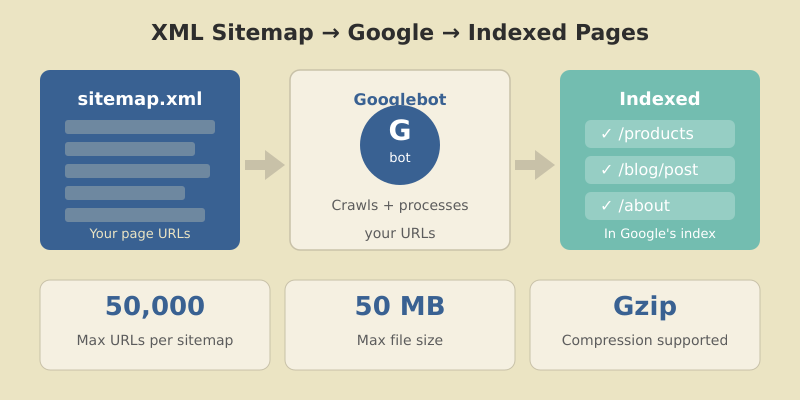
An XML sitemap is a file that lists all the important URLs on your website. It helps search engines like Google discover, crawl, and index your pages more efficiently.
For small sites with good internal linking, sitemaps are helpful but not critical. For large websites? They’re essential.
Here’s why:
lastmod dates speed this up.Google’s Gary Illyes has stated that Google is working toward “crawling less frequently, but more efficiently.” For large sites, this means well-structured sitemaps aren’t optional — they’re your lifeline to search visibility.
Before diving into best practices, understand the hard limits set by search engines:
| Limit Type | Maximum Value |
|---|---|
| URLs per sitemap | 50,000 |
| File size per sitemap | 50 MB (uncompressed) |
| Sitemaps per index file | 50,000 |
| Index file size | 50 MB (uncompressed) |
| Sitemap indexes per site (GSC) | 500 |
If your website has 200,000 URLs, you need at least 4 separate sitemaps (or more, for better organization) plus a sitemap index file to reference them all.
In practice, I recommend keeping sitemaps well under these limits — around 10,000-25,000 URLs per file. This makes debugging easier and reduces server load during crawls.
Before making changes, understand what you’re working with.
Find your current sitemap by checking these common locations:
yoursite.com/sitemap.xmlyoursite.com/sitemap_index.xmlyoursite.com/robots.txt (look for Sitemap: directive)Go to Indexing → Sitemaps in GSC. For each submitted sitemap, note:
A large gap between discovered and indexed URLs signals problems — either with the sitemap itself or with page quality. Pairing sitemap data with website traffic analysis helps you understand the full picture of how search engines interact with your site.
Use Screaming Frog or a similar crawler to analyze your sitemap URLs:
Every non-200, non-canonical URL in your sitemap wastes crawl budget and sends mixed signals to Google.
This is the most common mistake I see on large sites: sitemaps stuffed with URLs that shouldn’t be there.

index, follow or no robots meta tagnoindex tag?sort=price)I’ve worked on sites where 60% of sitemap URLs were non-indexable. Cleaning these up alone improved crawl efficiency dramatically.
Don’t dump all URLs into one giant sitemap. Split them logically.

For a typical e-commerce or content site:
| Sitemap | Contents | Example URLs |
|---|---|---|
| sitemap-pages.xml | Static pages | /about, /contact, /pricing |
| sitemap-posts.xml | Blog posts | /blog/post-title |
| sitemap-products.xml | Product pages | /products/item-name |
| sitemap-categories.xml | Category pages | /category/shoes |
| sitemap-images.xml | Image sitemap | Product images |
For very large sites, split further by subcategory, date, or alphabetically:
sitemap-products-a.xml (products starting with A)sitemap-products-b.xmlsitemap-posts-2025.xmlsitemap-posts-2026.xmlThe sitemap index file references all individual sitemaps:
<?xml version="1.0" encoding="UTF-8"?>
<sitemapindex xmlns="http://www.sitemaps.org/schemas/sitemap/0.9">
  <sitemap>
    <loc>https://example.com/sitemap-pages.xml</loc>
    <lastmod>2026-01-12</lastmod>
  </sitemap>
  <sitemap>
    <loc>https://example.com/sitemap-products.xml</loc>
    <lastmod>2026-01-12</lastmod>
  </sitemap>
</sitemapindex>
Submit only the index file to Google Search Console. Google will discover and crawl all referenced sitemaps automatically.
The lastmod tag tells search engines when a page was last meaningfully updated. Used correctly, it helps Google prioritize crawling. Used incorrectly, it destroys your credibility.

lastmod only when content actually changesGoogle’s John Mueller has confirmed they track lastmod accuracy. Sites that abuse it get their lastmod signals ignored.
Proper format examples:
<lastmod>2026-01-12</lastmod>
<lastmod>2026-01-12T15:30:00+00:00</lastmod>You’ll see these tags in many sitemap examples:
<changefreq>weekly</changefreq>
<priority>0.8</priority>
Google ignores both. They’ve confirmed this multiple times.
These tags were useful in 2005. Today, Google determines crawl frequency and page importance through its own signals — your declarations don’t influence their decisions.
You can include them without penalty, but I recommend removing them entirely. They add file size and create false expectations about what your sitemap controls.
For sitemaps approaching the 50MB limit, use Gzip compression. Google fully supports .xml.gz files.
Benefits:
Creating compressed sitemaps:
gzip -k sitemap-products.xml
# Creates sitemap-products.xml.gz
Update your sitemap index to reference the compressed version:
<loc>https://example.com/sitemap-products.xml.gz</loc>I’ve used this on sites with 2+ million URLs. Without compression, serving sitemaps would significantly impact server performance during crawls.
Static sitemaps work for small sites. For large, frequently-changing sites, dynamic generation is essential.
WordPress: Use Yoast SEO or Rank Math — both generate dynamic sitemaps automatically and handle the technical requirements.
Custom CMS: Query your database for indexable URLs and generate XML on request (with caching).
Static Site Generators: Build sitemaps during the build process. Tools like next-sitemap for Next.js or gatsby-plugin-sitemap handle this well.
For very large sites, consider hybrid approaches: generate sitemaps periodically (hourly/daily) and cache them, rather than building on every request.
Creating perfect sitemaps means nothing if you don’t submit and monitor them.

Google will crawl your index and discover all referenced sitemaps.
| Metric | What It Tells You |
|---|---|
| Discovered URLs | Total URLs Google found in sitemap |
| Indexed URLs | URLs actually in Google’s index |
| Index ratio | Indexed ÷ Discovered (aim for 80%+) |
| Errors | URLs Google couldn’t process |
| Last read | When Google last fetched the sitemap |
Check these weekly for large sites. A sudden drop in indexed URLs or spike in errors needs immediate investigation.
After auditing hundreds of sitemaps, these are the mistakes I see most often:
Including non-canonical URLs
If a page’s canonical tag points elsewhere, it shouldn’t be in your sitemap. This confuses Google and wastes crawl budget.
Mixing HTTP and HTTPS
Your sitemap URLs must match your canonical protocol. If your site is HTTPS, every sitemap URL should be HTTPS.
Forgetting robots.txt reference
Add your sitemap location to robots.txt:
Sitemap: https://example.com/sitemap_index.xmlNot updating after site changes
Migrated to a new URL structure? Deleted a product category? Your sitemap needs to reflect these changes immediately.
Submitting too many small sitemaps
While organization is good, don’t create thousands of tiny sitemaps with 10 URLs each. Find a balance — usually 5,000-25,000 URLs per sitemap works well.
Google determines crawl frequency based on your site’s update patterns. You can’t force more frequent crawls, but accurate lastmod dates help Google prioritize changed content. For news sites, Google may crawl sitemaps multiple times per day. For static sites, weekly or monthly is common.
For e-commerce and image-heavy sites, yes. Create a separate image sitemap or add image tags within your main sitemap. This helps Google discover images that might not be found through regular crawling, especially if they’re loaded via JavaScript.
A sitemap.xml file lists individual page URLs. A sitemap index file lists multiple sitemap files. For large sites exceeding 50,000 URLs, you need a sitemap index that references multiple smaller sitemaps. Submit only the index file to Google.
Sitemaps don’t directly improve rankings. They help with discovery and indexing — getting your pages into Google’s index. Once indexed, rankings depend on content quality, backlinks, and other SEO factors. However, pages that aren’t indexed can’t rank at all.
Check Google Search Console’s sitemap report. Compare “Discovered” vs “Indexed” URLs. A healthy sitemap shows 70-90%+ of discovered URLs indexed. Also monitor the “Coverage” report for indexing issues related to sitemap URLs.
A well-structured XML sitemap is one of the highest-impact technical SEO improvements you can make for large websites. The key principles are simple: include only indexable canonical URLs, organize logically by content type, use accurate lastmod dates, and monitor regularly in Search Console.
Start by auditing your current setup. Identify non-indexable URLs, split oversized sitemaps, and establish a dynamic generation process. Then monitor your index ratio monthly and investigate any drops.
For sites with 100,000+ pages, this isn’t optional optimization — it’s fundamental infrastructure. Get it right, and you’ll see measurable improvements in crawl efficiency and indexed page counts.
Your next step: Open Google Search Console right now. Check your sitemap’s discovered vs indexed ratio. If it’s below 70%, you have work to do — and now you know exactly how to fix it.
Most content calendars are just fancy to-do lists. They track what you’ll publish and when — but they don’t tell you if any of it actually works.
I learned this the hard way. In 2019, I was publishing four blog posts a week for a SaaS client. We had a beautiful Notion calendar, color-coded by topic. Six months later? Traffic was flat. Leads were flat. We were busy, but we weren’t growing.
The problem wasn’t the calendar. It was how we built it.
After restructuring our approach — starting with goals instead of topics — we increased organic traffic by 147% in the next quarter. The key wasn’t publishing more. It was publishing smarter.
In this guide, I’ll show you how to build a content calendar that’s tied to real business outcomes. You’ll learn the exact framework I use with clients, including the checkpoints that keep your strategy on track.
Before we build, let’s understand what goes wrong.
Problem 1: Focus on dates, not goals.
A calendar full of publishing dates feels productive. But if those dates aren’t connected to traffic targets or revenue goals, you’re just filling slots.
Problem 2: No feedback loop.
You publish, then move on to the next piece. Nobody checks if last month’s content performed. Bad strategies repeat indefinitely.
Problem 3: Random topics instead of strategic clusters.
Writing about whatever feels interesting leads to a scattered blog. Search engines reward topical authority — covering related subjects deeply, not random ones broadly.

If your current calendar has these problems, don’t worry. We’re going to fix all three.
Don’t open a spreadsheet yet. First, gather these inputs:
1. Clear business goals
What does success look like? More traffic? More demo requests? More purchases? Write down 1-3 primary goals.
2. Audience research
Who are you writing for? What problems do they have? What questions do they ask? Use customer interviews, support tickets, and forums like Reddit to build a picture.
3. Keyword research
You need a list of target keywords organized by topic cluster. Tools like Ahrefs, SEMrush, or even free options like Ubersuggest can help. Aim for 30-50 keywords to start.
4. Content audit
What do you already have? List your existing content, its current traffic, and which keywords it targets. You might have assets to update instead of creating from scratch.
With these four elements ready, you can build a calendar that actually drives results.
Here’s where most guides get it backwards. They start with “choose your topics” or “pick a template.” Wrong.
Start with the numbers you need to hit.

How much organic traffic do you want in 3, 6, and 12 months? Be specific.
Example:
Now work backwards. If you need 25,000 additional visits per month, and your average post brings 500 visits after 6 months of ranking, you need roughly 50 quality posts in your pipeline.
If your goal is leads, map the funnel:
This math tells you exactly how much content you need.
For e-commerce or affiliate content, calculate:
I use these calculations with every client. As a Google Analytics certified professional, I’ve found that teams who start with metrics outperform “publish and pray” teams by 3-4x.
Not all content serves the same purpose. Match your topics to where your audience is in their journey.

These readers don’t know you — and might not know they have a problem yet.
Content types:
Example: “What is Technical SEO? A Beginner’s Guide”
These readers know their problem and are researching solutions.
Content types:
Example: “Best SEO Audit Tools: 7 Options Compared”
These readers are ready to buy. They need the final push.
Content types:
Example: “How to Set Up Your First Campaign in [Your Tool]”
The balance: For most B2B blogs, aim for 50% awareness, 30% consideration, 20% decision content. Adjust based on your funnel data.
Now we create the actual calendar. I’ve used everything from Google Sheets to Notion to Asana. The tool matters less than the structure.

Every editorial calendar needs these fields:
| Column | Purpose |
|---|---|
| Title | Working headline |
| Primary Keyword | Main SEO target |
| Search Volume | Monthly searches (from keyword tool) |
| Buyer Stage | Awareness / Consideration / Decision |
| Status | Idea / Outlined / Writing / Review / Published |
| Publish Date | Target date |
| Author | Who’s writing |
| Goal Metric | What success looks like for this piece |
For teams serious about results, add:
| Column | Purpose |
|---|---|
| Content Cluster | Which topic group this belongs to |
| Internal Links To | Pages this should link to |
| Internal Links From | Pages that should link to this |
| Competing URLs | Top 3 ranking articles to beat |
| Promotion Plan | Distribution channels |
| 30-Day Traffic | Actual performance (update monthly) |
Google Sheets — Free, collaborative, flexible. I’ve used it since 2016 and it handles 90% of use cases. Best for teams under 10 people.
Notion — Better for combining calendar with content briefs and SOPs. Visual and modern. Best for async teams.
Asana/Monday — Best when content is part of larger project workflows. Adds task dependencies and timeline views.
Pick one and stick with it. Switching tools won’t improve your results — better planning will.
Here’s an unpopular truth: publishing frequency matters less than publishing quality.
One exceptional, well-promoted article beats four mediocre ones. I’ve seen blogs ranking with 20 posts outperform competitors with 200 because each piece was strategically chosen and thoroughly executed.

Be honest about resources:
| Team Size | Realistic Cadence |
|---|---|
| Solo | 2-4 posts/month |
| 1 writer + 1 editor | 4-8 posts/month |
| Small content team (3-5) | 8-16 posts/month |
Include these in your time estimates:
A 2,000-word quality post takes 15-25 hours total. Plan accordingly.
Things go wrong. Writers get sick. Topics need more research. Build 20% buffer into your schedule.
If you plan 8 posts per month, only commit to 6-7 in your public calendar. Use the buffer for updates, repurposing, or catching up.
This is the step most teams skip — and it’s the most important one.
A content calendar without review cycles is like driving without checking your mirrors. You’ll eventually crash.

Every week, answer:
Each month, analyze:
Action: Update your calendar based on findings. Double down on what works. Cut or revise what doesn’t.
Every quarter, zoom out:
In my experience, teams who do quarterly reviews grow 2x faster than those who “set and forget” their content strategy.
After building content calendars for dozens of clients, I’ve seen these errors repeatedly:
Overplanning
Don’t map out 12 months in detail. Things change. Plan 1 month firmly, sketch 2-3 months loosely, and keep 6+ months as themes only.
Ignoring the data
If something isn’t working after 3 months, change it. Too many teams keep publishing failing content because “it’s in the calendar.”
No promotion plan
Publishing is half the job. Every piece needs a distribution plan: social, email, outreach, internal links from existing content. Build this into your calendar.
Siloed creation
Writers shouldn’t work in isolation. Connect them to SEO data, customer feedback, and sales insights. The best content comes from collaboration.
Chasing trends over fundamentals
That viral format might get short-term attention. Evergreen, search-optimized content builds lasting traffic. Balance both, but prioritize fundamentals.
Plan 4-6 weeks in detail with assigned writers and deadlines. Sketch 2-3 months with topics and target keywords. Beyond that, maintain a prioritized backlog of ideas rather than fixed dates. This balances structure with flexibility.
Google Sheets works for most teams — it’s free, collaborative, and customizable. Notion is better if you want to combine your calendar with briefs and documentation. Use project management tools like Asana only if content is part of larger workflows.
Quality beats quantity. For most businesses, 4-8 well-researched, properly promoted posts outperform 20 thin ones. Match your cadence to your team’s capacity for creating genuinely valuable content.
Track three metrics monthly: organic traffic growth, keyword ranking improvements, and conversions (leads, signups, or sales from content). If all three trend upward, your calendar strategy is working.
Keep them separate but connected. Your editorial calendar handles long-form content strategy. Create a linked social calendar for distribution. This prevents your main calendar from becoming cluttered while ensuring promotion isn’t forgotten.
A content calendar that gets results isn’t about choosing the right template or the fanciest tool. It’s about connecting every piece of content to measurable business goals — and building in the checkpoints to keep your strategy honest.
Start with your metrics. Map content to the buyer journey. Build a realistic schedule with buffer time. And review your performance weekly, monthly, and quarterly.
Do this consistently, and you’ll stop wondering if your content is working. The data will tell you.
Your next step: Open a fresh spreadsheet. Add the essential columns from Step 3. Fill in your first month of content — tied to specific keywords and goals. Then set a calendar reminder for your first weekly check-in.
The best content calendar is the one you actually use. Start simple, iterate based on data, and watch your results compound.

Honest reviews of analytics tools, SEO tactics that actually work, and growth strategies for bootstrapped SaaS — no fluff, no affiliate bias.