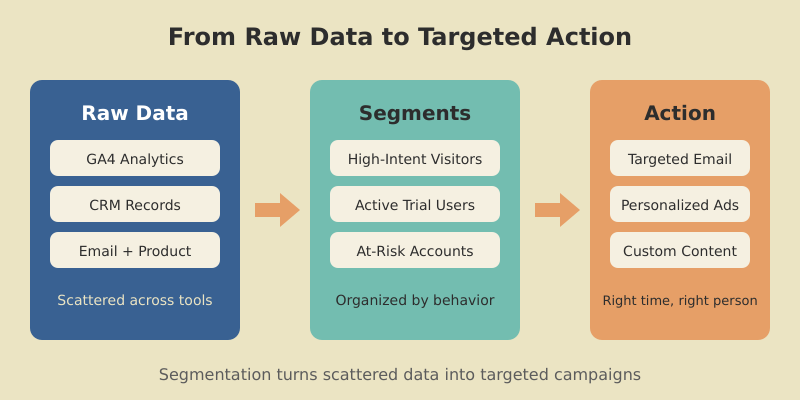
Most marketing teams say they segment their audience. In practice, they split an email list by job title, call it a day, and wonder why open rates stay flat. Real segmentation is messier — and far more rewarding.
I spent three months rebuilding the segmentation model for a B2B SaaS client last year. We went from two segments (“free” and “paid”) to seven behavioral groups. Email revenue jumped 34% in the first quarter. Not because we wrote better copy, but because each group finally got a message that matched where they actually were in the buying journey.
This guide walks you through the entire process: defining segments, collecting the right data, building them in GA4, activating them across channels, and measuring what works. No fluff, no theory-only frameworks — just the steps that move numbers.

What Is Audience Segmentation (And Why It Matters More in 2026)
So what is audience segmentation, exactly? It is the process of dividing your total addressable audience into smaller groups based on shared characteristics — demographics, behaviors, preferences, or needs. Instead of treating everyone the same, you tailor messaging, offers, and timing to each group.
The concept is simple. The execution is where most teams stumble. A 2025 study found that segmented email campaigns generate 14% higher open rates and 100% more clicks than non-segmented sends. Yet only 20% of companies use real-time, AI-powered segmentation. The gap between knowing you should segment and doing it well is enormous.
Three forces make segmentation especially urgent right now. First, third-party cookies are effectively dead — Chrome’s consent prompt means most users opt out, just like Safari and Firefox users already do. Second, customer acquisition costs keep climbing, so wasting budget on the wrong audience is more expensive than ever. Third, privacy regulations (GDPR, state-level US laws) limit what data you can collect, making every first-party signal more valuable.
The companies winning in 2026 are not the ones with the most data. They are the ones who organize data into segments that drive specific actions.
What Are Audience Segments: The Four Core Types
Before building anything, you need a clear mental model. What are audience segments in practice? They fall into four core types, each useful for different decisions.

Demographic Segmentation
The classic starting point: age, gender, income, job title, company size, location. Demographic segments are easy to build because the data is straightforward to collect. They work well for broad targeting — a B2B SaaS tool might segment by company size (SMB vs. enterprise) because the buying process differs completely.
The limitation is precision. Two marketing directors at mid-size companies can have wildly different needs. Demographics tell you who someone is, not what they want.
Behavioral Segmentation
This is where segmentation gets powerful. Behavioral segments group people by what they do: pages visited, features used, purchase frequency, email engagement, support tickets filed. A user who visits your pricing page three times in a week is in a fundamentally different mental state than someone who read one blog post.
Behavioral data comes from your own analytics — GA4 events, product usage logs, CRM activity. It is first-party, privacy-safe, and high-signal.
Psychographic Segmentation
Psychographics capture values, interests, attitudes, and motivations. Are your buyers motivated by cost savings or by being first to adopt new technology? Do they care about sustainability or speed?
Psychographic data is harder to collect at scale. Zero-party data — surveys, preference centers, quiz responses — is the most reliable source. When you have it, psychographic segments often outperform demographic ones because they explain why people buy, not just who they are.
Technographic Segmentation
For B2B and SaaS, technographic data — what tools, platforms, and tech stack a prospect uses — can be a deal-breaker. If your product integrates with Salesforce, targeting companies that use Salesforce is an obvious high-intent segment. Tools like BuiltWith and SimilarTech provide this data at scale.
Building Your Audience Segmentation Strategy From Scratch
A solid audience segmentation strategy follows five steps. I have used this framework for SaaS products, content sites, and ecommerce — the specifics change, but the structure holds.
Step 1: Define Business Objectives First
Segments exist to serve a goal. “Segment our audience” is not a goal. “Increase trial-to-paid conversion by 15% in Q2” is. Start with one or two measurable objectives, then ask: which audience groups are most relevant to each objective?
For the SaaS client I mentioned earlier, the goal was reducing churn. That meant we needed segments based on product engagement, not demographics. The objective dictated the segmentation model.
Step 2: Audit Your Available Data
List every data source you have: GA4, CRM, email platform, product analytics, customer support, billing system. For each source, note what user attributes and behaviors you can extract. Most teams discover they already have more data than they use — it is just scattered across tools.
Step 3: Choose Your Segmentation Model
Pick the segmentation type (or combination) that aligns with your objective. For acquisition, demographic + behavioral works well. For retention, behavioral + psychographic is usually stronger. Do not try to use all four types at once — start with two.
Step 4: Build and Validate Segments
Create your initial segments using the criteria from step 3. Then validate: is each segment large enough to matter? (A segment of 12 people is not actionable.) Are the segments distinct from each other? Does each segment suggest a different action you would take?
A good rule of thumb: if two segments would receive the same message, merge them.
Step 5: Activate and Iterate
Push segments to your marketing tools — email, ads, personalization engine — and run campaigns. Measure results per segment. Refine. This is not a one-time exercise. The best segmentation models evolve quarterly.

Target Audience Segmentation: Finding Your High-Value Groups
Target audience segmentation is about narrowing down from “everyone who visits our site” to “the specific groups most likely to become customers.” This is where data meets prioritization.
Here is a practical approach I use. Start with your existing customer base. Pull a list of your best customers — highest LTV, lowest churn, shortest sales cycle — and look for patterns. What do they have in common? Which pages did they visit before converting? How many touchpoints did they need?
In one project, we discovered that users who visited the integrations page within their first session converted at 3x the rate of those who did not. That single behavioral signal became our primary targeting criterion for ad campaigns. We built lookalike audiences around it, and cost per acquisition dropped 28%.
The RFM framework (Recency, Frequency, Monetary value) works well for ecommerce and subscription businesses. Score each customer on all three dimensions, then group them into segments: Champions (high across all three), At-Risk (were active, now quiet), New Customers (recent but low frequency). Each group gets a different retention or upsell strategy. For detailed customer segmentation examples using frameworks like RFM, see our dedicated guide.
Do not build more than five to seven segments initially. Each segment needs its own messaging, offers, and measurement. More than seven and your team will not be able to execute consistently.
Audience Data Segmentation: Collecting and Organizing What Matters
Segments are only as good as the data behind them. Audience data segmentation starts with getting the right inputs organized in the right places.

First-Party Data (Your Foundation)
This is data you collect directly through your own properties: website analytics, app usage, purchase history, email engagement, support interactions. GA4, your CRM, and your product database are the primary sources. First-party data is the most reliable and privacy-compliant foundation for segmentation.
Make sure your UTM parameters are consistent across all campaigns. Inconsistent tagging is the number one reason first-party data becomes unusable for segmentation — you end up with “google / cpc” in one campaign and “Google / CPC” in another, fragmenting your segments.
Zero-Party Data (The Gold Mine)
Zero-party data is what users voluntarily share: survey responses, preference selections, quiz answers, account profile fields. A 2025 study found 84% higher acceptance rates for zero-party data collection when users perceive a clear value exchange.
Practical examples: an onboarding flow that asks “What is your primary goal with our product?” (three options), a preference center in your email footer, or a quiz that recommends content based on answers. Each response becomes a segmentation attribute.
Second-Party Data (Strategic Partnerships)
Second-party data comes from trusted partners who share their first-party data with you, typically through data clean rooms. This approach is growing — 66% of US data professionals have adopted data clean rooms as a response to privacy regulations. It is relevant mainly for larger organizations with co-marketing partnerships.
Building a Unified View
The challenge is not collecting data. It is connecting it. A customer who visits your site (GA4 data), opens your emails (email platform data), and uses your product (product analytics data) exists as three separate records until you unify them. A Customer Data Platform (CDP) like Segment or RudderStack solves this — but even a well-structured CRM with consistent user IDs gets you 80% of the way.
How to Segment Your Audience in GA4: Step-by-Step
Let me walk you through exactly how to segment your audience using GA4. This is the most accessible starting point because GA4 is free and most marketing teams already have it installed.
Segments vs. Audiences in GA4
GA4 uses two related but different concepts. Segments exist only inside Exploration reports — they let you analyze a subset of your data. Audiences are persistent groups that you can use in standard reports and export to Google Ads for remarketing. You can create a segment first, then convert it to an audience.
Creating a Behavioral Segment
Open GA4 and navigate to Explore → create a new Exploration. In the left panel, click the “+” next to Segments. You will see three types: User segment, Session segment, and Event segment.
For a “high-intent visitors” segment, choose User segment and set these conditions:
- Event:
page_viewwherepage_locationcontains “/pricing” — at least 1 time - AND Event:
session_start— at least 2 times in the last 30 days
This gives you users who viewed your pricing page and returned to the site at least twice. That is a high-intent group worth targeting with specific messaging.
Creating a Sequential Segment
Sequential segments track users who complete actions in a specific order. For example: visited a blog post, then viewed the pricing page, then started a free trial — all within 7 days. This sequence maps to a content-driven conversion path and tells you which blog content actually drives pipeline.
In the segment builder, add a sequence condition. Set Step 1 as page_view where page path contains “/blog/”, Step 2 as page_view where page path contains “/pricing”, Step 3 as your trial signup event. Apply a “within 7 days” time constraint.
Converting Segments to Audiences
Once you have built a segment that shows interesting patterns, check the “Build an audience” checkbox when creating it. GA4 will create a persistent audience that updates automatically as new users meet the criteria. You can then use this audience for Google Ads remarketing or as a filter in standard reports.
I recommend building three to five core audiences that align with your traffic analysis framework: new visitors, engaged visitors, high-intent visitors, trial users, and paying customers. These five groups cover the full funnel and give you clear performance benchmarks.

Marketing Audience Segmentation: Activating Segments Across Channels
A segment sitting in an analytics dashboard does nothing. Marketing audience segmentation only becomes valuable when it changes what you send, to whom, and when.

Email Segmentation
Email is the highest-leverage channel for segmentation because you control the audience completely. Start with lifecycle stages: onboarding sequences for new signups, feature education for trial users, upgrade nudges for engaged free users, expansion offers for paying customers.
Layer behavioral triggers on top: “User completed Setup Wizard → send Advanced Features email in 3 days.” “User has not logged in for 14 days → send Re-engagement email.” These behavior-triggered sends consistently outperform batch newsletters — I have seen 2-3x higher click-through rates across multiple clients.
Paid Advertising
Export your GA4 audiences to Google Ads for remarketing. Create separate ad groups for each segment with tailored messaging. High-intent visitors who viewed pricing get a direct trial CTA. Blog readers get a content-upgrade or newsletter offer.
The key insight: exclude your existing customers from acquisition campaigns. It sounds obvious, but I regularly audit accounts where 15-20% of ad spend goes to people who already pay. Build a “current customers” audience in GA4 and add it as an exclusion to every acquisition campaign.
Content Personalization
Match your content calendar to your segment priorities. If your highest-value segment cares about enterprise security, create content for them — case studies, compliance guides, security whitepapers. Then distribute that content through the channels where that segment is most active.
On-site personalization takes this further. Show different CTAs, hero banners, or recommended content based on which audience a visitor belongs to. Tools like Optimizely and Mutiny make this possible without heavy engineering. Even simple changes — showing “Start Your Enterprise Trial” instead of “Start Free Trial” when a visitor from a Fortune 500 company lands on your site — can lift conversion rates meaningfully.
Audience Segmentation Analysis: Measuring What Works
You have built segments and activated them. Now you need to know if they are working. Audience segmentation analysis is an ongoing practice, not a one-time report.
Key Metrics Per Segment
Track these metrics for every active segment, ideally in a centralized marketing dashboard:
- Segment size and growth rate — Is the segment growing or shrinking over time?
- Conversion rate — What percentage of each segment completes your primary goal?
- Revenue per user — Which segments generate the most value?
- Engagement score — Composite of email opens, site visits, feature usage
- Cost to acquire — How much do you spend to get each segment’s attention?
Build a comparison view in GA4 Explorations. Create a Free-form exploration, add your audiences as a segment comparison, and set conversion rate as your primary metric. This instantly shows which segments convert best and worst.
Segment Decay and Refresh
Segments are not permanent. Customer behavior changes, markets shift, and your product evolves. Review your segmentation model quarterly. Look for segments that have become too small to be actionable, segments where conversion rates have converged (meaning the distinction no longer matters), and new behavioral patterns that suggest a segment you have not defined yet.
I typically retire or merge one to two segments per quarter and test one new segment. This keeps the model fresh without creating segment sprawl that overwhelms your marketing team.
A/B Testing by Segment
The most valuable segmentation analysis compares campaign performance across segments. Run the same A/B test — say, a new email subject line — but analyze results per segment rather than in aggregate. You will often find that Variant A wins for one segment and Variant B wins for another. Aggregate results hide these differences and lead to one-size-fits-all decisions.

Privacy-First Segmentation in a Cookieless World
The old model of segmentation relied heavily on third-party data: tracking pixels, cross-site cookies, purchased data lists. That model is gone. Chrome’s consent prompt, Safari’s ITP, Firefox’s ETP, and global privacy laws have made third-party cookies unreliable for segmentation.
But this is actually good news for marketers who build on first-party foundations. Here is how to approach privacy-first segmentation.
Server-Side Tracking
Client-side analytics miss 15-30% of visitors due to ad blockers and browser restrictions. Server-side tracking captures events on your server before sending them to analytics platforms, bypassing most client-side limitations. Google Tag Manager’s server-side container is the most accessible option. It takes a few hours to set up and immediately improves data completeness.
Consent-Based Value Exchange
Instead of tracking users without their knowledge, offer a clear value exchange. “Tell us your role and goals, and we will personalize your experience” converts at surprisingly high rates when the benefit is tangible. Preference centers, progressive profiling (asking one question per visit rather than a long form), and gated tools (calculators, assessments) all generate rich segmentation data with explicit consent.
Contextual Targeting as a Supplement
When you cannot identify a visitor, contextual targeting uses the content they are viewing — not their identity — to serve relevant messages. A visitor reading your article about SaaS metrics is likely interested in analytics tools, regardless of whether you have a cookie on them. AI-powered contextual tools analyze page content, sentiment, and structure to match ads and CTAs to reader intent.
First-Party Data Enrichment
Maximize the signals from your owned properties. Every form submission, every product interaction, every support conversation generates data. Connect these signals through a unified user ID across your analytics, CRM, and email platform. A strong distribution strategy brings visitors back to your owned properties where you can collect first-party data, rather than relying on rented audiences on social platforms.
Frequently Asked Questions
How many audience segments should I create?
Start with three to five segments. Each segment needs its own messaging strategy, so more segments means more execution work. Scale up to seven or eight once your team can consistently personalize content and campaigns for each group. Beyond eight, most marketing teams struggle to maintain meaningful differentiation between segments.
What tools do I need for audience segmentation?
At minimum, you need an analytics platform (GA4 is free), an email marketing tool with segmentation features (Mailchimp, ActiveCampaign, or similar), and a CRM. For advanced segmentation, consider a Customer Data Platform (CDP) like Segment or RudderStack to unify data from multiple sources. You do not need expensive tools to start — GA4 audiences and a well-structured email platform cover most use cases.
How is audience segmentation different from buyer personas?
Buyer personas are fictional composites — “Marketing Mary, 35, VP at a mid-size company.” Segments are data-defined groups based on actual behavior and attributes. Personas are useful for content planning and creative direction. Segments are what you use for targeting and measurement. The best approach uses personas to guide your messaging and segments to determine who sees that messaging.
How often should I update my segments?
Review segment definitions quarterly. Check whether segments are still the right size (large enough to be actionable, not so large they are meaningless), whether conversion rates have shifted, and whether new behavioral patterns have emerged. Dynamic segments in GA4 update automatically as users meet the criteria, so the maintenance is mainly about refining the criteria, not manually moving users.
Can I do audience segmentation without a CDP?
Yes. GA4 audiences, your email platform’s built-in segmentation, and a well-organized CRM cover 80% of segmentation needs. A CDP becomes valuable when you have more than five data sources and need real-time cross-channel identity resolution. For most small-to-mid-size businesses, manual connections between GA4, your email tool, and your CRM (possibly using Zapier or native integrations) work well enough to start seeing results from segmentation.