UTM Parameters: How to Track Every Campaign Like a Pro
You’re running campaigns across email, social media, paid ads, and partner sites. Traffic is coming in. But when you open...

Practical guides on SEO, analytics, SaaS growth, and marketing technology. No fluff, just actionable strategies that work.
You’ve launched your SaaS product. Users are signing up. Revenue is coming in. But when an investor asks about your unit economics or a board member wants to know your payback period, you’re scrambling to...
You’re running campaigns across email, social media, paid ads, and partner sites. Traffic is coming in. But when you open...
Every piece of content that ranks well in search starts with the same foundation: solid keyword research. Yet most marketers...
If your website has more than 10,000 pages, your XML sitemap strategy can make or break your SEO performance. I’ve...
Most content calendars are just fancy to-do lists. They track what you’ll publish and when — but they don’t tell...
You’ve launched your SaaS product. Users are signing up. Revenue is coming in. But when an investor asks about your unit economics or a board member wants to know your payback period, you’re scrambling to pull numbers from three different spreadsheets.
This is the reality for most early-stage SaaS founders — and it’s a problem that compounds. The metrics you track from day one shape the decisions you make, the story you tell investors, and ultimately whether your startup survives the transition from early traction to sustainable growth.
I’ve worked with SaaS companies from pre-revenue to Series B, helping them build analytics foundations. The pattern is consistent: teams that establish metric discipline early make better decisions and raise capital more efficiently. Teams that “figure it out later” spend months cleaning up data when they should be focused on growth.
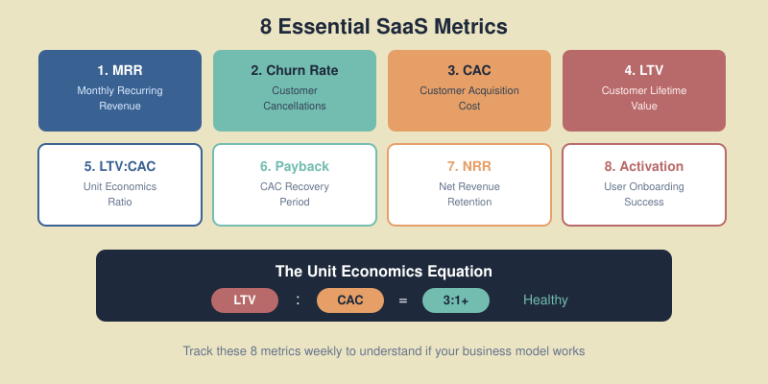
Here are the eight metrics every SaaS startup should track from day one — no more, no less. These aren’t vanity metrics. They’re the numbers that actually predict whether your business will work.

MRR is the heartbeat of your SaaS business. It’s the predictable revenue you can count on every month from active subscriptions.
Unlike one-time sales, MRR compounds. A 10% monthly growth rate doesn’t just add revenue — it creates a foundation that generates more revenue next month. This compounding effect is what makes SaaS businesses valuable.
MRR also tells you if your business model works. Growing MRR means customers find enough value to keep paying. Flat or declining MRR signals a fundamental problem with product-market fit or retention.
MRR = Number of customers × Average revenue per account (ARPA)
Or more precisely, sum the monthly value of all active subscriptions. Annual plans should be divided by 12.
Track MRR components separately:
This breakdown reveals whether growth comes from acquisition or expansion — critical for understanding your growth engine.

Churn is the percentage of customers who cancel their subscription in a given period. It’s the silent killer of SaaS businesses.
High churn creates a leaky bucket problem. You can pour unlimited customers in the top, but if they’re flowing out the bottom just as fast, you’ll never build a sustainable business. Reducing churn often has a bigger impact on growth than increasing acquisition.
Monthly Churn Rate = (Customers lost in month / Customers at start of month) × 100
Be consistent about what counts as “lost” — cancellations, non-renewals, and failed payments all matter.
The 2025 average across SaaS is about 3.5% monthly churn. If you’re significantly above this, prioritize retention before scaling acquisition.

Track both. You might lose 10 small customers but retain your largest accounts, resulting in low revenue churn despite high customer churn. Revenue churn is often more meaningful for business health.
CAC is how much you spend to acquire a single new customer. It’s the foundation of understanding whether your growth is sustainable.
If it costs you $500 to acquire a customer who only pays you $200 over their lifetime, you’re literally paying people to use your product. Many startups have grown themselves into bankruptcy by ignoring CAC.
CAC = Total sales and marketing spend / Number of new customers acquired
Include everything: advertising, sales salaries and commissions, marketing tools, content production, events — all the costs required to acquire customers.
CAC varies dramatically by market and sales model:
The 2025 average CAC across B2B SaaS is around $702. But absolute CAC doesn’t matter as much as CAC relative to customer value — which brings us to LTV.
Not all acquisition channels are equal. Your Google Ads CAC might be $800 while organic content brings customers at $150. Track CAC by channel to allocate budget efficiently.
LTV is the total revenue you expect from a customer over their entire relationship with your company. It’s the other half of the unit economics equation.
LTV tells you how much you can afford to spend on acquisition while remaining profitable. A $10,000 LTV customer justifies a much higher CAC than a $500 LTV customer.
Simple formula:
LTV = ARPA × Customer Lifetime (in months)
Where customer lifetime = 1 / Monthly Churn Rate
More accurate formula:
LTV = ARPA × Gross Margin % × (1 / Monthly Churn Rate)
Including gross margin gives you the actual profit from each customer, not just revenue.
LTV alone isn’t meaningful — you need to compare it to CAC. But generally:
The LTV:CAC ratio is the ultimate test of your business model. It answers a simple question: can you profitably acquire customers?
A 3:1 LTV:CAC ratio is the industry gold standard. This means for every $1 you spend on acquisition, you generate $3 in lifetime value. Anything above 3:1 is considered healthy.
LTV:CAC Ratio = Customer Lifetime Value / Customer Acquisition Cost

| Ratio | Interpretation | Action |
|---|---|---|
| Less than 1:1 | Losing money on every customer | Stop spending on acquisition immediately |
| 1:1 to 2:1 | Marginally viable | Focus on reducing CAC or increasing LTV |
| 3:1 | Healthy business model | Continue optimizing, consider scaling |
| 5:1+ | Very efficient | May be underinvesting in growth |
If your ratio is below 3:1, don’t scale. Fix the fundamentals first — either reduce acquisition costs or improve retention and monetization.
CAC payback period measures how many months it takes to recover your customer acquisition cost from a customer’s payments.
Even with a healthy LTV:CAC ratio, a long payback period creates cash flow problems. If you spend $1,000 to acquire a customer but don’t recover that cost for 18 months, you need significant capital to fund growth.
CAC Payback Period = CAC / (ARPA × Gross Margin %)
This tells you the number of months until a customer becomes profitable.

Investors typically want to see CAC recovery in under 12 months. Longer payback periods require more capital to grow and increase risk.
Payback period directly impacts your runway. A 6-month payback means you can reinvest in acquisition twice per year. A 24-month payback means you’re waiting two years before that investment returns.
Annual prepayment plans dramatically improve payback by bringing revenue forward. A customer who pays annually upfront might generate positive cash flow immediately.
NRR measures how much revenue you retain and expand from your existing customer base, excluding new customer acquisition.
NRR above 100% means your existing customers generate more revenue over time through upgrades and expansion. This is the holy grail of SaaS — you can grow even without acquiring new customers.
High NRR indicates strong product-market fit and customer success. It also makes your business more resilient — you’re not entirely dependent on new acquisition.
NRR = (Starting MRR + Expansion - Contraction - Churn) / Starting MRR × 100
Calculate over a cohort period, typically 12 months.

Top-performing SaaS companies often have NRR above 120%. This means even with zero new customers, they’d still grow 20% annually.
Activation rate measures what percentage of new signups reach a meaningful milestone that predicts long-term retention — your “aha moment.”
Users who don’t activate rarely convert or retain. Your activation rate is a leading indicator of future churn and conversion. Improving activation often has cascading effects throughout your funnel.
Activation is specific to your product. Common activation milestones include:
The right activation metric correlates strongly with retention. Analyze your data to find which early actions predict long-term customers.
Activation Rate = (Users who completed activation milestone / Total new signups) × 100
Measure within a defined timeframe — typically 7, 14, or 30 days from signup.
Low activation usually points to onboarding friction, unclear value proposition, or attracting the wrong users. It’s often the highest-leverage metric to improve in early-stage SaaS.
Don’t try to track everything in spreadsheets. As you grow, manual tracking breaks down. Set up proper infrastructure early.
Establish a regular rhythm:
Tracking too many metrics — Eight metrics is enough for early stage. Adding more creates noise and dilutes focus. Add complexity as you scale.
Inconsistent definitions — Define exactly what counts as a “customer,” how you calculate MRR, and what qualifies as “activated.” Document these definitions and stick to them.
Looking at metrics in isolation — LTV without CAC is meaningless. Churn without NRR misses expansion. Always consider metrics in relationship to each other.
Ignoring cohorts — Aggregate metrics hide important trends. Your overall churn might be 5%, but if recent cohorts churn at 8% while older cohorts churn at 3%, you have a growing problem.
Waiting too long to start — “We’ll figure out metrics when we’re bigger” leads to months of data cleanup. Start tracking properly from day one.
Start tracking immediately with whatever data you have. Even with 10 customers, you can calculate basic MRR and activation rate. Early data helps you establish trends and catch problems before they compound.
Track MRR for operational decisions — it’s more granular and responsive. Use ARR (MRR × 12) when communicating with investors or comparing to annual benchmarks. Most SaaS companies track both.
Review MRR and activation weekly. Do a full metrics review monthly. Conduct deep cohort analysis quarterly. Don’t obsess over daily fluctuations — they’re mostly noise.
Usually reducing churn. A 1% improvement in churn often has a bigger long-term impact than a 1% improvement in acquisition, especially as you scale. Fix the leaky bucket before pouring more water in.
Add metrics when you have specific questions they answer or when you scale past early-stage. Series A companies might add metrics like sales cycle length, expansion rate, or support ticket volume. Start simple, add complexity gradually.

These eight SaaS metrics — MRR, churn, CAC, LTV, LTV:CAC ratio, payback period, NRR, and activation rate — form the foundation of understanding whether your business model works.
You don’t need complex BI tools or a data team to start. A well-structured spreadsheet tracking these eight metrics weekly gives you more insight than most funded startups have. The key is consistency: track the same metrics the same way, every week, from day one.
When investors ask about your unit economics, you’ll have clear answers. When you need to decide between investing in acquisition or retention, the data will guide you. When something breaks, you’ll catch it early instead of discovering the problem months later.
Your next step: Open a spreadsheet and set up tracking for MRR and churn this week. Add CAC and LTV next week. Within a month, you’ll have all eight metrics in place and a clearer picture of your business than most founders ever achieve.
You’re running campaigns across email, social media, paid ads, and partner sites. Traffic is coming in. But when you open Google Analytics, everything’s lumped under “direct” or “referral” — and you have no idea which campaign actually drove those conversions.
This is the reality for marketers who skip UTM parameters. And it’s completely avoidable.
I’ve been setting up tracking systems for marketing teams since 2016, and UTM parameters remain one of the most powerful yet underutilized tools in the analytics stack. When implemented correctly, they give you crystal-clear attribution data. When done poorly — or not at all — you’re making decisions based on incomplete information.
In this guide, I’ll show you exactly how to use UTM parameters to track every campaign with precision, avoid common mistakes that corrupt your data, and build a system that scales with your marketing efforts.

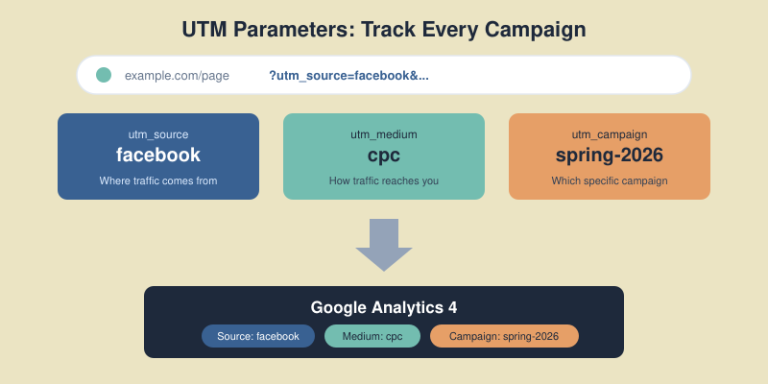
UTM parameters (Urchin Tracking Module) are tags you add to URLs that tell analytics tools where traffic came from. When someone clicks a link with UTM parameters, that information gets passed to Google Analytics, allowing you to see exactly which campaigns, channels, and content drove the visit.
A URL with UTM parameters looks like this:
https://example.com/landing-page?utm_source=facebook&utm_medium=paid&utm_campaign=spring-sale-2026
Without these tags, GA4 often misclassifies traffic — email campaigns show up as “direct,” social posts get lumped into “referral,” and you lose visibility into what’s actually working.
UTM parameters solve three critical problems:
In my experience, teams that implement proper UTM tracking typically discover that 20-30% of their traffic was being misattributed. That’s a significant blind spot when making budget decisions.
There are five standard UTM parameters. Three are essential, two are optional but useful for specific use cases.

utm_source — Where the traffic comes from
This identifies the platform, website, or vendor sending traffic. Be specific but consistent.
google, facebook, newsletter, linkedin, partner-siteutm_medium — How the traffic reaches you
This describes the marketing channel or mechanism. Use standardized values that match GA4’s default channel groupings when possible.
cpc, email, social, affiliate, display, organicutm_campaign — Which specific campaign
This identifies the specific promotion, product launch, or marketing initiative.
spring-sale-2026, product-launch-q1, webinar-seo-basicsutm_term — Keyword targeting (mainly for paid search)
Originally designed for paid search keywords. Use it to track which terms triggered the ad click.
running+shoes, project+management+softwareutm_content — Content differentiation
Use this to distinguish between different links pointing to the same URL — like A/B testing ad creatives or tracking multiple links in the same email.
hero-button, sidebar-link, blue-cta, version-aThe most common UTM mistake isn’t forgetting to use them — it’s using them inconsistently. “Facebook,” “facebook,” “fb,” and “FB” all create separate line items in GA4, fragmenting your data and making analysis nearly impossible.

Always use lowercase — UTM parameters are case-sensitive. Email and email create separate entries. Pick lowercase and stick with it.
Use hyphens instead of spaces — Spaces get encoded as %20 in URLs, making them ugly and harder to read in reports. Use hyphens: spring-sale not spring%20sale.
Avoid special characters — Stick to letters, numbers, and hyphens. Special characters can break tracking or cause encoding issues.
Be descriptive but concise — email is better than e, but monthly-newsletter-subscriber-list-segment-a is overkill. Find the balance.
Standardize values across teams — Create a documented list of approved values. If your paid team uses cpc and your social team uses paid-social, your reports become fragmented.
| Parameter | Recommended Values |
|---|---|
| utm_medium | cpc, email, social, affiliate, display, referral, organic, video |
| utm_source | google, facebook, instagram, linkedin, twitter, newsletter, partner-name |
These align with GA4’s default channel groupings, making your reports cleaner and more actionable.
The utm_campaign parameter is where most teams struggle. It’s a free-form field, which means it’s easy to create chaos. Here’s how to structure it properly.
A good campaign name answers: What is this? When did it run? What’s it promoting?
I recommend this structure:
[type]-[name]-[date/identifier]
Examples:
promo-spring-sale-2026q1launch-new-feature-jan2026webinar-seo-fundamentals-20260115newsletter-weekly-w03You’ll run similar campaigns multiple times — monthly newsletters, seasonal sales, weekly promotions. Including dates lets you compare performance over time.
Without dates, your January newsletter data mixes with December’s, making trend analysis impossible.
Campaign names should be understandable at a glance. When you’re reviewing reports months later, promo-blackfriday-2026 tells you exactly what you’re looking at. bf26promo1 requires mental translation.
You can build UTM URLs manually, but I don’t recommend it for teams. Manual creation leads to typos and inconsistency.
Google offers a free Campaign URL Builder that generates properly formatted URLs. It’s simple but doesn’t enforce naming conventions.
For teams, I prefer spreadsheet-based UTM builders. They offer:
Create a Google Sheet with columns for each parameter, use data validation for standardized dropdowns, and add a formula column that concatenates everything into the final URL.
For larger teams, tools like UTM.io, Terminus, or Bitly offer advanced features: team governance, link shortening, and integration with marketing platforms.
Different channels have different tracking needs. Here’s how to approach each.

Email is frequently misattributed as “direct” traffic. Always tag email links.
| Parameter | Value |
|---|---|
| utm_source | newsletter (or specific list name) |
| utm_medium | |
| utm_campaign | campaign-name-date |
| utm_content | header-link, cta-button, footer-link |
Use utm_content to track which links in the email get clicked most. This data helps optimize email layout.
Organic social posts need UTMs — otherwise they often show as referral traffic without campaign context.
| Parameter | Value |
|---|---|
| utm_source | facebook, linkedin, twitter, instagram |
| utm_medium | social |
| utm_campaign | specific campaign or content-type |
Most ad platforms (Google Ads, Meta Ads) have auto-tagging features. Use those when available — they provide more detailed data than manual UTMs.
For platforms without auto-tagging, or when you need custom tracking:
| Parameter | Value |
|---|---|
| utm_source | platform name |
| utm_medium | cpc, display, video (match the ad type) |
| utm_campaign | campaign name from ad platform |
| utm_term | targeted keywords |
| utm_content | ad creative identifier |
Track traffic from partners to understand which relationships drive value.
| Parameter | Value |
|---|---|
| utm_source | partner-name |
| utm_medium | affiliate or referral |
| utm_campaign | partnership type or promo |
I’ve audited dozens of UTM implementations. These mistakes appear repeatedly.

This is the most damaging mistake. Adding UTM parameters to links within your own website overwrites the original traffic source, creates false sessions, and corrupts your attribution data.
If someone arrives from a Facebook ad, then clicks an internal link with UTMs, GA4 now thinks they came from wherever that internal UTM pointed. You’ve lost the true source.
Rule: UTMs are for external links pointing TO your site, never for links WITHIN your site. Use GA4 events or custom dimensions for internal tracking.
As mentioned earlier: Facebook, facebook, and FACEBOOK are three different sources in GA4. Pick one format (lowercase) and enforce it.
Email and organic social are the most commonly untagged channels. Without UTMs, email often appears as direct traffic, and social posts show as generic referrals. Always tag these channels.
I’ve seen campaign names like 2026_q1_email_newsletter_segment-a_version-2_test-subject-line-b. This creates analysis paralysis. Keep names informative but manageable.
Without documentation, teams drift into inconsistency. Create a UTM governance document that specifies:
Once your UTMs are in place, here’s how to analyze the data in GA4.

Navigate to: Reports → Acquisition → Traffic acquisition
This shows session-level data. Key dimensions to use:
Navigate to: Reports → Acquisition → User acquisition
This shows how users first discovered your site — useful for understanding which channels bring in new audiences.
For deeper analysis, use GA4’s Explore feature to build custom reports combining UTM dimensions with your conversion metrics. This lets you answer questions like:
Once you’ve mastered the basics, these advanced techniques add more value.
Ad platforms support dynamic parameters that auto-populate based on the ad. For example, in Google Ads:
utm_campaign={campaignid}&utm_content={creative}
This automatically inserts the campaign ID and creative ID, ensuring accuracy without manual entry.
Use UTMs on QR codes for print materials, event signage, and physical promotions. Create unique campaign names for each placement to track which offline touchpoints drive traffic.
Long UTM URLs look suspicious and can deter clicks. Use link shorteners like Bitly, Rebrandly, or your own branded short domain. The UTM data still gets captured — the shortened link just redirects to the full URL.
Review your UTM data monthly. Look for:
Clean data requires ongoing maintenance.
No, UTM parameters don’t affect SEO rankings. Google ignores UTM parameters when evaluating page content. However, don’t use UTMs on internal links — that causes analytics issues, not SEO issues.
Google Ads auto-tagging (GCLID) provides more detailed data than manual UTMs. Use auto-tagging for Google Ads. Manual UTMs are better for platforms without auto-tagging or when you need custom campaign tracking.
There’s no strict limit, but keep URLs under 2,000 characters total for maximum compatibility. More importantly, keep parameter values concise and readable — they should be understandable in reports.
No, once a link is shared, changing it requires sharing a new link. This is why planning and consistency upfront matters. Document your UTM strategy before launching campaigns.
Source identifies WHERE traffic comes from (facebook, google, newsletter). Medium identifies HOW it reaches you (cpc, email, social). Think of source as the specific platform and medium as the channel type.

Proper UTM parameters transform your marketing analytics from guesswork into precision. You’ll know exactly which campaigns drive traffic, which channels deliver ROI, and where to focus your budget.
The implementation isn’t complicated: establish naming conventions, document approved values, use a URL builder, and never tag internal links. The discipline of consistent UTM usage pays dividends every time you make a marketing decision.
Start simple. Tag your email campaigns and social posts first — these are the most commonly misattributed channels. Build your UTM spreadsheet, train your team on the conventions, and review your data monthly.
Your next step: Create a UTM naming convention document for your team. Define your approved values for source, medium, and campaign naming structure. Then tag your next campaign properly and watch the clean data flow into GA4.
Every piece of content that ranks well in search starts with the same foundation: solid keyword research. Yet most marketers either skip this step entirely or do it so superficially that they end up creating content nobody searches for.
I’ve been doing keyword research professionally since 2015, and the process has evolved dramatically. Today, it’s not just about finding high-volume terms — it’s about understanding user intent, mapping content to the buyer journey, and building topical authority through strategic clustering.
In this guide, I’ll walk you through my complete keyword research process — from finding your first seed keywords to building a full content strategy that drives organic traffic and conversions.

Keyword research is the process of discovering the words and phrases people type into search engines when looking for information, products, or solutions. It’s the bridge between what your audience wants and the content you create.
Here’s why it’s non-negotiable for content success:
Without keyword research, you’re essentially guessing. And in my experience working with dozens of content teams, guessing leads to wasted resources and flat traffic charts.
Before diving into tools and tactics, you need to understand search intent — the reason behind a search query. Google’s algorithm has become remarkably good at determining intent, and content that mismatches intent simply won’t rank.
| Intent Type | User Goal | Example Queries | Content Format |
|---|---|---|---|
| Informational | Learn something | “what is keyword research” | Guides, tutorials, explainers |
| Navigational | Find specific site/page | “ahrefs login” | Homepage, login pages |
| Commercial | Research before buying | “best keyword research tools” | Comparisons, reviews, lists |
| Transactional | Complete an action | “ahrefs pricing” | Product pages, pricing pages |

When I evaluate a keyword, I always check the current search results first. If Google shows mostly product pages for a term, writing a blog post won’t work — the intent doesn’t match.
The fastest way: Google the keyword and analyze what ranks.
Match your content format to the dominant intent, or you’re fighting an uphill battle.
Every keyword research tool throws numbers at you. Here’s what actually matters:

The average monthly searches for a keyword. Higher isn’t always better — a 50-volume keyword with perfect intent often outperforms a 10,000-volume keyword with mismatched intent.
I typically look for:
An estimate of how hard it is to rank for a term, usually scored 0-100. This metric varies wildly between tools, so use it directionally rather than absolutely.
My general framework:
What advertisers pay for clicks on this keyword. High CPC signals commercial value — people are willing to pay for this traffic because it converts.
A keyword with $15 CPC and 200 monthly searches often beats a $0.50 CPC keyword with 5,000 searches in terms of business value.
Some keywords get lots of searches but few clicks — Google answers them directly in featured snippets or AI overviews. Check if the SERP has:
These features can steal clicks from organic results. Factor this into your prioritization.
You don’t need expensive tools to start, but paid tools save significant time at scale.
Google Search Console — Shows what keywords you already rank for. Essential for finding quick wins and content gaps.
Google Keyword Planner — Free with a Google Ads account. Volume ranges are broad, but useful for initial research.
Google Autocomplete & Related Searches — Type your seed keyword and see what Google suggests. These are real searches people make.
AnswerThePublic — Visualizes questions people ask around a topic. Great for finding informational content ideas.
Ahrefs — My primary tool. Best for keyword difficulty accuracy, content gap analysis, and competitive research. I’ve used it since 2018 and it’s worth every dollar.
SEMrush — Excellent for competitor keyword analysis and tracking. Shows exactly what keywords rivals rank for.
Moz — Good keyword suggestions and SERP analysis. More affordable entry point.
Ubersuggest — Budget-friendly option with decent data. Good for beginners.
For most content teams, one premium tool (Ahrefs or SEMrush) plus free tools covers everything you need.
Seed keywords are the broad topics your business relates to. They’re the starting point for expansion.
Ask yourself:
For a project management software company, seed keywords might be:
Start with 5-10 seed keywords. You’ll expand from there.
Now turn those seeds into hundreds of potential keywords.
Keyword tool suggestions: Enter seed keywords into Ahrefs or SEMrush and export all suggestions. A single seed can generate 1,000+ related terms.
Competitor analysis: Find what keywords competitors rank for that you don’t. In Ahrefs: Site Explorer → enter competitor → Organic Keywords → filter by position 1-20.
Question mining: Use “People Also Ask” boxes, Quora, Reddit, and industry forums to find questions your audience asks.
Modifier expansion: Add common modifiers to seed keywords:
After expansion, you should have 200-500+ keywords to work with.
Not all keywords deserve content. Filter ruthlessly.
For each keyword, assess:
| Factor | Question to Ask |
|---|---|
| Business relevance | Does this relate to what we sell/do? |
| Traffic potential | Is the volume worth the effort? |
| Ranking feasibility | Can we realistically compete? |
| Conversion potential | Will this traffic convert? |
| Content gap | Can we create something better than existing results? |
I score keywords on a simple 1-5 scale for each factor, then prioritize by total score.
Modern SEO rewards topical authority. Instead of isolated posts, organize keywords into clusters around pillar topics.
A topic cluster consists of:
Group your keywords by parent topic. For “keyword research,” clusters might include:
Pillar: Keyword Research (this article)
Each cluster page links back to the pillar. The pillar links out to all cluster pages. This structure signals expertise to Google.

Different keywords serve different stages of the customer journey. Map yours accordingly.

User knows they have a problem but not the solution.
User researches potential solutions.
User ready to choose/buy.
A balanced content strategy covers all stages. Too much awareness content without decision content means traffic that never converts.
You can’t publish everything at once. Prioritize strategically.
I use a simple scoring system:
| Factor | Weight | Scoring |
|---|---|---|
| Business value | 3x | 1-5 based on conversion potential |
| Traffic potential | 2x | 1-5 based on volume |
| Ranking difficulty | 2x | 5=easy, 1=hard (inverted) |
| Content gap | 1x | 1-5 based on opportunity |
Calculate: (Business × 3) + (Traffic × 2) + (Difficulty × 2) + (Gap × 1)
Highest scores = publish first.

Start with keywords where you can rank quickly:
Early wins build momentum and prove the process works.
Keywords alone aren’t a strategy. Here’s how to connect the dots.
Match keywords to optimal content formats:
| Keyword Pattern | Content Type |
|---|---|
| “How to…” | Step-by-step tutorial |
| “What is…” | Definitive guide / explainer |
| “Best…” | Listicle / roundup |
| “X vs Y” | Comparison post |
| “[Product] review” | In-depth review |
| “[Topic] template” | Template + explanation |
Translate prioritized keywords into a publishing schedule:
I recommend planning 1-3 months ahead, with flexibility to adjust based on performance data.
After reviewing hundreds of keyword strategies, these errors appear repeatedly:
Chasing volume over intent
A 10,000-volume keyword means nothing if the intent doesn’t match your content or business model.
Ignoring difficulty
New sites targeting KD 80+ keywords waste months creating content that won’t rank.
One keyword per page thinking
Modern content should target keyword clusters, not single terms. A good article naturally ranks for dozens of related keywords.
Skipping competitor analysis
If you don’t know what’s ranking, you don’t know what to beat. Always analyze the current SERP before writing.
Set and forget
Keywords trends shift. Review and update your keyword strategy quarterly.
Focus on one primary keyword and 2-5 secondary keywords per page. However, well-written content naturally ranks for dozens or hundreds of related terms. Don’t force keywords — write comprehensively about the topic and variations will rank naturally.
Conduct comprehensive keyword research quarterly, with lighter monthly reviews. Trends shift, new opportunities emerge, and competitors change tactics. Your keyword strategy should evolve with the market.
Sometimes yes. Keyword tools often underestimate volume for newer or niche terms. If a keyword has clear intent and business relevance, it may be worth targeting even with “zero” reported volume. Trust your industry knowledge alongside the data.
Neither in isolation. The best keywords balance achievable difficulty with meaningful volume and strong business relevance. A low-difficulty keyword with 100 monthly searches often delivers better ROI than a high-difficulty keyword with 10,000 searches you’ll never rank for.
Typically 3-6 months for new content to rank well. Lower-difficulty keywords may show results in weeks, while competitive terms can take a year or more. Consistent publishing and link building accelerate results.

Effective keyword research is the foundation of every successful content strategy. It transforms guesswork into data-driven decisions, ensuring every piece of content you create has real ranking potential and business value.
The process isn’t complicated: start with seed keywords, expand systematically, filter ruthlessly, organize into clusters, and prioritize by impact. Then execute consistently and measure results.
Whether you’re building a content program from scratch or optimizing an existing one, the principles remain the same. Understand what your audience searches for, create content that matches their intent, and build topical authority through strategic clustering.
Your next step: Open your keyword tool of choice (or start with Google Search Console if you don’t have one). Export your current rankings, identify gaps, and build your first topic cluster. Start with one cluster, execute it well, then expand from there.

If your website has more than 10,000 pages, your XML sitemap strategy can make or break your SEO performance. I’ve seen large e-commerce sites with millions of products struggle to get indexed — not because their content was bad, but because their sitemaps were a mess.
When I audited a 500,000-page e-commerce site last year, only 23% of their product pages were indexed. The culprit? A single bloated sitemap with broken URLs, non-canonical pages, and no logical organization. After restructuring their XML sitemap architecture, indexed pages jumped to 78% within three months.
In this guide, I’ll share the exact best practices I use for large websites — the same strategies that help enterprise sites get their content discovered and indexed efficiently.
An XML sitemap is a file that lists all the important URLs on your website. It helps search engines like Google discover, crawl, and index your pages more efficiently.
For small sites with good internal linking, sitemaps are helpful but not critical. For large websites? They’re essential.
Here’s why:
lastmod dates speed this up.Google’s Gary Illyes has stated that Google is working toward “crawling less frequently, but more efficiently.” For large sites, this means well-structured sitemaps aren’t optional — they’re your lifeline to search visibility.
Before diving into best practices, understand the hard limits set by search engines:
| Limit Type | Maximum Value |
|---|---|
| URLs per sitemap | 50,000 |
| File size per sitemap | 50 MB (uncompressed) |
| Sitemaps per index file | 50,000 |
| Index file size | 50 MB (uncompressed) |
| Sitemap indexes per site (GSC) | 500 |
If your website has 200,000 URLs, you need at least 4 separate sitemaps (or more, for better organization) plus a sitemap index file to reference them all.
In practice, I recommend keeping sitemaps well under these limits — around 10,000-25,000 URLs per file. This makes debugging easier and reduces server load during crawls.
Before making changes, understand what you’re working with.
Find your current sitemap by checking these common locations:
yoursite.com/sitemap.xmlyoursite.com/sitemap_index.xmlyoursite.com/robots.txt (look for Sitemap: directive)Go to Indexing → Sitemaps in GSC. For each submitted sitemap, note:
A large gap between discovered and indexed URLs signals problems — either with the sitemap itself or with page quality.
Use Screaming Frog or a similar crawler to analyze your sitemap URLs:
Every non-200, non-canonical URL in your sitemap wastes crawl budget and sends mixed signals to Google.
This is the most common mistake I see on large sites: sitemaps stuffed with URLs that shouldn’t be there.

index, follow or no robots meta tagnoindex tag?sort=price)I’ve worked on sites where 60% of sitemap URLs were non-indexable. Cleaning these up alone improved crawl efficiency dramatically.
Don’t dump all URLs into one giant sitemap. Split them logically.

For a typical e-commerce or content site:
| Sitemap | Contents | Example URLs |
|---|---|---|
| sitemap-pages.xml | Static pages | /about, /contact, /pricing |
| sitemap-posts.xml | Blog posts | /blog/post-title |
| sitemap-products.xml | Product pages | /products/item-name |
| sitemap-categories.xml | Category pages | /category/shoes |
| sitemap-images.xml | Image sitemap | Product images |
For very large sites, split further by subcategory, date, or alphabetically:
sitemap-products-a.xml (products starting with A)sitemap-products-b.xmlsitemap-posts-2025.xmlsitemap-posts-2026.xmlThe sitemap index file references all individual sitemaps:
<?xml version="1.0" encoding="UTF-8"?>
<sitemapindex xmlns="http://www.sitemaps.org/schemas/sitemap/0.9">
<sitemap>
<loc>https://example.com/sitemap-pages.xml</loc>
<lastmod>2026-01-12</lastmod>
</sitemap>
<sitemap>
<loc>https://example.com/sitemap-products.xml</loc>
<lastmod>2026-01-12</lastmod>
</sitemap>
</sitemapindex>
Submit only the index file to Google Search Console. Google will discover and crawl all referenced sitemaps automatically.
The lastmod tag tells search engines when a page was last meaningfully updated. Used correctly, it helps Google prioritize crawling. Used incorrectly, it destroys your credibility.

lastmod only when content actually changesGoogle’s John Mueller has confirmed they track lastmod accuracy. Sites that abuse it get their lastmod signals ignored.
Proper format examples:
<lastmod>2026-01-12</lastmod>
<lastmod>2026-01-12T15:30:00+00:00</lastmod>
You’ll see these tags in many sitemap examples:
<changefreq>weekly</changefreq>
<priority>0.8</priority>
Google ignores both. They’ve confirmed this multiple times.
These tags were useful in 2005. Today, Google determines crawl frequency and page importance through its own signals — your declarations don’t influence their decisions.
You can include them without penalty, but I recommend removing them entirely. They add file size and create false expectations about what your sitemap controls.
For sitemaps approaching the 50MB limit, use Gzip compression. Google fully supports .xml.gz files.
Benefits:
Creating compressed sitemaps:
gzip -k sitemap-products.xml
# Creates sitemap-products.xml.gz
Update your sitemap index to reference the compressed version:
<loc>https://example.com/sitemap-products.xml.gz</loc>
I’ve used this on sites with 2+ million URLs. Without compression, serving sitemaps would significantly impact server performance during crawls.
Static sitemaps work for small sites. For large, frequently-changing sites, dynamic generation is essential.
WordPress: Use Yoast SEO or Rank Math — both generate dynamic sitemaps automatically and handle the technical requirements.
Custom CMS: Query your database for indexable URLs and generate XML on request (with caching).
Static Site Generators: Build sitemaps during the build process. Tools like next-sitemap for Next.js or gatsby-plugin-sitemap handle this well.
For very large sites, consider hybrid approaches: generate sitemaps periodically (hourly/daily) and cache them, rather than building on every request.
Creating perfect sitemaps means nothing if you don’t submit and monitor them.

Google will crawl your index and discover all referenced sitemaps.
| Metric | What It Tells You |
|---|---|
| Discovered URLs | Total URLs Google found in sitemap |
| Indexed URLs | URLs actually in Google’s index |
| Index ratio | Indexed ÷ Discovered (aim for 80%+) |
| Errors | URLs Google couldn’t process |
| Last read | When Google last fetched the sitemap |
Check these weekly for large sites. A sudden drop in indexed URLs or spike in errors needs immediate investigation.
After auditing hundreds of sitemaps, these are the mistakes I see most often:
Including non-canonical URLs
If a page’s canonical tag points elsewhere, it shouldn’t be in your sitemap. This confuses Google and wastes crawl budget.
Mixing HTTP and HTTPS
Your sitemap URLs must match your canonical protocol. If your site is HTTPS, every sitemap URL should be HTTPS.
Forgetting robots.txt reference
Add your sitemap location to robots.txt:
Sitemap: https://example.com/sitemap_index.xml
Not updating after site changes
Migrated to a new URL structure? Deleted a product category? Your sitemap needs to reflect these changes immediately.
Submitting too many small sitemaps
While organization is good, don’t create thousands of tiny sitemaps with 10 URLs each. Find a balance — usually 5,000-25,000 URLs per sitemap works well.
Google determines crawl frequency based on your site’s update patterns. You can’t force more frequent crawls, but accurate lastmod dates help Google prioritize changed content. For news sites, Google may crawl sitemaps multiple times per day. For static sites, weekly or monthly is common.
For e-commerce and image-heavy sites, yes. Create a separate image sitemap or add image tags within your main sitemap. This helps Google discover images that might not be found through regular crawling, especially if they’re loaded via JavaScript.
A sitemap.xml file lists individual page URLs. A sitemap index file lists multiple sitemap files. For large sites exceeding 50,000 URLs, you need a sitemap index that references multiple smaller sitemaps. Submit only the index file to Google.
Sitemaps don’t directly improve rankings. They help with discovery and indexing — getting your pages into Google’s index. Once indexed, rankings depend on content quality, backlinks, and other SEO factors. However, pages that aren’t indexed can’t rank at all.
Check Google Search Console’s sitemap report. Compare “Discovered” vs “Indexed” URLs. A healthy sitemap shows 70-90%+ of discovered URLs indexed. Also monitor the “Coverage” report for indexing issues related to sitemap URLs.

A well-structured XML sitemap is one of the highest-impact technical SEO improvements you can make for large websites. The key principles are simple: include only indexable canonical URLs, organize logically by content type, use accurate lastmod dates, and monitor regularly in Search Console.
Start by auditing your current setup. Identify non-indexable URLs, split oversized sitemaps, and establish a dynamic generation process. Then monitor your index ratio monthly and investigate any drops.
For sites with 100,000+ pages, this isn’t optional optimization — it’s fundamental infrastructure. Get it right, and you’ll see measurable improvements in crawl efficiency and indexed page counts.
Your next step: Open Google Search Console right now. Check your sitemap’s discovered vs indexed ratio. If it’s below 70%, you have work to do — and now you know exactly how to fix it.

Most content calendars are just fancy to-do lists. They track what you’ll publish and when — but they don’t tell you if any of it actually works.
I learned this the hard way. In 2019, I was publishing four blog posts a week for a SaaS client. We had a beautiful Notion calendar, color-coded by topic. Six months later? Traffic was flat. Leads were flat. We were busy, but we weren’t growing.
The problem wasn’t the calendar. It was how we built it.
After restructuring our approach — starting with goals instead of topics — we increased organic traffic by 147% in the next quarter. The key wasn’t publishing more. It was publishing smarter.
In this guide, I’ll show you how to build a content calendar that’s tied to real business outcomes. You’ll learn the exact framework I use with clients, including the checkpoints that keep your strategy on track.
Before we build, let’s understand what goes wrong.
Problem 1: Focus on dates, not goals.
A calendar full of publishing dates feels productive. But if those dates aren’t connected to traffic targets or revenue goals, you’re just filling slots.
Problem 2: No feedback loop.
You publish, then move on to the next piece. Nobody checks if last month’s content performed. Bad strategies repeat indefinitely.
Problem 3: Random topics instead of strategic clusters.
Writing about whatever feels interesting leads to a scattered blog. Search engines reward topical authority — covering related subjects deeply, not random ones broadly.

If your current calendar has these problems, don’t worry. We’re going to fix all three.
Don’t open a spreadsheet yet. First, gather these inputs:
1. Clear business goals
What does success look like? More traffic? More demo requests? More purchases? Write down 1-3 primary goals.
2. Audience research
Who are you writing for? What problems do they have? What questions do they ask? Use customer interviews, support tickets, and forums like Reddit to build a picture.
3. Keyword research
You need a list of target keywords organized by topic cluster. Tools like Ahrefs, SEMrush, or even free options like Ubersuggest can help. Aim for 30-50 keywords to start.
4. Content audit
What do you already have? List your existing content, its current traffic, and which keywords it targets. You might have assets to update instead of creating from scratch.
With these four elements ready, you can build a calendar that actually drives results.
Here’s where most guides get it backwards. They start with “choose your topics” or “pick a template.” Wrong.
Start with the numbers you need to hit.

How much organic traffic do you want in 3, 6, and 12 months? Be specific.
Example:
Now work backwards. If you need 25,000 additional visits per month, and your average post brings 500 visits after 6 months of ranking, you need roughly 50 quality posts in your pipeline.
If your goal is leads, map the funnel:
This math tells you exactly how much content you need.
For e-commerce or affiliate content, calculate:
I use these calculations with every client. As a Google Analytics certified professional, I’ve found that teams who start with metrics outperform “publish and pray” teams by 3-4x.
Not all content serves the same purpose. Match your topics to where your audience is in their journey.

These readers don’t know you — and might not know they have a problem yet.
Content types:
Example: “What is Technical SEO? A Beginner’s Guide”
These readers know their problem and are researching solutions.
Content types:
Example: “Best SEO Audit Tools: 7 Options Compared”
These readers are ready to buy. They need the final push.
Content types:
Example: “How to Set Up Your First Campaign in [Your Tool]”
The balance: For most B2B blogs, aim for 50% awareness, 30% consideration, 20% decision content. Adjust based on your funnel data.
Now we create the actual calendar. I’ve used everything from Google Sheets to Notion to Asana. The tool matters less than the structure.

Every editorial calendar needs these fields:
| Column | Purpose |
|---|---|
| Title | Working headline |
| Primary Keyword | Main SEO target |
| Search Volume | Monthly searches (from keyword tool) |
| Buyer Stage | Awareness / Consideration / Decision |
| Status | Idea / Outlined / Writing / Review / Published |
| Publish Date | Target date |
| Author | Who’s writing |
| Goal Metric | What success looks like for this piece |
For teams serious about results, add:
| Column | Purpose |
|---|---|
| Content Cluster | Which topic group this belongs to |
| Internal Links To | Pages this should link to |
| Internal Links From | Pages that should link to this |
| Competing URLs | Top 3 ranking articles to beat |
| Promotion Plan | Distribution channels |
| 30-Day Traffic | Actual performance (update monthly) |
Google Sheets — Free, collaborative, flexible. I’ve used it since 2016 and it handles 90% of use cases. Best for teams under 10 people.
Notion — Better for combining calendar with content briefs and SOPs. Visual and modern. Best for async teams.
Asana/Monday — Best when content is part of larger project workflows. Adds task dependencies and timeline views.
Pick one and stick with it. Switching tools won’t improve your results — better planning will.
Here’s an unpopular truth: publishing frequency matters less than publishing quality.
One exceptional, well-promoted article beats four mediocre ones. I’ve seen blogs ranking with 20 posts outperform competitors with 200 because each piece was strategically chosen and thoroughly executed.

Be honest about resources:
| Team Size | Realistic Cadence |
|---|---|
| Solo | 2-4 posts/month |
| 1 writer + 1 editor | 4-8 posts/month |
| Small content team (3-5) | 8-16 posts/month |
Include these in your time estimates:
A 2,000-word quality post takes 15-25 hours total. Plan accordingly.
Things go wrong. Writers get sick. Topics need more research. Build 20% buffer into your schedule.
If you plan 8 posts per month, only commit to 6-7 in your public calendar. Use the buffer for updates, repurposing, or catching up.
This is the step most teams skip — and it’s the most important one.
A content calendar without review cycles is like driving without checking your mirrors. You’ll eventually crash.

Every week, answer:
Each month, analyze:
Action: Update your calendar based on findings. Double down on what works. Cut or revise what doesn’t.
Every quarter, zoom out:
In my experience, teams who do quarterly reviews grow 2x faster than those who “set and forget” their content strategy.
After building content calendars for dozens of clients, I’ve seen these errors repeatedly:
Overplanning
Don’t map out 12 months in detail. Things change. Plan 1 month firmly, sketch 2-3 months loosely, and keep 6+ months as themes only.
Ignoring the data
If something isn’t working after 3 months, change it. Too many teams keep publishing failing content because “it’s in the calendar.”
No promotion plan
Publishing is half the job. Every piece needs a distribution plan: social, email, outreach, internal links from existing content. Build this into your calendar.
Siloed creation
Writers shouldn’t work in isolation. Connect them to SEO data, customer feedback, and sales insights. The best content comes from collaboration.
Chasing trends over fundamentals
That viral format might get short-term attention. Evergreen, search-optimized content builds lasting traffic. Balance both, but prioritize fundamentals.
Plan 4-6 weeks in detail with assigned writers and deadlines. Sketch 2-3 months with topics and target keywords. Beyond that, maintain a prioritized backlog of ideas rather than fixed dates. This balances structure with flexibility.
Google Sheets works for most teams — it’s free, collaborative, and customizable. Notion is better if you want to combine your calendar with briefs and documentation. Use project management tools like Asana only if content is part of larger workflows.
Quality beats quantity. For most businesses, 4-8 well-researched, properly promoted posts outperform 20 thin ones. Match your cadence to your team’s capacity for creating genuinely valuable content.
Track three metrics monthly: organic traffic growth, keyword ranking improvements, and conversions (leads, signups, or sales from content). If all three trend upward, your calendar strategy is working.
Keep them separate but connected. Your editorial calendar handles long-form content strategy. Create a linked social calendar for distribution. This prevents your main calendar from becoming cluttered while ensuring promotion isn’t forgotten.
A content calendar that gets results isn’t about choosing the right template or the fanciest tool. It’s about connecting every piece of content to measurable business goals — and building in the checkpoints to keep your strategy honest.
Start with your metrics. Map content to the buyer journey. Build a realistic schedule with buffer time. And review your performance weekly, monthly, and quarterly.
Do this consistently, and you’ll stop wondering if your content is working. The data will tell you.

Your next step: Open a fresh spreadsheet. Add the essential columns from Step 3. Fill in your first month of content — tied to specific keywords and goals. Then set a calendar reminder for your first weekly check-in.
The best content calendar is the one you actually use. Start simple, iterate based on data, and watch your results compound.